

Log Auditing and Compliance Storage: How Long to Keep Logs for MLPS, GDPR, SOC2 – and How to Store Them Safely
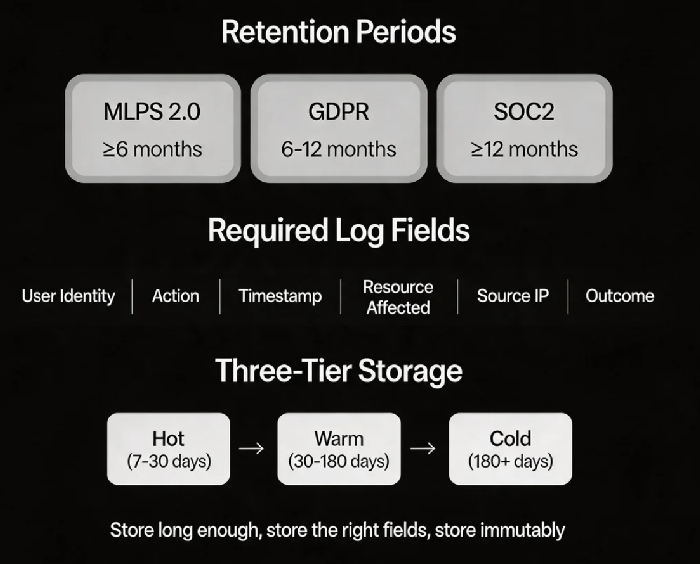
Last year, a client received notice of an upcoming compliance audit. Their technical lead scrambled to prepare log data. They quickly discovered two problems. First, MLPS required six months of log retention. They only kept 90 days because storage costs were high. Second, some log entries from six months ago were missing entirely. A collection script had failed, and no one had noticed.
The audit result: non‑compliant. Not just a fail – a formal required remediation plan.
This is the most common compliance failure I see. It’s not that teams don’t want to keep logs. It’s that they don’t know how to do it compliantly and cost‑effectively.
Today, let’s talk about log auditing and compliance storage. Not the “logs are important” fluff, but a practical guide: how long to keep logs for MLPS, GDPR, and SOC2, what fields must be included, how to make logs immutable, and how to keep costs under control.
01 How Long Must You Keep Logs?
Different regulations have different retention periods.
MLPS 2.0 (China)
GB/T 22239‑2019 requires log retention of at least six months. The Cybersecurity Law (Article 21) also mandates that network operators “retain related network logs for no less than six months.”
GDPR (EU)
GDPR does not specify an exact retention period. Instead, it requires that you can demonstrate compliance when asked – for example, by providing logs for subject access requests or proving that data was deleted. In practice, many organisations keep logs for 6‑12 months and use data classification to tier retention.
SOC2 (international)
SOC2 focuses on security, availability, processing integrity, confidentiality, and privacy. For audit logs, a common requirement is at least 12 months of retention. Log entries must include at least four critical fields: who performed the action, what action was performed, when it happened, and which resource was affected.
That client failed because they kept only 90 days of logs. They thought the 6‑month requirement was a suggestion. It is not.
02 What Information Must Logs Contain?
Retention length is one issue. Content completeness is another. Missing fields will cause an audit to fail just as quickly.
A compliant audit log entry must include these fields:
| Field | Description | Example |
|---|---|---|
| User identity | Who performed the action | admin@company.com |
| Action | What was done | DELETE, GRANT, CREATE |
| Timestamp | When it happened | 2025-05-14 10:30:22.123 UTC |
| Resource affected | Which object was changed | /production/orders |
| Source IP | Where it came from | 192.168.1.100 |
| Outcome | Success or failure | 200 OK / 403 Forbidden |
Auditors don’t look at your configuration pages. They ask for a sample of exported logs. If any of these fields are missing, the control fails.
That client’s logs had the user, timestamp, and action. But the “resource affected” field was empty. The auditor said: “I know someone deleted something. I have no idea what.”
03 How to Store Logs So They Cannot Be Tampered With
Storing logs is not enough. If logs can be modified or deleted, they are not compliant.
WORM storage (Write Once, Read Many)
Compliance audits require logs to be immutable. WORM technology locks log data after it is written, preventing any modification or deletion for a defined retention period.
Major cloud providers support WORM:
AWS S3 Object Lock
Alibaba Cloud OSS Compliance Retention
Azure Blob Immutable Storage
Google Cloud Object Retention Lock
Configuration checklist:
Set a retention period (e.g., 7 months when 6 months are required)
During the retention period, no one – not even the root account – can delete or modify the logs
After the retention period, objects are automatically released or can be moved to archive storage
Permission isolation
Only a security auditor should have permission to query logs. No one should have permission to modify or delete them.
Auditor: can query and export
Security administrator: can configure log sources but cannot read logs
Everyone else: no access
That client enabled S3 Object Lock in “compliance mode” with a 7‑month retention period. Their security lead said: “We used to worry that logs might be deleted accidentally – or intentionally. Now they are locked.”
04 Storage Tiering: Compliance Without Breaking the Bank
Keeping six or twelve months of logs can be expensive, especially if you are collecting terabytes per day.
Three‑tier storage architecture:
| Tier | Time window | Storage type | Cost | Query speed |
|---|---|---|---|---|
| Hot | Last 7‑30 days | SSD / NVMe | High | Milliseconds |
| Warm | 30 days to 6 months | Object storage (standard) | Medium | Seconds |
| Cold / Archive | 6+ months | Archive storage, optical | Very low | Hours |
Lifecycle policies to automate tiering:
On creation: logs go to hot tier for fast querying
After 30 days: automatically transition to warm tier – cost drops 60%
After 180 days: automatically transition to cold/archive – cost drops 90%+
After retention period: automatically delete
Cloud log services (SLS, CLS, CloudWatch Logs) support intelligent tiering. Logs move automatically. Queries transparently search across tiers.
After implementing tiering, that client’s monthly log storage cost dropped from 250 – while still meeting the six‑month retention requirement.
05 How to Respond to an Audit Quickly
Auditors rarely give much notice – often just a few days to a week. Being prepared saves panic.
Preparation checklist:
Pre‑configured export templates – CSV or JSON with all required fields
Time‑range filters – ability to quickly filter by date, user, or action
Regular self‑checks – monthly sample inspection to verify collection is running and fields are complete
Automated compliance reports – one‑click generation of a report covering the required period
What auditors commonly ask for:
Administrator actions during a certain period (who + what + when + resource)
Proof that logs cannot be tampered with (show WORM configuration and integrity checks)
Proof that logs were retained for the required period (show lifecycle policies and retention settings)
That client now runs a self‑check script every month. It picks a random week, verifies field completeness, and checks for gaps in collection. When the next audit came, they exported six months of logs, attached a screenshot of the WORM configuration, and delivered everything in one day.
The Bottom Line
Log compliance is not complicated, but it is detailed. You need to keep logs for the required period, include the required fields, and store them in a way that prevents tampering.
That client’s ops lead later said: “I used to think logs were for our own debugging. Now I know they are for someone else’s audit. For debugging, a missing log is annoying. For an audit, a missing log is a finding.”
Are your logs stored for the required period? Do they contain all the required fields? Could someone modify or delete them without detection? Check tonight. The auditor won’t wait.
