

One Table with 100 Million Rows? A Guide to Database Sharding and Partitioning
Last year, a client’s orders table grew to 120 million rows. Queries were becoming unbearably slow. Writes were starting to stall. They had tried adding indexes, read‑write splitting, and upgrading to larger instances. Nothing worked for long. A cross‑month report that used to run in seconds now took half an hour.
Their lead engineer asked me: “Do we need to shard?”
I asked back: “How do you usually query orders?”
“By user ID or order ID.”
“Do you query by time often?”
“Yes, operations teams look at order windows regularly.”
I said: “Your workload might be a good fit for partitioning. You may not need full sharding yet.”
Many DBAs jump straight to sharding when a table grows large. But sharding is major surgery. If partitioning can solve the problem, it’s far simpler.
Today, let’s talk about what to do when a single table exceeds 100 million rows: partitioning, sharding, and how to choose between them.
01 Partitioning: The Simplest First Step
Partitioning splits a single logical table into multiple physical tables based on a rule. To the application, it’s still one table. The database automatically prunes irrelevant partitions at query time.
Partitioning methods:
Range partitioning: By a continuous range, e.g., by month. Good for logs, orders, time‑series data.
List partitioning: By discrete values, e.g., by province.
Hash partitioning: By a hash of a column. Good when there’s no natural range.
Pros:
Transparent to the application – no code changes.
When the query includes the partition key, only relevant partitions are scanned.
Easy to manage – you can drop old partitions quickly.
Limitations:
Queries without the partition key must scan all partitions.
Many databases have a limit on the number of partitions (e.g., MySQL’s 8192).
Cross‑partition queries (e.g., a report that spans months) are still slow.
That client partitioned their orders table by create_time (monthly). Their query for “orders of a specific user” didn’t include create_time, so it still scanned all partitions. They added a composite index (user_id, create_time). Queries could now filter by user and then by time range – partition pruning started working.
02 Sharding: The Last Resort
When partitioning isn’t enough, you consider sharding.
Vertical sharding: Split by business domain. Order database, user database, product database – each on its own instance.
Horizontal sharding: Split the same logical table across multiple database instances, based on a shard key.
When to consider horizontal sharding:
A single table exceeds 5 million rows and queries are slowing.
A single table exceeds 10 million rows and indexes become less effective.
Write throughput cannot be increased by adding read replicas (because writes still go to the primary).
That client’s table had 120 million rows – well beyond those thresholds. But partitioning still worked for them. They didn’t need to shard yet.
03 Shard Key: Choose Wrong and Nothing Works
The shard key is the most critical – and most error‑prone – part of horizontal sharding.
A good shard key:
Appears in most queries.
Distributes data evenly to avoid hot spots.
Is stable (rarely changes).
Common choices:
user_id: User‑centric queries hit only one shard.
order_id: Order‑centric queries hit only one shard.
time: Good for time‑range queries, but may create a hot shard for recent data.
If that client had sharded on user_id (hash into 16 shards), a query for a single user’s orders would hit exactly one shard. Fast. But an operations report spanning all users would have to query all 16 shards. Those queries would be slower, but they could be offloaded to a separate analytics system.
04 Partitioning vs Sharding: How to Decide
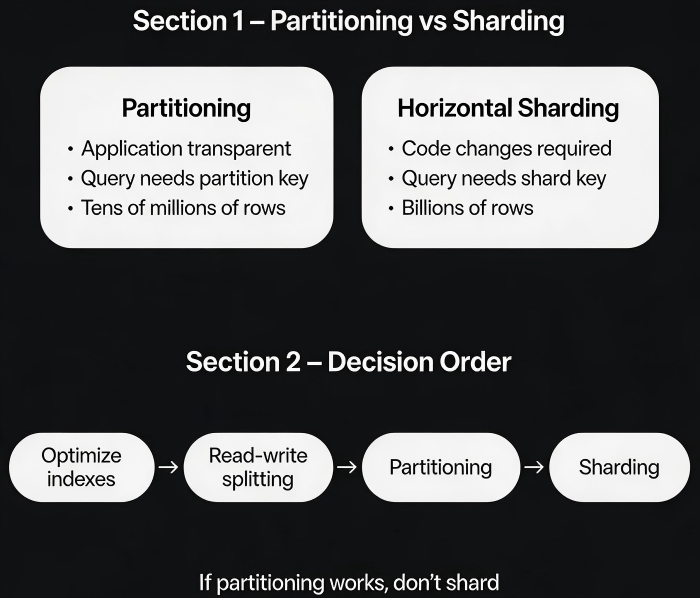
| Dimension | Partitioning | Horizontal Sharding |
|---|---|---|
| Application transparency | Yes | No – code changes required |
| Query must include key | Partition key | Shard key |
| Cross‑partition / cross‑shard queries | Slow | Even slower |
| Max data size | Tens of millions | Hundreds of billions |
| Operational complexity | Low | High |
| Best for | Time‑based data, natural range | User‑centric, key‑based access |
When to choose partitioning:
Data has a natural time dimension, and queries often include a time range.
You want to keep the application unchanged.
When to choose sharding:
Partitioning no longer gives enough performance.
Queries rarely include a time range, but often include a user ID or similar.
You need to scale beyond what a single database instance can handle.
Rule of thumb: If partitioning works, don’t shard. Sharding is a last resort, not a first option.
05 A Real Story: 300 Million Orders – A Three‑Step Evolution
An e‑commerce company’s orders table grew to 300 million rows over three years. They evolved through three stages.
Stage 1: Partitioning
They partitioned by month on create_time. Queries for a single user’s orders without a time range still scanned all partitions. They added a composite index (user_id, create_time). Queries could use the index and also benefit from partition pruning. Partitioning carried them to 150 million rows.
Stage 2: Archiving
They moved orders older than one year to a historical database. The active database now held only one year of data – about 50 million rows. Performance was restored.
Stage 3: Horizontal sharding
As the business grew further, even the active database became too large. They sharded by user_id (hash) into 16 shards. Queries for a user’s orders now touched a single shard. Analytical reports were moved to a separate data warehouse.
Today, the orders table has over 500 million rows. Each shard holds roughly 30 million rows – a manageable size. Queries are fast again.
Their tech lead said: “Partitioning bought us two years. Archiving bought us another year. Sharding was the last step – and only necessary when we exhausted everything else.”
The Bottom Line
When a single table grows to 100 million rows, don’t reach for sharding immediately. Start with partitioning – it’s simpler and often enough.
That client’s lead later summarised the decision order:
“First, optimise indexes. Then use read‑write splitting. Add caching if needed. Try partitioning. Only at the very end consider sharding.”
Your table is growing. Have you tried partitioning yet?
