

Cloud WAF Selection and Configuration: SQL Injection, CC Attack, and Bot Mitigation
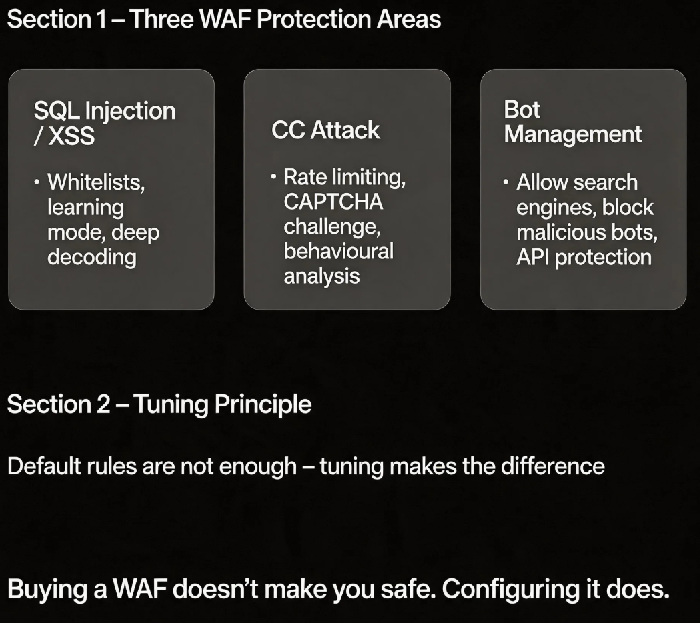
Last year, a client was hit by a CC attack just before their biggest sale. The traffic peaked at tens of thousands of requests per second. Their CDN struggled. Their origin collapsed. They had a cloud WAF, but it was using the default configuration. The threshold was set too high – the attack traffic wasn’t blocked, and legitimate users couldn’t get through either.
Their security lead asked: “We bought a WAF. Why didn’t it work?”
I asked: “Did you tune the policies?”
“No. It was out of the box.”
This is the common misconception: buying a WAF makes you safe. It doesn’t. Default rules stop only basic attacks. Without tuning, you might as well not have one.
Today, let’s talk about cloud WAF selection and configuration. Not the “WAF is important” fluff, but a practical guide: how to block SQL injection, how to stop CC attacks, and how to distinguish good bots from bad ones.
01 WAF Deployment Modes – Which One to Choose
Cloud WAFs typically offer three deployment modes.
Reverse proxy mode: The domain CNAME points to the WAF. The WAF cleans traffic and forwards it to the origin. This is the most common setup. CDN + WAF chaining – the CDN absorbs volumetric DDoS, and the WAF handles layer‑7 attacks. Good for most web applications.
Transparent proxy mode: Traffic passes through the WAF without changing DNS resolution. The WAF is inserted into the network path. More complex to configure. Suitable for legacy systems where you can’t change DNS.
Monitoring mode: Only logs, does not block. Used to test rules before enforcing them, avoiding false positives.
That client used reverse proxy mode, but their policies weren’t tuned. When the attack hit, the WAF itself became overloaded. After the incident, they enabled CDN + WAF chaining: the CDN absorbed the high‑volume attack, and the WAF performed layer‑7 inspection.
02 SQL Injection and XSS – Not a Switch You Flip
Web attack protection is often enabled by default, but there are traps.
False positives: A legitimate request gets blocked because it looks like SQL injection. Example: a user searching for the string “drop table”. The WAF sees a SQL command. Solution: Configure whitelists for safe URLs and parameters. Many WAFs offer a “learning mode” that observes traffic and automatically generates whitelists.
False negatives: Attackers use encoding to bypass rules (URL encoding, Unicode encoding). Default rules catch most attempts, but advanced bypasses may require “deep decoding”. The trade‑off: increased CPU overhead.
File upload protection: Block webshell uploads. Enable file content inspection, restrict file types, scan uploaded content.
That client had a search feature that allowed the term “1 or 1=1”. It was a legitimate search, but the WAF treated it as a SQL injection attempt. Whitelisting the search URL solved the problem.
03 CC Attack Mitigation – Rate Limiting Is a Trade‑off
A CC attack uses many seemingly legitimate requests to exhaust server resources.
WAF CC protection mechanisms:
Rate limiting: Limit requests per second from a single IP. Too strict blocks legitimate users (e.g., an office with a shared public IP). Too loose lets the attack through. Start with a permissive limit, observe logs, then tighten.
CAPTCHA challenge: When a request rate exceeds the limit, present a CAPTCHA. Effective at stopping automated attacks, but it impacts user experience. Best applied only to sensitive endpoints.
Behavioural analysis: Machine learning models detect anomalous request patterns – bursts of requests, abnormal User‑Agent strings, fixed intervals. Reduces false positives.
That client’s WAF had a rate limit of 100 requests per second. The attack peaked at 200 – it wasn’t blocked. After changing the limit to 30 requests per second and enabling CAPTCHA challenges, the attack was stopped. Legitimate users solved the CAPTCHA and continued.
04 Bot Management – Good Bots Go Through, Bad Bots Get Blocked
Not all bots are bad. Search engine crawlers must be allowed, or your SEO will suffer.
Bot management policies:
Search engine crawlers: Check the User‑Agent. Allow. But attackers can spoof User‑Agents, so this isn’t enough on its own.
Malicious bots: Detect headless browsers, abnormal request frequencies, lack of JavaScript execution. Block or rate‑limit.
API protection: APIs usually don’t need to be crawled. Require tokens.
Advanced bot defence:
Dynamic pages: Return obfuscated HTML that is expensive for bots to parse.
JavaScript challenges: Present a challenge that a real browser can solve but a simple script cannot.
That client’s product prices were being scraped by a competitor. After enabling bot management, the WAF identified headless browser requests and returned fake data (prices +5%). The competitor scraped the wrong numbers.
05 Logs and Alerts – Know When You’re Under Attack
A WAF isn’t just about blocking – it’s about knowing what’s happening.
Key alerts:
A single IP triggers the CC rate limit
The same URL is targeted by multiple attack types (SQL injection, XSS, command injection)
Sudden spike in request volume
Log analysis:
Review false positives regularly. Update whitelists.
Identify attack source IPs. Add them to a blacklist.
Recognise attack patterns – directory traversal, credential stuffing, brute‑force attempts.
That client’s WAF logs showed thousands of SQL injection attempts during the attack. They hadn’t looked at the logs and assumed it was just a CC attack. After the incident, they added alerting. The next time an attack started, they were notified within minutes and adjusted policies immediately.
06 A Real Story: Tuned Policies Saved a Flash Sale
An e‑commerce client enabled their WAF with default policies before a flash sale. We made a few changes:
SQL injection/XSS: enabled learning mode to generate whitelists and reduce false positives.
CC attack: reduced the rate limit from 100 to 30 requests per second and enabled CAPTCHA challenges.
Bots: allowed search engine crawlers, returned fake prices to malicious scrapers.
Alerts: configured DingTalk notifications – triggered when CC thresholds were hit.
During the flash sale, a CC attack started in the early morning. The WAF triggered the rate limit and presented a CAPTCHA. The attack was blocked. Legitimate users solved the CAPTCHA and continued shopping. Damage was near zero.
Their security lead said: “I used to think a WAF was a set‑and‑forget device. Now I know – a tuned WAF and a default WAF are two different products.”
The Bottom Line
A WAF is not a set‑and‑forget appliance.
That client’s security lead later summed it up: “Whitelist for SQL injection. Rate‑limit with CAPTCHA for CC. Distinguish good bots from bad. And don’t ignore the logs.”
Your WAF – is it still on its default settings?
