

The Pitfalls of Sticky Sessions: How to Keep Users Logged In Without Them
Last year, a client scaled their application from 10 instances to 30 for a flash sale. After the scale‑out, users flooded support: “My shopping cart is empty.” “I’ve been logged out.” The problem? They were using sticky sessions (session affinity) on their load balancer. A user’s requests always went to the same backend instance. When they added new instances, new users went to the new machines, but existing users stayed on the old ones. The old instances weren’t removed – but the sessions weren’t shared. From the user’s perspective, they had been sent to a “different” server that didn’t recognise them.
This is the classic sticky‑session failure: it keeps your session, but breaks your ability to scale.
Today, let’s talk about the pitfalls of sticky sessions and how to keep users logged in without them.
01 What Are Sticky Sessions?
Sticky sessions, also known as session affinity, make the load balancer send all requests from a particular user to the same backend server.
Common implementations:
Source IP hash: The load balancer hashes the client IP. All requests from that IP go to the same server. Problem: an entire office shares one public IP – all employees land on the same server, causing load imbalance.
Cookie insertion: The load balancer inserts a cookie that identifies the backend server. The browser sends the cookie with every request, so the load balancer knows which server to use.
Application‑based session ID: The load balancer reads a session ID from the request (e.g., a header or cookie) and hashes it.
That client used cookie‑based sticky sessions. Simple. It worked. Until they tried to scale.
02 The Four Pitfalls of Sticky Sessions
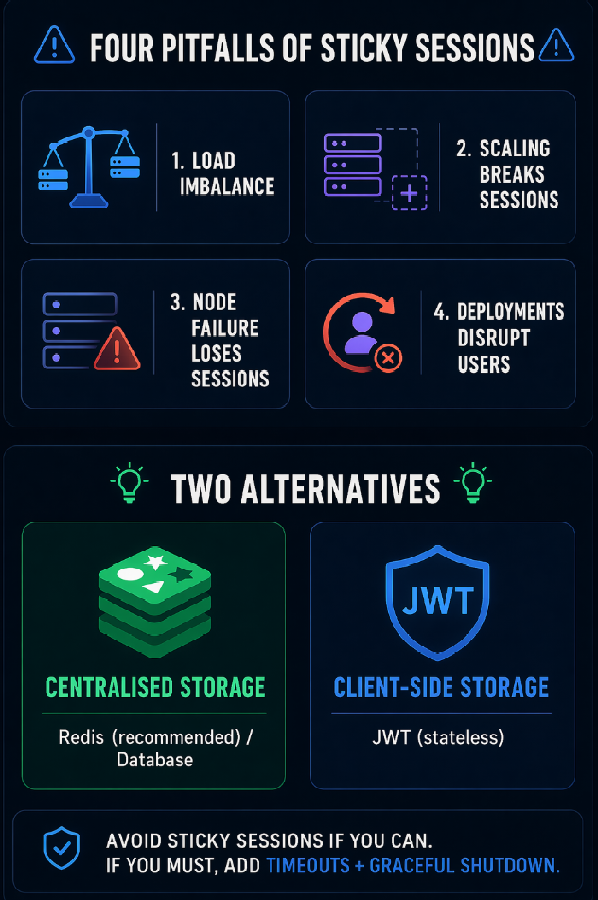
Pitfall 1: Load imbalance
Some users generate many more requests than others. With sticky sessions, those “heavy” users pin themselves to a single server. That server becomes overloaded while others sit idle. The problem is worse with source‑IP affinity, but exists with cookie‑based affinity too.
Pitfall 2: Scaling breaks sessions
You add new instances. Existing users are still pinned to the old instances. The new instances only receive new users. The old instances remain just as loaded as before. The scale‑out gave you no capacity relief. When you scale in (remove instances), users pinned to the removed instances lose their sessions entirely.
That client scaled from 10 to 30 instances. After the scale‑out, existing users were still only on the original 10 instances. Those 10 machines remained fully loaded. The 20 new instances handled only new users. The scale‑out had almost no effect on peak load.
Pitfall 3: Node failure loses all sessions on that node
If a server crashes or is restarted, every user whose session was pinned to that server loses their session. They must log in again. Their shopping carts, progress, and state are gone.
Pitfall 4: Deployments and restarts affect users
When you restart a server for a deployment, all users pinned to that server are disrupted. Even a rolling restart causes a wave of disconnections.
03 The Solution: Centralised Session Storage
The way out is simple: don’t store sessions on the servers. Store them in a central location that every server can access.
Option 1: Redis (recommended)
After login, the session is stored in Redis. For each request, the server reads the session from Redis.
Pros: Scaling has no effect on sessions. Node failures don’t lose sessions (the next node reads from Redis). Servers become stateless – any server can handle any request.
Cons: Redis becomes a dependency (needs high availability). Each request adds a small latency hit (milliseconds).
Option 2: JWT (client‑side storage)
The session data is encrypted and stored in a cookie. The server does not store any session state.
Pros: Completely stateless. No dependency on Redis. Scaling is invisible.
Cons: Cookie size limit (4KB). Cannot actively invalidate a session unless you maintain a blacklist. Slightly higher security risk if the secret is leaked.
Option 3: Database
Store sessions in the application database.
Pros: No new components. Simple.
Cons: Slower than Redis. Adds load to the database.
That client chose Redis. User sessions were stored in a Redis cluster (high availability). Each server read the session from Redis for every request. Scaling, node failures, and deployments no longer affected user sessions.
04 If You Must Use Sticky Sessions, Mitigate the Damage
Sometimes legacy systems make it hard to eliminate sticky sessions immediately. How to reduce the pain?
Set a session timeout on the load balancer: Don’t keep the sticky binding forever. Set a timeout, e.g., 15 minutes. If the user is inactive for that long, the binding is released. Their next request may go to a different server, but they’ll still be logged in (if the session itself is stored centrally).
Graceful shutdown: When an instance is about to be removed, notify the load balancer to stop sending new requests. Allow existing sessions to finish before shutting down. Users won’t notice.
Session replication: Replicate sessions across two or more nodes. If one node fails, another can take over.
Before their full migration, that client added graceful shutdown. Deployments no longer dropped users instantly. The load balancer drained connections first, then shut down the instance.
05 When Are Sticky Sessions Acceptable?
Sticky sessions aren’t always evil. Some scenarios are fine.
Internal systems: Few users, low load, stable cluster size. Scaling events are rare. A node failure affects few people.
Low‑traffic systems: A personal blog or a small tool. An occasional session loss isn’t catastrophic.
Local caching: Some caches are local to an instance. If you accept that a node failure loses the cache, sticky sessions are acceptable.
For core transaction systems, high‑concurrency services, and environments that must scale elastically – avoid sticky sessions.
06 A Real Story: From Logouts to Seamless Scaling
That client, before the change: sticky sessions, 10 instances. They scaled to 30 for a flash sale. Existing users were logged out. Support calls flooded.
After the change:
Sessions stored in Redis (cluster with failover)
Servers were stateless – any instance could handle any request
Load balancer used round‑robin (no sticky sessions)
The next flash sale, they scaled to 50 instances. Users stayed logged in. No complaints.
Their ops lead said: “Scaling used to be a bloodbath – we’d lose a batch of users every time. Now scaling is invisible. Users don’t notice a thing.”
The Bottom Line
Sticky sessions are a double‑edged sword. Simple to set up, but they cripple scalability and resilience.
That client’s ops lead later said: “If you can get rid of sticky sessions, do it. If you can’t, at least set timeouts, use graceful shutdown, and replicate sessions. But really, centralise your sessions.”
Where are your user sessions stored today? On the servers themselves, or somewhere that every server can reach?
