

Cloud VPN in Practice: Connecting On‑Prem Data Centers – IPsec Tunnel Configuration and Troubleshooting
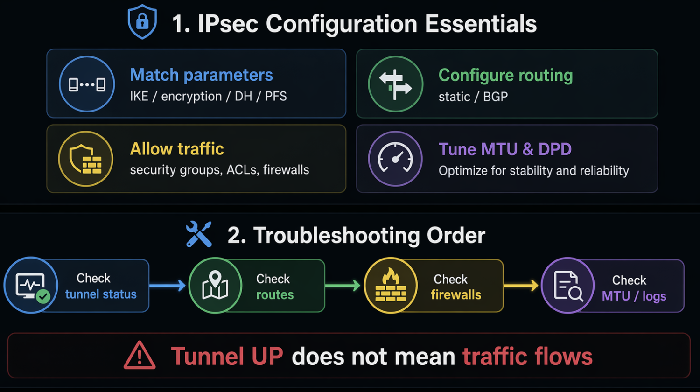
Last year, a client moved their applications and databases to the cloud. But some legacy systems still ran in their on‑premises data center. They needed connectivity. They set up a VPN. The tunnel status showed “UP.” But the cloud applications couldn’t reach the on‑prem database.
They spent two days troubleshooting. Security groups were open. On‑prem firewalls were configured. Routes were in place. Nothing worked.
The problem? MTU. IPsec adds headers, reducing the effective MTU. The cloud sent large packets that the on‑prem side dropped. Small packets worked. Large packets didn’t. Database queries use large packets.
This is the classic VPN troubleshooting scene: the tunnel is up, but the traffic won’t flow.
Today, let’s talk about cloud VPN in practice. Not the “IPsec is important” intro, but a practical guide: how to configure IPsec tunnels, set up routing, and troubleshoot when things don’t work.
01 VPN Gateway: Cloud‑Managed or Self‑Hosted?
Cloud‑managed VPN gateway: AWS VPN, Azure VPN Gateway, Alibaba Cloud VPN Gateway.
Pros: No maintenance. High availability built in. Tight cloud integration.
Cons: Expensive. Configuration flexibility is limited. Logging is often sparse.
Best for: Teams that don’t want to manage VPN infrastructure.
Self‑hosted VPN: Run StrongSwan, OpenSwan, or WireGuard on an EC2 instance.
Pros: Cheap (just the EC2 instance). Highly flexible. Full logs.
Cons: You must build high availability yourself. You own the maintenance.
Best for: Teams with networking skills that want control and detailed logs.
That client started with a cloud‑managed VPN. It was easy to set up, but when things broke, they couldn’t see detailed logs. They switched to a self‑hosted StrongSwan instance. The logs immediately pointed to the MTU issue.
02 IPsec Configuration: Both Sides Must Match
When an IPsec tunnel fails to establish, 90% of the time it’s mismatched parameters between the two ends.
Critical parameters that must match:
| Parameter | Description | Common mismatches |
|---|---|---|
| IKE version | IKEv1 or IKEv2 | One side v1, the other v2 |
| Encryption algorithm | AES128/256, 3DES | Different algorithms |
| Authentication algorithm | SHA1, SHA256 | Different algorithms |
| DH group | DH14, DH2 | Different groups |
| PFS (Perfect Forward Secrecy) | On or off | One side on, the other off |
| Pre‑shared key | The password | Different keys |
Practical advice:
Start with IKEv1 for better compatibility. IKEv2 is more secure but some older devices don’t support it.
Use AES256 + SHA256 for a good balance of security and performance.
Use DH group 14 or higher.
Enable DPD (Dead Peer Detection) so the tunnel recovers automatically after a failure.
That client’s logs showed the tunnel reconnecting repeatedly. The on‑prem device required PFS; the cloud side had it disabled. Enabling PFS on the cloud side fixed the flapping.
03 Routing: Static Routes or BGP?
Once the tunnel is up, you need to tell traffic where to go.
Static routing – Manually add routes: “to reach the on‑prem network, use the VPN gateway.”
Pros: Simple.
Cons: When on‑prem adds a new subnet, you must update routes manually. No automatic failover.
BGP dynamic routing – Run BGP over the VPN tunnel. Routes are exchanged automatically.
Pros: On‑prem subnet changes are automatically learned. Multiple tunnels can fail over automatically.
Cons: More complex to configure.
That client used static routing. When on‑prem added a new subnet, they forgot to update the routes – traffic failed. They switched to BGP. New routes were learned automatically. No more forgotten updates.
04 Four Places You Must Allow Traffic
Many people assume that if the VPN tunnel is up and routes are set, traffic will flow. Not true. Four places must allow the traffic.
Cloud security groups – Outbound and inbound rules on cloud instances must allow traffic to/from the on‑prem CIDR.
Cloud network ACLs – Subnet‑level ACLs must also allow the traffic.
On‑prem firewall – The corporate firewall must allow IPsec traffic and the application ports.
On‑prem host firewall – The local firewall on the on‑prem server (iptables, Windows Firewall) must allow the traffic.
That client’s cloud security group had no inbound rule for the on‑prem CIDR. The application could not initiate a connection back from the database. Adding the rule fixed it.
05 Troubleshooting: Tunnel Up, Traffic Down – Step by Step
The tunnel shows UP, but business traffic doesn’t work. Follow this order.
Step 1: ping test
Ping an on‑prem IP from the cloud. Does it work?
If not, check security groups, firewalls, and routes.
Step 2: port testtelnet on-prem-db-ip 3306 – does it connect?
If not, check if the database service is listening and if the on‑prem firewall allows the port.
Step 3: MTU check
If small pings (e.g., 100 bytes) work but large pings (e.g., 1500 bytes) fail, you have an MTU problem.
IPsec adds overhead. The effective MTU drops from 1500 to around 1400.
Fix: Enable TCP MSS clamping on the VPN gateway, or reduce the MTU on the cloud instances.
Step 4: logs
Cloud‑managed VPNs have limited logs. A self‑hosted StrongSwan instance logs to /var/log/charon.log.
Look for IKE negotiation failures, mismatched algorithms, DPD timeouts.
That client’s ping test revealed the issue: 1400‑byte packets worked; 1500‑byte packets failed. After lowering the MTU on the cloud instances, business traffic worked immediately.
06 A Real Story: DPD Mismatch Caused Intermittent Outages
A client had a VPN tunnel that would work for a while, then stop, then recover after a few minutes. This cycle repeated constantly.
The root cause: mismatched DPD (Dead Peer Detection) parameters. On‑prem DPD interval was 10 seconds, timeout 30 seconds. Cloud DPD interval was 30 seconds, timeout 120 seconds. The cloud thought the tunnel was alive; the on‑prem side thought it was dead.
They standardised the parameters: interval 10 seconds, timeout 30 seconds on both sides. The tunnel became stable.
Their network lead said: “We thought the tunnel was either up or down. We didn’t realise partially working tunnels could be worse than a fully broken one.”
The Bottom Line
A VPN is the first step in hybrid cloud connectivity. Getting the tunnel up is only the beginning. Making business traffic flow is the real goal.
That client’s network lead later said: “Match parameters on both ends. Configure routing – static is simple, BGP is better. Check all four firewalls. And never forget MTU – it’s the silent killer.”
Is your cloud‑to‑on‑prem network really connected, or does it just look like it is?
