

Cloud IP Address Planning: How to Choose CIDR and Avoid IP Conflicts
Last year, a client ran out of IP addresses in their VPC. They had been running for two years. Business grew. Suddenly, they couldn’t deploy new services. The error message: “Insufficient IP addresses.”
When they first built the VPC, they chose a /24 CIDR block – 256 IP addresses. Each subnet consumes 5 reserved IPs, leaving 251 usable. That seemed plenty at the time.
But they had EC2 instances, RDS, Redis, NAT gateways, load balancers, and a growing Kubernetes cluster. Each Kubernetes node consumes one VPC IP. As the cluster grew, the IP pool drained.
The worst part? A VPC’s primary CIDR cannot be changed. To get more IPs, they would have to rebuild the entire VPC and migrate dozens of services. A full week of work.
This is the classic cloud IP planning tragedy: choose casually at the start, pay for it later.
Today, let’s talk about cloud IP address planning. Not the “what is CIDR” intro, but a practical guide: how to choose a CIDR that lasts, how to avoid conflicts with on‑premises networks, and which services consume IPs you might forget.
01 How Big Should Your CIDR Be?
Many people building their first VPC pick /24 (256 IPs) and think “that’s plenty.” That’s the first trap.
IP consumption is higher than you think:
Each EC2 / ECS instance: at least 1 primary IP
Each load balancer: at least 1 IP
Each NAT gateway: at least 1 IP
Each RDS instance: at least 1 IP
Each Redis / ElastiCache instance: at least 1 IP
Each Kubernetes node: 1 VPC IP
VPN / Direct Connect gateway: consumes IPs
A medium‑sized workload – dozens of K8s nodes, plus databases, caches, load balancers – can exhaust a /24 surprisingly quickly.
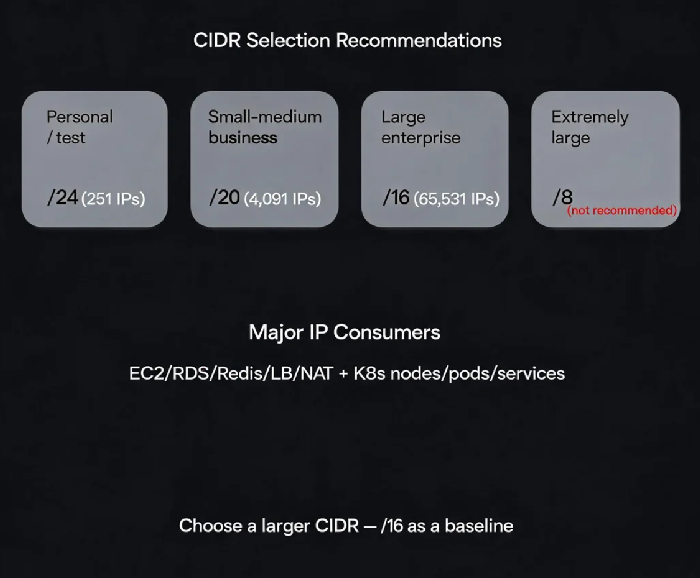
CIDR selection recommendations:
| Scale | Recommended CIDR | Usable IPs | Notes |
|---|---|---|---|
| Personal / small test | /24 | 251 | Non‑production, short‑term only |
| Small to medium business | /20 | 4,091 | Recommended – room to grow |
| Large enterprise / multi‑environment | /16 | 65,531 | Multiple VPCs, large‑scale deployments |
| Extremely large | /8 (not recommended) | 16.7 million | Too large – route table inefficiency |
That client rebuilt their VPC with a /16 (10.0.0.0/16). They never worried about IP shortages again.
02 Avoiding Conflicts: Cloud and On‑Prem Must Not Overlap
In hybrid cloud scenarios, your VPC must connect to your on‑premises data centre via VPN or Direct Connect. If the IP ranges overlap, routing breaks.
A classic conflict:
On‑premises uses
10.0.0.0/8VPC also uses
10.0.0.0/8When the VPN establishes, traffic destined for
10.0.0.0/8has two possible paths – the cloud doesn’t know which to use.
How to avoid conflicts:
Before planning, ask your networking team: “What IP ranges does on‑prem use?”
Choose a CIDR that does not overlap. Use
172.16.0.0/12or192.168.0.0/16if needed.Multiple VPCs also cannot overlap – otherwise, VPC peering will fail.
That client’s on‑premises network used 10.0.0.0/8. Their VPC used 172.16.0.0/12. No conflict. VPN worked without issue.
03 Separate by Environment: Don’t Mix Production and Test
Don’t put production, staging, and development environments into the same VPC. Lack of isolation creates security risks and broad blast radius.
Recommended multi‑VPC structure:
Production VPC:
/16(e.g.,10.0.0.0/16)Staging / test VPC:
/16(e.g.,10.1.0.0/16)Development VPC:
/16(e.g.,10.2.0.0/16)
Each environment is independent. Changes in one don’t affect others. Security policies can be applied per environment.
If VPC count is limited, you can use different CIDR blocks within a single VPC and isolate by subnet, but network policy management becomes more complex.
04 Subnet Planning: By Availability Zone and Purpose
A VPC must be divided into subnets.
By Availability Zone: A set of subnets in each AZ for high availability.
By purpose:
Public subnets: Load balancers, NAT gateways, bastion hosts
Application subnets: EC2 / ECS instances
Data subnets: RDS, Redis, ElastiCache
Reserved IPs: Each subnet consumes 5 reserved IPs (in AWS and most clouds). Don’t create too many subnets – they waste IPs. Aim for fewer than 20‑30 subnets per VPC.
That client adopted a clear structure: separate VPCs per environment, subnets per AZ and per purpose. Operations became much simpler.
05 Special IP Consumption: Kubernetes Is a Hungry Consumer
Kubernetes clusters consume IPs in ways that are often underestimated.
Node IPs: Each worker node consumes one VPC IP.
Pod IPs: By default, each pod consumes one VPC IP. 200 pods = 200 IPs.
Service IPs: Each Kubernetes service (ClusterIP) consumes one VPC IP.
If your VPC CIDR is too small, a Kubernetes cluster will exhaust IPs surprisingly fast.
Mitigations:
Use a separate Pod CIDR (supported by AWS EKS) so pods don’t consume VPC IPs.
Choose larger instance types to reduce the number of nodes.
Reserve ample IP space in your initial CIDR selection.
06 A Real Story: From /24 to /16 – A Week of Migration
A client started with a /24 VPC (10.0.1.0/24). Two years later, their Kubernetes cluster had grown from 5 nodes to 50 nodes, plus RDS, Redis, and ELB. IPs were exhausted.
The remediation:
Created a new VPC with CIDR
10.0.0.0/16Separate VPCs for production, staging, and development
Subnets per AZ and per purpose
Migrated services batch by batch, cut over by DNS
It took one week. Their ops lead said: “We saved five minutes at the start by picking /24. Then we spent a week paying it back.”
The Bottom Line
IP address planning seems like a small, one‑time decision at VPC creation. But changing it later is painful.
That client’s ops lead later said: “Choose a larger CIDR – /16 as a baseline. Avoid overlapping with on‑premises. Separate environments into different VPCs. Subnet by AZ and purpose. And don’t forget Kubernetes – it eats IPs.”
Look at your VPC today. How many IPs are left? Will it last the next two years?
