

Cloud Data Migration Tool Selection: DMS, Snowball, or CDC – Which One to Choose?
Last year, a client needed to move 50TB of data to the cloud for a data center migration. They asked the team: "Should we just use DMS? I heard it works."
I asked: "What's your bandwidth?"
"200 Mbps."
"Have you calculated how long that would take?"
The room went quiet.
Rough math: To transfer 50TB over a 200Mbps link, even if you could sustain the full speed, would take about 24 days. In reality, internet bandwidth doesn't run at 100%, and you'd likely need over a month. And that's assuming the network stays stable, the source database stays online, and nothing else uses the bandwidth.
This is the most common mistake in data migration tool selection: looking at tool features without matching them to the actual migration scenario.
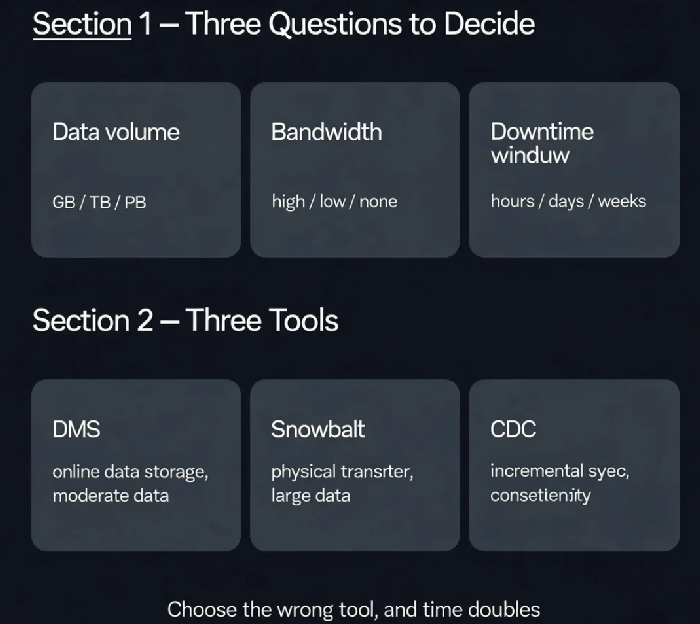
Today, let's talk about how to choose between DMS, Snowball, and CDC-based tools. The answer depends on three factors: data volume, network bandwidth, and downtime window.
01 Start with Three Questions
Before picking a tool, answer these three questions.
First, how much data are you moving? Hundreds of GB to a few TB? DMS online migration works. Tens to hundreds of TB? DMS over the network may take months – Snowball physical transfer becomes the better option . Petabytes? You'd be looking at Snowmobile.
Second, what's your network bandwidth? With 200Mbps, transferring 50TB takes about 24 days at theoretical maximum. If you only have 50Mbps, that multiplies by four. If you have Direct Connect, you'll be more optimistic – but only if your link isn't shared with other production traffic . The lower your bandwidth, the more attractive offline transfer becomes.
Third, how long can your application be offline? Can you accept hours of downtime, or does it need to be minutes? DMS with CDC can achieve near‑zero downtime with careful planning. Snowball physical transfer requires a longer cutover window .
That client had 50TB, 200Mbps, and a strict 4‑hour cutover window. DMS over the network would have taken a month – not viable. Snowball became the only realistic choice.
02 AWS DMS: Online Migration for Moderate Data Volumes
AWS DMS is the go‑to tool for migrating databases to and within AWS with minimal downtime .
Best for:
Data volumes from hundreds of GB to a few TB
Sufficient network bandwidth (Direct Connect or high‑speed internet)
Need for continuous replication and near‑zero downtime
Structured databases (MySQL, PostgreSQL, Oracle, SQL Server)
Key capabilities:
Full load: One‑time copy of all existing data
CDC (Change Data Capture): Captures ongoing changes at the source and replicates them to the target, keeping databases in sync for a seamless cutover
Important notes:
Cross‑region DMS migrations incur standard AWS data transfer charges – factor this into your cost planning
For large tables, split them into parallel chunks for better performance. Avoid creating secondary indexes during the initial load phase
If that client had tried to use DMS to move 50TB, even at 200Mbps, the transfer would have taken over a month – the business couldn't wait that long.
03 Snowball: Physical Transfer for Large Datasets
When the network is too slow or the data volume is too large, offline physical transfer is the answer .
Best for:
Data volumes from tens of TB to PB scale
Limited network bandwidth where online transfer would take too long
Migration timelines that can't wait months for network transfer
How it works: AWS ships you a physical storage device (Snowball Edge). You copy your data onto it, ship it back, and AWS loads it into the cloud .
Things to watch:
Each Snowball Edge device holds about 80TB of usable capacity – you may need multiple units for larger datasets
Shipment time is part of the migration timeline – not suitable for urgent emergencies
Combine with DataSync for incremental sync: use Snowball for the full load, DataSync to capture ongoing changes during the migration window, ensuring data consistency
That client chose Snowball: two Snowball Edge devices in parallel. They exported and shipped the data within a week. AWS import took another few days. The entire migration completed in two weeks – much faster than a 24‑day online transfer.
04 CDC: Continuous Sync for Data Consistency
CDC isn't a standalone tool – it's a capability built into DMS and other replication tools .
Best for:
Scenarios where the source database continues to be written to during migration
Dual‑running validation phases where you need to verify target performance
Ultra‑short cutover windows
How it works: CDC reads database transaction logs (binlog, WAL) and captures every INSERT, UPDATE, and DELETE, applying them to the target in real time .
Why it matters:
Replication lag can be measured in milliseconds
Low load on the source database (reading logs, not querying tables)
Can be used alongside a full load: take a consistent snapshot, then let CDC handle changes made during the transfer
After the client's Snowball transfer completed, they enabled CDC to capture the incremental changes made during the migration window – ensuring data consistency at cutover.
05 Selection Decision Flow
Step 1: How much data?
Under 5TB, good bandwidth → DMS full load + CDC for short downtime
5‑50TB, good bandwidth → DMS is feasible, but estimate the time
5‑50TB, limited bandwidth → Snowball + DMS/CDC hybrid
Over 50TB → Snowball or Snowmobile, or a combination of CDC and Snowball to minimise downtime
Step 2: How long can you tolerate downtime?
Minutes or less → DMS + CDC for near‑zero downtime
Hours to a day → DMS full load with a planned cutover window
More than a day → Physical transfer is acceptable
Step 3: Can the source tolerate query pressure?
Production core, no extra load → CDC (reading logs)
Can handle SELECT queries → DMS full load is fine
06 A Real Story: 50TB Done in Two Weeks
That client with 50TB, 200Mbps, and a 4‑hour cutover window?
The solution:
Two Snowball Edge devices for parallel full data copy (about a week)
Ship devices back, AWS imports the data (about 3 days)
During the import, DMS CDC kept the target synchronised with ongoing source changes
Data validation before cutover confirmed consistency
Cutover window: under 2 hours
Their tech lead later said: "If we'd tried to push that much data over the wire, we'd still be waiting."
The Bottom Line
Choosing the right data migration tool isn't about picking the "best" tool – it's about matching the tool to your specific scenario.
That client's ops lead later summarised: "Small data with good bandwidth? Use DMS. Large data with limited bandwidth? Use Snowball. Always use CDC for data consistency. If the network is too slow, don't push bytes – ship them."
