

Your CDN Data Can Be Lost Too? Origin Configuration and High Availability Best Practices
Last year, a client had configured their CDN perfectly. Cache hit ratio was high. User access was fast. Then one day, a construction crew cut through the fiber optic cable at their origin data center. The CDN edge nodes couldn't reach the origin to fetch fresh content. Cached resources expired. Users saw a wall of 502 errors. Worse, they had configured only a single origin with no backup. The business was down for four hours while the cable was repaired.
Their question to me: "Isn't CDN supposed to be highly available? Why did it fail when the origin went down?"
This is the common misconception about CDN: CDN accelerates the distribution path. If the origin fails, CDN can't save you.
Today, let's talk about CDN origin configuration and high availability. Caching is the icing on the cake. The origin is the cake itself. No matter how fast your CDN is, if the origin fails, your service fails.
01 Origin High Availability Is the Foundation of CDN
CDN's architecture determines its dependency on the origin. When a user request arrives at an edge node and the requested content is not cached, the edge node must fetch it from the origin . The edge nodes store only cached copies. The authoritative data lives at the origin.
This means the stability and availability of your origin directly determine whether your CDN can serve content at all.
In that client's scenario, the cache hit ratio was excellent for static assets. But during business updates—new images, new CSS files—the edge nodes needed to fetch fresh content from the origin. When the origin went down, all new resources became unavailable. Users saw broken pages.
If they had configured a backup origin, CDN edge nodes would have automatically attempted to fetch from the backup . But they hadn't. They had to wait for the fiber to be repaired.
02 Primary and Backup Origins: The Simplest Disaster Recovery
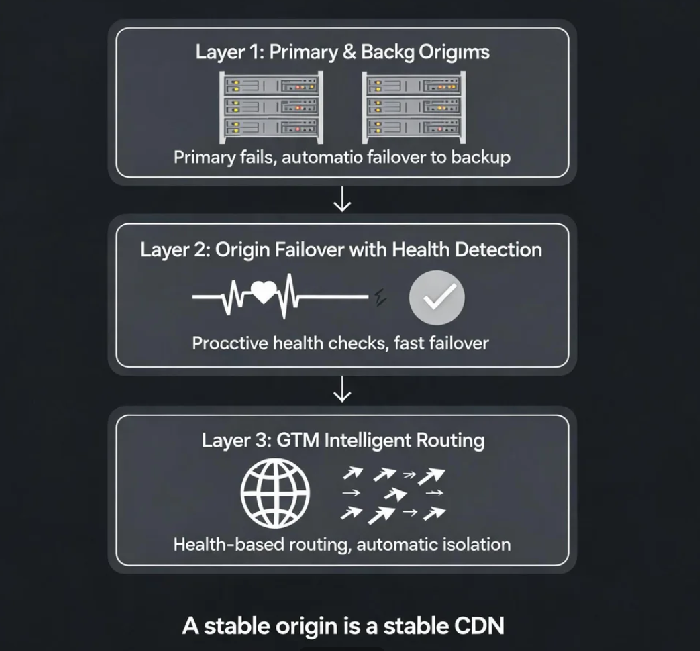
Almost every CDN provider supports configuring a primary and backup (or secondary) origin . Configuring a backup origin is the simplest and most effective way to ensure origin high availability.
How it works: CDN edge nodes attempt to fetch from the primary origin first. If the primary returns a configured error status code (e.g., 503 Service Unavailable, 504 Gateway Timeout) or experiences connection timeout, the edge node automatically fails over to the backup origin .
Key configuration points:
The backup origin should be in a different network environment (different ISP, different availability zone, even a different cloud provider) to avoid correlated failures.
The backup origin must be kept in sync with the primary—either through automated replication or a scheduled sync task, such as CDNetworks' scheduled sync using Function Compute to copy content to an OSS bucket .
The origin-pull protocol (HTTP or HTTPS) must be consistent across primary and backup origins. Some providers will sync the protocol setting automatically when you configure a hot backup . If the protocol is inconsistent, the backup may also fail.
After that incident, the client configured a backup origin: primary in data center A, backup in data center B. When another fiber cut occurred, CDN edge nodes automatically failed over to the backup. Business operations were mostly unaffected.
03 Origin Failover with Health Detection
Modern CDN platforms offer intelligent origin failover that detects origin health proactively and triggers switching even before a user request encounters an error.
How it works: A health detection module continuously probes the origin server—checking TCP connectivity, TLS/SSL handshake, and HTTP response codes at configured intervals . If the origin fails to respond correctly (e.g., does not return HTTP 200), the detection module shortens the probe cycle and marks the origin as unhealthy .
Detection levels:
Aggressive detection—probes more frequently, switches faster, but may cause more false positives
Conservative detection—probes less frequently, has a higher tolerance for transient issues, but may delay failover
Once an origin is marked unhealthy, the CDN automatically routes all requests to the backup. When the primary recovers and passes health checks, traffic can be shifted back automatically.
The zero-delay failover feature eliminates the perception of failure entirely . The client's users experience no downtime, because the switch happens before they even send a request.
4 Origin Shield: Protecting Your Origin from Overload
Beyond failover, there's another layer of protection that's often overlooked: origin shielding.
An origin shield is a mid-tier caching layer between your edge nodes and your origin . Instead of thousands of edge nodes hammering your origin for uncached content, they all go through the shield first. The shield aggregates requests and makes a single request to your origin .
Key benefits:
Up to 99% of requests handled at the edge, with only a small fraction reaching the origin
Protection against "thundering herd" problems—when thousands of requests arrive simultaneously for uncached content
Reduced origin egress costs—Fastly customers report cost reductions of 60% per month using shielding
Enhanced security—the origin can be locked down to accept traffic only from the shield IPs
One Fastly customer saw a traffic surge of 120,000 requests per second. Their origin handled just 54 of them. The shield absorbed the rest .
05 Timeout and Retry Tuning: Don't Let CDN Wait Idly
When an edge node fetches from the origin, if the origin responds slowly or times out, the edge node waits. If the timeout is set too long, the user's request is also delayed.
Critical timeout parameters:
TCP connection timeout: Typically 10 seconds by default . If the origin network is unstable, you can adjust this, but shouldn't exceed 10-15 seconds.
HTTP read timeout: The time allowed for the origin to return all content after the connection is established. Default is typically 30 seconds . If your dynamic endpoints are slow, you can increase it, but for static resources, keep it tight.
Retry logic: When the origin returns 5xx errors, the edge node retries. Retries are attempted on origin addresses in order of priority and weight . If a specific origin IP fails multiple times, it can be moved to a "dead table" and skipped for a configured timeout period .
Best practice: Set timeouts based on your origin's average response time, not a fixed "one size fits all" value. If you shorten timeouts and combine them with a backup origin and intelligent detection, you can achieve fast failover and minimal user impact. The goal is to detect failure and fail over quickly, not to let edge nodes retry a dead origin endlessly .
06 A Real Story: Three-Origin Disaster Recovery Protects a Flash Sale
An e-commerce platform configured CDN origin failover with three origins: primary, backup, and a third-party cloud origin managed by GTM. During the annual flash sale, the primary origin's network became unstable. Requests started timing out. The CDN automatically switched to the backup origin. Users barely noticed.
Their ops lead later said: "We used to scramble when an origin failed. Now we don't even notice—the CDN handles it."
The Bottom Line
CDN data is never truly lost? CDN doesn't store your data permanently. The origin holds the authoritative copy. If the origin fails, CDN can't help.
The client's ops lead later summarized: "CDN is an amplifier, not a storage device. If the origin is stable, CDN is stable. Configure primary and backup origins. Tune timeout values. Deploy GTM for intelligent switching. With three layers of protection, you'll never worry about losing data at the origin again."
How many origins have you configured for your CDN?
