

CDN Cache Hit Rate Stuck? From Caching Policies to Preheating and Purge – A Practical Guide
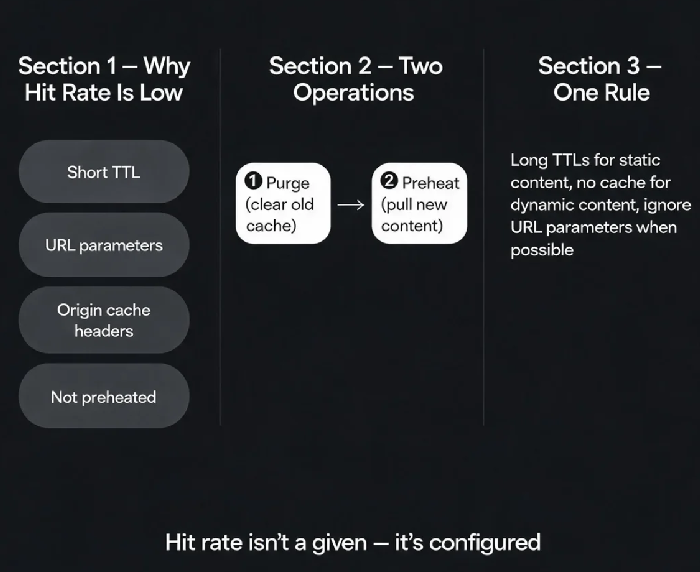
Last year, a client had their CDN configured and their origin stable. But every time they checked the dashboard, the hit rate was only 30%. Origin bandwidth stayed high, and the CDN wasn't saving them much money. They asked me: "Is my business just not cacheable?"
I looked at their configuration and found several issues. Cache TTLs were set too short. Dynamic API responses were being cached. URLs had random parameters that made the CDN treat every request as a different file. The result: inefficient caching and excessive origin fetches.
This is the most common CDN pitfall: you bought a CDN, but you didn't tune the caching policy. You're only using its transport capacity, not its caching power.
01 What Is Cache Hit Ratio?
Cache hit ratio is the percentage of requests served directly from CDN edge nodes without going back to the origin .
Think of it like a supermarket: if a product is in stock at the local store (edge cache), you get it immediately. If it's out of stock, the store has to order it from the central warehouse (origin), and you wait longer.
Why hit rate matters:
User experience: edge hits are usually 10-100x faster than origin fetches
Origin load: every miss puts pressure on your origin servers
Cost: CDN providers charge for origin traffic; a low hit rate means you're paying for both CDN and higher origin egress
02 Why Is Your Hit Rate Low?
1. Cache TTL is too short
If you set cache expiry to 1 hour for static images, content expires and re-fetches from origin dozens of times a day. Static assets that rarely change should have TTLs measured in months or years .
2. Cache follows origin headers
CDNs respect Cache-Control and Pragma headers from your origin . If your origin sends no-cache, no-store, or max-age=0, the CDN won't cache. Disable "follow origin headers" if you want CDN-level control.
3. URL parameters are killing your hit rate
1.jpg?timestamp=123456 and 1.jpg?timestamp=654321 are treated as different files. Every request with a different timestamp goes back to the origin.
Solution: Enable "ignore parameters" to cache only the base URL, or configure the CDN to ignore only non-critical parameters.
4. Not enough "heat"
CDN edge nodes have limited cache space. Files that aren't accessed frequently get evicted. A domain with low traffic may naturally have a lower hit rate because the cache doesn't get "warmed up."
03 Fixing the Configuration
Set appropriate TTLs by file type:
| File type | Recommended TTL | Reason |
|---|---|---|
| Images, CSS, JS | 1 year | Rarely change; use versioning for updates |
| HTML | 5-10 minutes | Content updates frequently |
| API responses | 0 (no cache) | Each response is user-specific |
Use versioning for static assets: main.v123.css instead of main.css. When the file changes, update the version and the CDN fetches the new version. No purging needed.
Ignore URL parameters: If your site uses query parameters for tracking or cache-busting, consider enabling "ignore parameters" to cache a single version of each resource.
Configure proper HTTP response headers:
http
Cache-Control: public, max-age=31536000, immutable
For static assets, this tells the CDN and browsers to cache for a year.
04 Preheating vs. Purging – Two Operations, One Goal
Preheating: Pushing content to CDN edge nodes before users request it . The CDN fetches the content from your origin in advance, so the first real user request hits the cache.
Purge: Clearing cached content from edge nodes after it's already there. This forces the CDN to fetch fresh content from the origin on the next request .
When to preheat:
First-time CDN setup
Before flash sales or major traffic events
Content that you know will be popular but hasn't been cached yet
When to purge:
After updating content (fix a typo, update an image)
When you need users to see the latest version immediately
Note: Purge temporarily lowers hit rate. If you purge frequently, your hit rate will drop. Use preheating after a purge to quickly restore cache coverage.
05 How Hit Rate Is Actually Calculated
CDN data flow: User → L1 edge node → L2 intermediate node → Origin.
The hit rate shown in dashboards is typically L1 hit rate. In practice, the "effective" hit rate is higher – requests that miss L1 may hit L2 without going all the way to origin.
A small example: A domain has 10 accessible URLs. One of them is uncacheable. The other 9 hit. Even though 90% of requests hit, losing 10% of hits can double your origin bandwidth if that uncacheable URL accounts for a large share of traffic.
06 A Real Story: From 30% to 85%
A news website had a hit rate stuck at 30%. We identified:
Cache TTL set to only 1 hour for all resources
URL parameters not ignored – causing massive duplicate caching
Dynamic pages being cached, users saw stale content
After adjustments:
Images/CSS/JS set to 1-year TTL with versioning
URL ignore parameters enabled
Dynamic content set to no-cache
Preheated popular article lists before a major event
The hit rate climbed to 85% the next month. Origin bandwidth dropped 60%. Their ops lead said: "I used to think CDN was just about speed. Now I know caching policy is where the real savings come from."
The Bottom Line
CDN cache hit rate isn't a given – it's configured.
That client's ops lead later summarised: "Long TTLs for static content, no cache for dynamic content, ignore URL parameters when you can, and know the difference between preheat and purge. That's how you get your hit rate up."
What's your CDN hit rate today? Go check your dashboard. You might be surprised.
