

Static vs Dynamic Acceleration: Which CDN Strategy Fits Your Business?
Last year, a friend running a SaaS tool site complained to me: "I bought a CDN, but my site is still slow. Users say the API just spins."
I asked which CDN plan he had purchased. "Static acceleration," he said. "Images and CSS load much faster."
The problem was obvious. His site was a tool — the core functionality was APIs. Images and CSS were just the facade. Static acceleration does nothing for APIs. Every request still had to travel back to the origin.
It's like buying better tyres for a race car without touching the engine. Pick the wrong CDN type, and you're wasting money while users still complain.
01 Static Acceleration: Storing Unchanging Content Close to Users
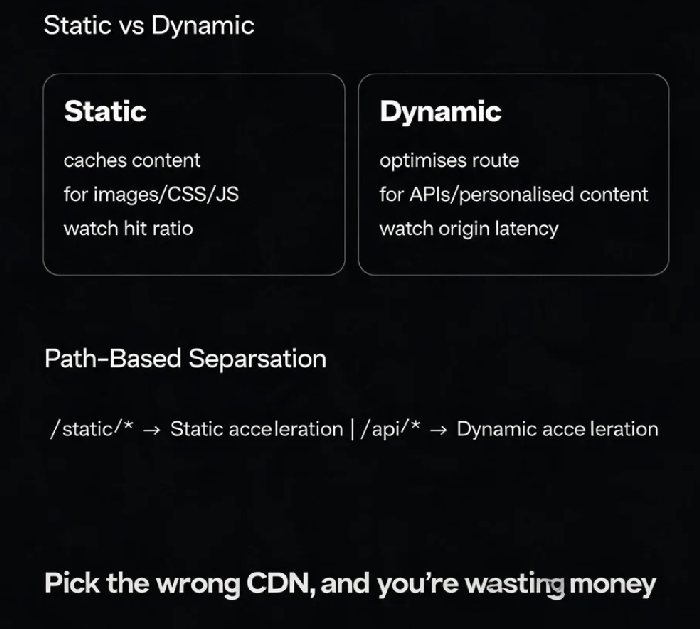
Static acceleration targets resources that never change — images, CSS, JavaScript files, videos.
How it works: Once these files are published, the content is fixed. The CDN caches them on edge nodes around the world. Users fetch them from the nearest location.
Key metric: Cache hit ratio. A user in Shanghai caches an image — another user in the same region can fetch it directly without going back to the origin.
Static acceleration typically achieves hit ratios above 90%. It's ideal for news sites, corporate websites, and e-commerce product images.
02 Dynamic Acceleration: Handling Requests That Change Every Time
Dynamic acceleration targets content that changes with every request — API responses, personalised pages, database query results, shopping cart data.
How it works: Dynamic content can't be cached in advance because it's different for each user. Every request must go back to the origin. Dynamic acceleration solves the problem of "making that round trip faster" — through intelligent routing, protocol optimisation, and connection reuse.
Static content takes the "cache" path; dynamic content takes the "highway" path. The principles are completely different.
03 What Happens When You Choose the Wrong Type?
Scenario 1: API service with a static acceleration plan
Cache hit ratio is near zero, because every request returns different data. The CDN edge nodes can't cache anything. Every request goes back to the origin — you're paying for a detour with no speed gain.
Scenario 2: Static assets with a dynamic acceleration plan
Images and CSS don't need "faster transfer" — they need to be cached nearby. Dynamic acceleration does little for static resources, but costs significantly more than static plans. You're paying a premium for features you're not using.
04 Most Sites Need Both
Very few sites are purely static or purely dynamic. E-commerce needs both: static acceleration for product images and page templates, dynamic acceleration for inventory queries, shopping carts, and checkout.
How to implement it:
Separate by path:
/static/*goes static,/api/*goes dynamicSeparate by domain:
static.yourdomain.comfor static,api.yourdomain.comfor dynamicUse all‑site acceleration (DCDN): Some providers offer integrated solutions that handle both automatically — static content is cached, dynamic content uses intelligent routing and protocol optimisation with zero code changes
That friend with the tool site switched to all‑site acceleration with path‑based rules: images went static, APIs went dynamic. API response time dropped by 60%.
05 A Quick Selection Guide
The Bottom Line
Static and dynamic acceleration are complementary capabilities, not alternatives. Most businesses need both.
Before choosing a CDN, understand your content: is it "unchanging" or "different every time"? Then pick the right plan.
That friend later said: "I wish I'd understood the difference — I wouldn't have wasted a month on the wrong plan."
What about your business — which CDN strategy do you need?
