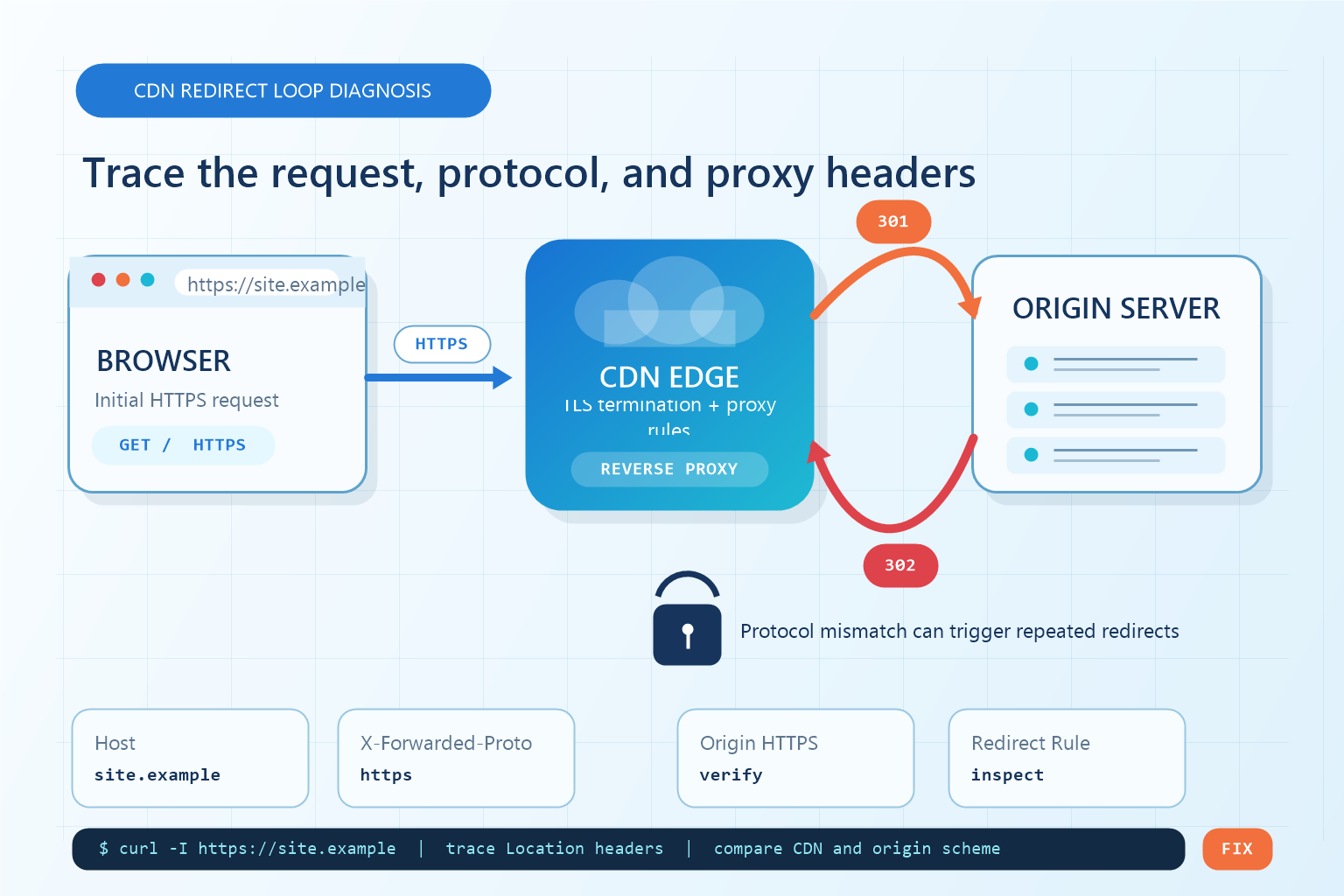
When a website works correctly through its origin IP or local reverse proxy but starts returning endless 301 or 302 responses after a CDN is enabled, the CDN itself is rarely the only component at fault. A redirect loop usually means that two layers disagree about the original request: one believes the visitor used HTTP while another believes the visitor used HTTPS, or the CDN and origin disagree about the requested hostname.
The fastest way to solve the problem is to trace the redirect chain, compare the CDN path with a direct-origin request, and then correct the first layer that changes the scheme or host incorrectly.
1. Confirm that the failure is really a redirect loop
Start with the response headers instead of relying only on the browser error page:
curl -I https://www.example.com/
Look at the status code and the Location header. If the first request returns a redirect, request that destination as well. To see the complete sequence with a safe redirect limit, use:
curl -v -L --max-redirs 10 https://www.example.com/ -o /dev/null
A compact command can also show the final status and number of redirects:
curl -sS -L -o /dev/null -w 'final_url=%{url_effective}\nstatus=%{http_code}\nredirects=%{num_redirects}\n' https://www.example.com/Common loop patterns include:
http://example.comredirecting tohttps://example.com, followed by the origin redirecting back to HTTP.example.comredirecting towww.example.com, while another layer redirectswwwback to the apex domain.The same HTTPS URL redirecting to itself because the application does not recognize that the visitor's original request was HTTPS.
A language, login, or trailing-slash rule alternating between two URLs.
Record every Location value. The first unexpected redirect is more useful than the final browser error.
2. Compare the CDN route with the origin route
Testing the origin by IP alone can be misleading because virtual hosting depends on the Host header. If you know the origin IP, use --resolve so curl connects directly to that IP while still sending the production hostname and using the correct TLS name:
curl -I --resolve www.example.com:443:203.0.113.10 https://www.example.com/
Then compare it with the public CDN request:
curl -I https://www.example.com/
Interpret the result carefully:
If the direct-origin request is healthy but the CDN route loops, inspect CDN origin protocol, forwarded headers, Host handling, edge redirects, and cached responses.
If both routes loop, the problem is probably in Nginx, Apache, the load balancer, the CMS, or application redirect logic.
If the IP request behaves differently from the hostname request, check virtual-host selection and TLS SNI before changing application code.
3. Verify the CDN-to-origin protocol
The most common redirect loop appears when the visitor uses HTTPS but the CDN connects to the origin over HTTP. The origin sees an HTTP request and redirects it to HTTPS. The browser is already on HTTPS, so the CDN repeats the same HTTP origin request and receives the same redirect again.
Check the CDN's origin protocol setting:
HTTPS only: usually the clearest choice when the origin has a valid certificate for the configured origin hostname.
Match viewer: the CDN uses the visitor's scheme when contacting the origin.
HTTP only: workable only when the origin and application correctly trust a forwarded scheme header and do not force HTTPS based solely on the direct connection.
If HTTPS-to-origin is enabled, verify that the origin certificate is valid, unexpired, and covers the hostname used by the CDN. Also confirm that the origin listens on the expected port.
Avoid solving an origin TLS problem by randomly weakening SSL modes. A mode that encrypts only part of the path can hide a certificate issue and create a new redirect loop.
4. Check the Host header, virtual host, and TLS SNI
Many origin servers host multiple websites on one IP. The hostname presented by the CDN determines which Nginx server block, Apache virtual host, certificate, and application configuration receives the request.
Confirm these three values agree:
The hostname configured as the CDN origin.
The HTTP
Hostheader sent to the origin.The hostname used for TLS SNI and certificate validation.
A mismatch can send traffic to a default virtual host whose only job is to redirect to a canonical domain. That redirect may return the request to the CDN, creating a loop.
For Nginx, inspect both the public virtual host and the proxy configuration. A typical reverse-proxy block preserves the original host and passes the original scheme:
location / {
    proxy_set_header Host $host;
    proxy_set_header X-Real-IP $remote_addr;
    proxy_set_header X-Forwarded-For $proxy_add_x_forwarded_for;
    proxy_set_header X-Forwarded-Proto $scheme;
    proxy_pass http://app_backend;
}
This example is not universal. Behind a trusted CDN or load balancer, $scheme may describe the proxy-to-origin connection rather than the visitor's original request. The correct value depends on where TLS terminates and which proxy is trusted.
5. Make the application understand the original scheme
When TLS terminates at the CDN or load balancer, the application may receive plain HTTP even though the browser used HTTPS. The standard clue is normally X-Forwarded-Proto: https or a provider-specific equivalent.
Check the request headers received by the origin. For a temporary diagnostic endpoint, log the following values:
HostX-Forwarded-HostX-Forwarded-ProtoForwardedthe local connection scheme and port
Then configure the web framework or CMS to trust proxy headers only from known CDN or load-balancer addresses. Do not blindly trust forwarding headers from every client; otherwise a visitor may spoof the scheme or host and affect redirect generation.
For WordPress, also verify that WordPress Address (URL) and Site Address (URL) use the intended HTTPS hostname. If a reverse proxy terminates TLS, WordPress must reliably detect the original HTTPS request before its canonical redirect logic runs.
6. Remove conflicting redirect rules
A modern request can pass through several redirect-capable layers:
CDN edge rules
Load balancer or ingress controller
Nginx or Apache
Application framework
WordPress or another CMS
Security, cache, or SEO plugins
Choose one authoritative layer for each policy. For example, let the CDN enforce HTTP-to-HTTPS while the application owns path and language normalization. Do not keep equivalent canonical-domain rules active at every layer unless their behavior is identical and tested.
Search for rules involving HTTP to HTTPS, apex to www, trailing slashes, default language paths, login routes, maintenance pages, and access-control redirects.
Temporarily disable one rule at a time and retest with curl. Changing several layers simultaneously makes it difficult to identify the real cause and increases rollback risk.
7. Do not overlook cached 301 and 302 responses
CDNs, browsers, reverse proxies, and application caches can retain redirect responses. After correcting the configuration:
Purge the affected CDN URL or cache key.
Clear reverse-proxy and application caches where applicable.
Test in a fresh browser profile or use curl.
Add a temporary query string only as a diagnostic aid, not as the permanent fix.
If the redirect disappears only after a cache purge, review the CDN cache policy. Redirect responses should not be cached longer than intended, and the cache key must include any host, scheme-related, or language input that changes the response.
8. Use a safe repair order
On a production website, make changes in an order that preserves access and provides an easy rollback:
Save the current CDN, web server, and application configuration.
Capture the failing redirect chain with timestamps.
Test the origin with the correct hostname using
curl --resolve.Correct the CDN-to-origin protocol and origin hostname.
Correct trusted proxy and forwarded-scheme handling.
Remove duplicate canonical redirect rules.
Purge cached redirect responses.
Validate important pages before restoring long cache lifetimes.
Do not start by disabling HTTPS enforcement everywhere. That may stop the visible loop while leaving visitors on an insecure URL or exposing a deeper host-routing error.
9. Final validation checklist
After the repair, verify all expected entry points:
curl -I http://example.com/
curl -I http://www.example.com/
curl -I https://example.com/
curl -I https://www.example.com/
The non-canonical variants should take a short, predictable path to one final HTTPS URL. Also test the homepage, a deep URL, login and admin pages, API endpoints, static assets, cache misses and hits, and IPv4 and IPv6 if both are published.
A healthy setup normally needs no more than one or two intentional redirects before returning a successful response. The important point is not the exact number but that every step moves toward a single canonical URL and never returns to an earlier state.
Conclusion
A 301/302 loop after enabling a CDN is usually a disagreement between layers, not a mysterious browser problem. Trace the redirect chain, compare CDN and direct-origin behavior, and verify the origin protocol, Host header, TLS SNI, and forwarded scheme. Once each layer has a clearly defined responsibility, redirect behavior becomes predictable and much easier to maintain.
References
AWS CloudFront Developer Guide: Request and response behavior for custom origins
AWS CloudFront Developer Guide: Require HTTPS between CloudFront and a custom origin
AWS CloudFront Developer Guide: Control origin requests with a policy
NGINX documentation: ngx_http_proxy_module
Cloudflare documentation: ERR_TOO_MANY_REDIRECTS
MDN Web Docs: X-Forwarded-Proto