

Cloud Incident Response in Practice: From Detection to Recovery – Building an Effective Response Framework
It’s 3 AM. Your phone buzzes again.
You squint at the screen: “Order service response time > 5 seconds.” You roll out of bed, open your laptop, VPN in, pull up Grafana. CPU looks normal. Memory is fine. But error logs are scrolling like a waterfall.
You start digging through logs, line by line. Fifteen minutes later, you spot it—the database connection pool is exhausted. You restart the pool. The service recovers. But you have no idea why it happened, or if it will happen again. You stare at the screen, afraid to go back to sleep.
This is the reality for most operations teams: when things break, you scramble to put out the fire. And after the smoke clears, you still don’t know what started it.
Today, let’s talk about cloud incident response. Not the “write a runbook” fluff, but a real framework: from detection to recovery—what to do, who does it, and how to go from firefighter to incident commander.
01 Accept This: Outages Are Normal
Many people design systems assuming they won’t fail. That’s the biggest illusion.
Cloud providers have outages. Fiber gets cut. Code has bugs. Humans make mistakes. It’s not a matter of if something will go wrong—it’s when.
Once you accept this, your mindset shifts: from “how do we prevent failures?” to “how do we survive them when they happen?” That shift is the difference between reactive firefighting and proactive incident response.
Counter‑intuitive truth: Your response plan is not a document—it’s muscle memory built through drills. A beautifully written runbook that’s never been tested is useless when the pager goes off.
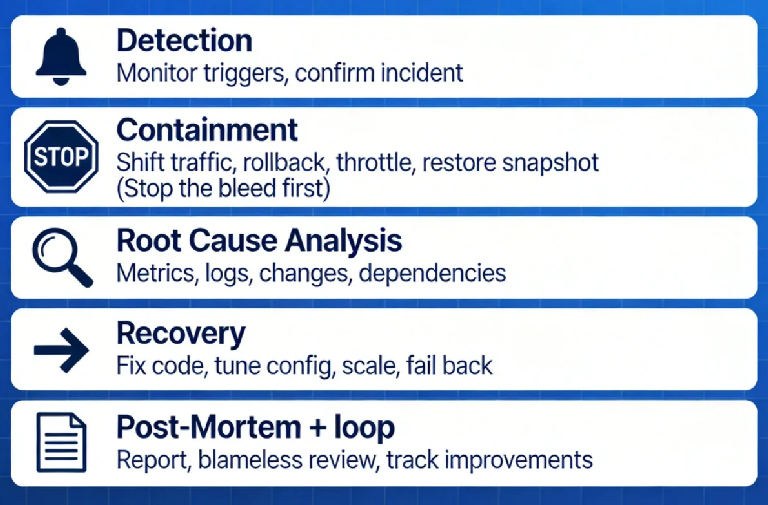
02 The Five Phases of Incident Response
A complete incident response can be broken into five phases. Each has a clear goal.
Phase 1: Detection
How do you learn about the problem? Monitoring alerts? Customer complaints? Someone randomly refreshing a dashboard?
A good detection system doesn’t rely on luck. It tells you: which service, what metric, when it started.
Goal: Quickly confirm it’s a real incident, avoid alert fatigue.
Phase 2: Containment
Once you confirm an incident, your first action is not to find the root cause—it’s to stop the bleeding.
Shift traffic away from the affected service.
Roll back a recent deployment.
Throttle non‑critical features to preserve capacity.
Restore from a recent snapshot or backup.
Goal: Get users back to a working state, even if degraded.
This is where many teams fail: they spend 30 minutes debugging before taking any action. Wrong order. First recover, then investigate.
Phase 3: Root Cause Analysis
With the service stabilized, now you dig.
Check metrics: CPU, memory, network, I/O—what spiked?
Inspect logs: error logs, access logs—any clues?
Review changes: who deployed code, changed config, released a new version?
Examine dependencies: downstream services, databases, caches—did they fail?
Goal: Find the underlying cause, not just the symptom.
Phase 4: Recovery
Once you understand why it broke, you implement a permanent fix.
Fix the code, test, deploy.
Correct configuration, validate.
Scale up resources, adjust thresholds.
Work with dependency owners to resolve their issues.
Goal: Return the system to normal operation, with confidence it won’t immediately break again.
Phase 5: Post‑Mortem
This is the most skipped phase—and the most important.
Write a post‑mortem: timeline, impact, root cause, actions taken, follow‑up items.
Hold a blameless review: focus on process, not people.
Track improvements: which code changes? which monitoring gaps? which process tweaks?
Goal: Make sure you never hit the same pothole twice.
03 Roles: Who Does What During an Incident
The worst thing during an outage is a crowd of people staring at a screen with no one in charge.
A simple incident response team needs three roles:
Incident Commander: Coordinates the response. Makes decisions about cutting traffic, rolling back, declaring an update. Doesn’t need deep technical knowledge—but must be able to make calls.
Technical Lead: Investigates the root cause and proposes fixes. Usually a senior engineer familiar with the affected system.
Communications Lead: Handles internal and external updates. Tells leadership, updates status pages, briefs customer support. Keeps the tech team free from “are we there yet?” interruptions.
In a small team, one person may wear multiple hats. But the roles must be clear. The worst scenario is everyone digging, no one communicating, and customers left in the dark.
04 Common Cloud Incidents and Response Playbooks
Different failure modes require different responses. Pre‑prepared playbooks speed up decision‑making.
Scenario A: Application latency spikes
Quick fix: restart instances, scale out, shift traffic.
Investigate: slow SQL? deadlocks? dependency timeouts? code regression?
Scenario B: Database connection pool exhausted
Quick fix: restart application pods, temporarily increase pool size.
Investigate: unclosed connections? query pile‑up? sudden traffic surge?
Scenario C: Accidental data deletion
Quick fix: stop writes, restore from backup.
Investigate: who deleted it? why did they have permission? why wasn’t backup tested?
Scenario D: Security breach / compromised credentials
Quick fix: revoke credentials, isolate affected resources.
Investigate: how was access obtained? what was accessed? any data exfiltration?
Scenario E: Cloud provider region outage
Quick fix: fail over to another availability zone or region.
Investigate: cloud status page, wait for resolution.
Having these playbooks documented and rehearsed means you’re not inventing the wheel at 3 AM.
05 The Toolchain for Rapid Recovery
Cloud platforms offer powerful “quick‑stop” tools—but you need to have them configured ahead of time.
Load balancers: can instantly remove unhealthy nodes.
Auto‑scaling: can rapidly add capacity.
Snapshots and backups: enable fast rollback of data.
Infrastructure as Code: can redeploy environments in minutes.
Traffic management: can shift, throttle, or degrade gracefully.
These tools aren’t just architectural choices; they must be validated in drills. Make sure that when you need to push a button, it actually works.
06 A Real Story: From Panic to Composure
Last year, I helped an e‑commerce client build an incident response program. They had suffered two major outages: one where a database was accidentally dropped—recovery took eight hours—and another where a traffic spike during a sale overwhelmed their cluster, causing a full meltdown.
We did three things:
First, defined roles. We named an incident commander, technical lead, and communications lead. We posted their names and responsibilities on a wall. Everyone knew who to call and who was in charge.
Second, built playbooks. For each common scenario, we documented: detection clues, containment steps, who to engage, and where to find tools.
Third, started drills. Every quarter, on a quiet weekend, we simulated a realistic failure. The first drill: from detection to recovery took two hours. The third drill: 25 minutes.
Last month, they hit a database connection pool exhaustion. From alert to recovery: 15 minutes. The technical lead told me afterward: “We used to panic. Now we know: first contain, then investigate. It’s not stressful anymore.”
The Bottom Line
Incident response can feel overwhelming. But at its core, it’s simple: when something breaks, someone needs to know what to do, someone needs to know who to call, and someone needs to stop the bleeding.
You don’t need a 50‑page runbook. Start with one page. Name your commander. Write down the first three steps for your most likely failure. Then run a drill.
That client who went from eight‑hour recovery to 15 minutes? They didn’t add fancy tools. They added clarity.
Next time your phone rings at 3 AM, will you be a firefighter—or an incident commander?
