

Cloud Disaster Recovery Drills: You Have Backups—But Have You Ever Restored?
Last winter, at 2 AM, a client called me with a shaking voice: “Our database is gone. Help me restore it.”
I asked: “Do you have backups?”
“Yes! Daily automated backups. Never missed a day.”
“Then restore it.”
Twenty minutes later, he called back: “It failed. The backup files are corrupted. They’ve been corrupt for three months.”
That night, their team manually recovered from binlogs. They worked until sunrise. They lost almost a full day of customer orders. The post‑mortem revealed a painful truth: the backup had run for three years. No one had ever restored it.
This isn’t an isolated story. I’ve seen too many companies with beautiful backup scripts, perfect monitoring—and zero confidence that those backups actually work. Until the day they’re needed.
Today, let’s talk about cloud disaster recovery drills. Not the “backups are important” fluff, but the real thing: how to practice, what to test, and how often—so when disaster strikes, you’re not learning the hard way.
01 Backup Isn’t the Goal. Recovery Is.
This sentence should be tattooed on every database server.
People assume buying cloud backup services means they’re safe. RDS automated backups? Check. S3 versioning? Check. VM snapshots? Check. Good to go.
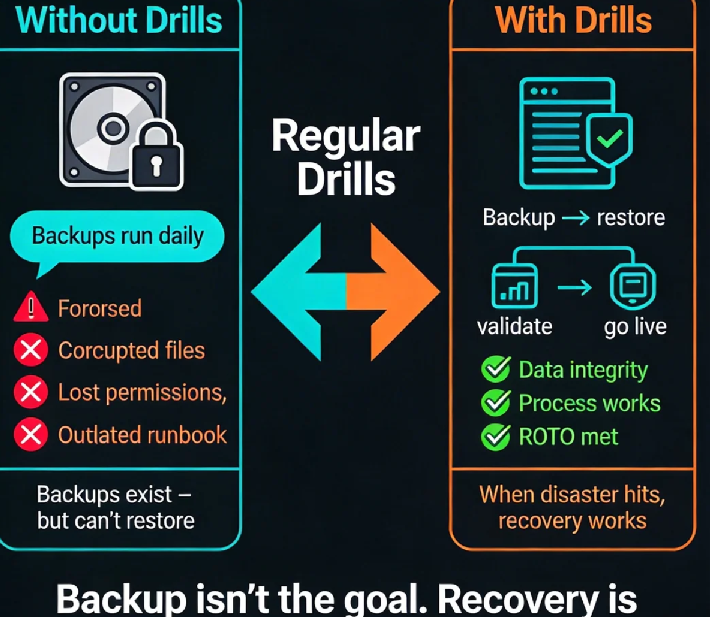
But backup is just the process. Recovery is the goal. A backup you’ve never restored is the same as no backup.
I once ran a quick poll with dozens of operations engineers: “When’s the last time you successfully restored a backup?” The answers were chilling. Over 60% said “never” or “I don’t remember.” A few said “three years ago—it worked then, but I don’t know now.”
This is what disaster recovery drills are for: proving that your “insurance” actually pays out.
02 Without Drills, You Don’t Know What’s Broken
Here are real traps I’ve seen—each from companies that thought they were covered.
Trap 1: Corrupted backup files.
This is the most common. The backup script runs, logs say “success,” but the file is unreadable. If you’re using RDS, the provider checks integrity. If you rolled your own with mysqldump, no one’s looking.
Trap 2: Recovery time is wildly underestimated.
One client stored terabytes in Glacier. When they actually needed it, retrieval took 12 hours. Recovery took another 8. Their business was down for a full day. They had always assumed “a few hours.”
Trap 3: Permissions vanish.
Backups stored in S3 with strict access controls. The person who had the keys left the company. The new engineer couldn’t even list the files.
Trap 4: Documentation is dead.
The recovery runbook was written three years ago. IP addresses, credentials, commands—all outdated. When the real emergency hit, the team stared at a document that led nowhere.
Every single one of these traps would have been caught by a drill. But no one drilled. So the traps sat there, waiting.
03 What Should You Actually Test?
A DR drill isn’t just “copy the backup file somewhere.” It has three layers.
Layer 1: Technical recovery
Can you restore the data at all? To a specific point in time?
After restore, is the data complete? Can you query it?
How long did it take? Does it meet your RTO (Recovery Time Objective)?
This is the foundation. Databases, VMs, object storage—every data source needs validation.
Layer 2: Application validation
Restored data doesn’t mean the application runs.
Can the app connect to the restored database?
Does configuration need updating? IP addresses change.
Are dependent services all available?
I’ve seen databases restored perfectly, but the app still couldn’t start because it pointed to the old IP. That’s a 30‑minute delay that a drill would have caught.
Layer 3: Process and people
Is the recovery runbook still accurate?
Do the people who need access still have it?
Does everyone know who to call first?
This layer is the most overlooked—and often the most critical.
04 How Often Should You Drill? And How?
There’s no universal rule, but here’s a practical approach.
Mission‑critical systems (payments, core transactions): quarterly. If it can kill the business, test it often.
General production systems: every six months or annually.
Regulated industries: follow the mandate (finance, healthcare, etc.).
You don’t need a full‑scale production failover every time.
Small drill: restore a single non‑critical backup to a test environment. Verify the data. One hour.
Medium drill: pick a low‑traffic weekend, restore a full system to staging, and validate the application works. Half a day.
Large drill: actually fail over production traffic to the restored environment. Once a year, on a planned maintenance window.
Start small. Prove the simple case works. Then build complexity.
05 After the Drill: Close the Loop
Drilling without learning is just theater. After every drill:
Record how long it took, where you got stuck, what went wrong.
Review the process. Fix the runbook. Update permissions.
Improve the backup strategy if needed.
One client’s first drill took six hours—way past their RTO. They rewrote recovery scripts and optimized their data architecture. The next drill: 90 minutes.
Disaster recovery isn’t something you buy. It’s something you build, test, and rebuild.
06 A Real Story
Last year, I ran a DR drill for an e‑commerce company. They were confident: “We have automated backups. We’re fine.”
We picked a non‑critical MySQL replica and tried to restore it from RDS automated backups.
Here’s what happened:
The backup file was fine, but during restore the disk ran out of space—no one had calculated the restore‑time capacity.
After we added disk, restore succeeded. Then the app couldn’t connect—IP changed, config wasn’t updated.
After fixing the config, the app connected—but the last 15 minutes of data were missing. They were using daily backups, with a 2 AM recovery point. They lost hours of transactions.
Total time: four hours.
They changed their strategy after that: point‑in‑time recovery (PITR) for critical databases, scripted the restore process, rewrote the runbook.
Three months later, the second drill: 40 minutes start to finish. Their ops lead told me: “Now I can actually sleep at night.”
The Bottom Line
That client who called me at 2 AM? After the incident, they rebuilt their backup system and started quarterly drills. Now they run drills like clockwork. Last time I asked, they said: “Latest drill: backup to full recovery in 25 minutes.”
I said, “If you’d run a drill before the crash…”
He cut me off. “Don’t. That one night cost more than a hundred years of drills.”
Backups are invisible when they work. When they don’t, there’s no second chance.
When was the last time you restored yours? Pick a non‑critical system this week. Run a small drill. It might take an hour. But it could save you a sleepless night.
Because data—once lost—stays lost.
