

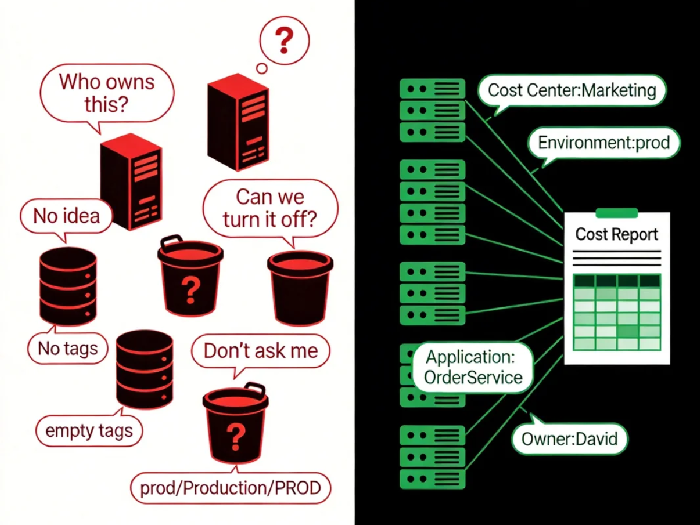
Last month, a client's finance director emailed me with a screenshot of their AWS bill. Red circles highlighted a dozen EC2 instances. Three questions: "Whose servers are these? What are they for? Can we turn them off?"
I forwarded the email to their operations lead. His reply: "I wish I knew."
It took three days to figure it out. Some were test environments from three years ago—long overdue for retirement. Others were experimental projects some developer spun up and then left behind when they changed jobs. A few had no identifiable owner at all. We turned them off and waited to see who complained.
The total cost of these "zombie resources"? Over twenty thousand dollars a month.
This isn't an isolated story. I've seen countless cloud bills where the cost breakdown is filled with "miscellaneous" and "untagged." Finance can't understand it. Operations can't explain it. When the boss asks, no one answers.
Today, let's talk about cloud resource tagging. Not the "tags are important" fluff, but how to actually design, enforce, and maintain a tagging strategy that makes every dollar find its owner.
01 Tags Are for Humans, Not Machines
Let's start with a fundamental truth: cloud providers built tagging to help people manage resources.
Machines don't care about tags. EC2 instances run fine with or without them. S3 buckets store data regardless. Tags have no functional impact.
But humans care deeply. Finance cares about cost allocation. Operations cares about resource ownership. Business units care about budget accountability.
This leads to the first principle of tag design: Use human language, not machine language.
What does that mean in practice?
Don't use "Project123" – use "E-commerce Campaign"
Don't use vague labels like "Env1" – use "production," "staging," "development"
Don't use personal tags like "John's server" – use team dimensions
I worked with a company that wrote a 20-page tagging standard with dozens of required tags. Nobody could remember them all. Unsurprisingly, adoption was near zero. They simplified to five mandatory tags: cost center, environment, application, owner, creation date. Within six months, coverage went from 20% to 90%.
Tags aren't better when there are more of them. Tags are better when they're actually used.
02 The Three Dimensions of a Good Tagging Strategy
After reviewing tagging practices at hundreds of companies, I've found that effective tag sets revolve around three dimensions.
Dimension One: Business
Answers "what is this for?"
Cost center: The entity responsible for payment, e.g., "Marketing," "R&D"
Project: Specific initiative, e.g., "Double 11 Campaign," "CRM Redesign"
Application: The business system, e.g., "Order Service," "User Dashboard"
Dimension Two: Environment
Answers "where is this running?"
Environment: production, staging, testing, development
Region: domestic, overseas, southeast asia
Compliance tier: general, sensitive, critical
Dimension Three: Operations
Answers "who do I call when it breaks?"
Owner: team name or contact email
Created date: for lifecycle tracking
Auto-shutdown flag: can this be turned off outside business hours?
These three dimensions cover about 90% of real-world management needs. Anything beyond that is usually noise.
03 The Most Overlooked Trap: Tag Value Consistency
Many companies write good tagging standards but still end up with chaos. Why? Because the same tag gets filled with different values.
Take the "environment" tag. Some people write "prod." Others write "production." Still others write "Production" with a capital P. In cost analysis tools, these become three different dimensions. Reports break. Allocations fail.
There's only one solution: Standardize. Then enforce.
Standardize tag keys: English or local language? Lowercase or camelCase? Decide and don't change.
Standardize tag values: Environment can only be [prod, staging, dev]. No free text.
Mind case sensitivity: "Prod" and "prod" are different. Either enforce lowercase everywhere or use tools to normalize.
Most cloud providers now support "tag policies" that can enforce rules at resource creation time. This is the nuclear option—and it's the most effective one.
04 Three Barriers to Tagging Adoption
Great theory. Hard reality. Tagging initiatives fail for three common reasons.
Barrier One: Developers find it annoying
"I'm busy writing code. I don't have time to add tags." This is the most common objection.
Solution: Don't make humans do it manually. Use Infrastructure as Code (Terraform, CloudFormation) to bake tags into templates. Resources get tags automatically at creation. Developers never touch them.
Barrier Two: Historical debt
Thousands of existing resources with no tags. Backfilling seems impossible.
Solution: Batch it. Start with critical production resources. Then test environments. For resources with no identifiable owner, add a "cleanup-pending" tag, observe for a while, then delete if no one claims them. Don't try to eat the elephant in one bite. Give yourself six months.
Barrier Three: No accountability
Tags are applied. Costs are allocated. Then what? Nobody looks at the reports.
Solution: Send regular cost reports. Every team gets a monthly breakdown of their spending, clearly tagged and allocated. Teams that exceed budget write explanations. Persistent offenders need improvement plans. The purpose of cost visibility is to create ownership.
05 From Tags to Cost Allocation
Once tags are working, the next step is cost allocation.
Cloud provider bills can generate reports by tag. But there's a problem: shared costs.
Shared resources: load balancers, NAT gateways used by multiple projects
Fixed costs: support plans, domain fees
Mixed costs: a single RDS instance used by multiple applications
This requires an allocation model. Three common approaches:
Proportional allocation: Split shared costs based on each application's resource usage.
Fixed percentage allocation: Agree on fixed splits, e.g., Project A pays 40%, Project B pays 60%.
Direct allocation: Costs that can be mapped directly to a specific tag go straight to that owner.
No perfect model exists. The key is transparent rules, regular reviews, and willingness to iterate.
06 The Last Mile: Automation
At the end of the tagging journey, you'll face a question: what about resources that still don't have tags?
My advice: Be firm. Enforce.
Check tags at creation time; block creation if standards aren't met
Regularly scan for untagged resources; notify suspected owners
After a grace period, automatically shut down or delete resources that remain untagged
This sounds harsh. But it's the only way to make tagging sustainable. Otherwise, someone will "forget" every month, and you'll be chasing them forever.
AWS and Azure have tools for this: AWS Config can write rules that trigger remediation; Azure Policy can enforce tags at creation. Use them.
07 A Real Story
Remember the client from the opening? We did two things for them:
First, we designed a simplified tag standard—five mandatory tags, enforced through Terraform templates.
Second, we set up automated monthly cost reports, broken down by cost center, sent directly to the responsible teams.
Three months later, that same finance director sent me another email. This time, a thank-you note. Monthly cost reconciliation now took half a day instead of a week. And after cleaning up the "zombie resources," their monthly bill dropped by 18%.
He wrote: "I used to think cost visibility was a technical problem. Now I see it's a management problem."
I replied: "Technology is just the tool. Management is the solution."
The Bottom Line
Can you answer these questions about your cloud resources right now?
Who owns each server? What business purpose does it serve? How much does it cost? Should it still be running?
If you can't, start with tagging. Design a simple standard. Enforce it with IaC. Send regular reports. Create accountability.
It's not glamorous work. But a year from now, you'll thank yourself. And so will your finance team.
