

Advanced Observability: Distributed Tracing and Performance Profiling in Practice
Last week, a friend running a microservices-based e‑commerce platform vented to me. Their order system had a gremlin. Occasionally, a user would click “place order” and wait three seconds instead of the usual 200ms. No pattern. No reproducible steps. Their APM dashboard showed “order service slow,” but that service contained dozens of functions—they had no idea which one was the culprit. And because it affected only 1% of requests, they couldn’t catch it in staging.
“I know it’s slow,” he said. “But I don’t know why.”
I told him: “You need two things. Distributed tracing. And performance profiling.”
This is where observability gets real. Metrics tell you that something is slow. Logs tell you what error occurred. But tracing and profiling tell you where—down to the exact line of code.
01 Tracing Alone Won’t Save You
A common misconception: once you deploy distributed tracing (Jaeger, SkyWalking, etc.), all performance mysteries will vanish.
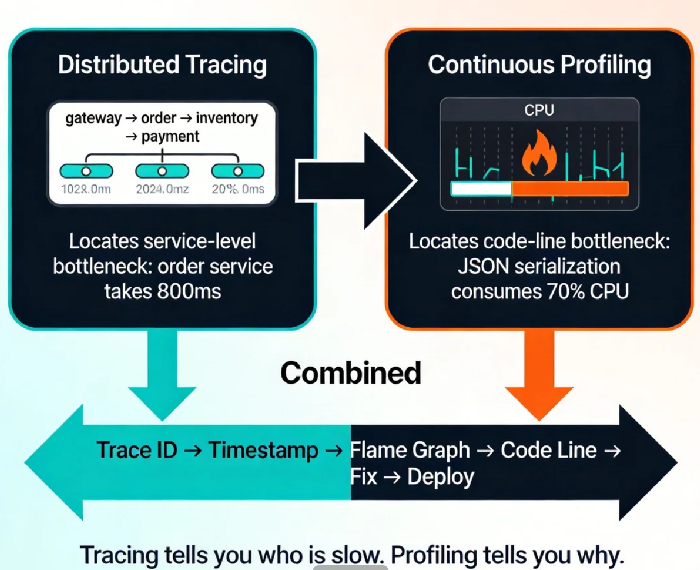
Tracing gives you the journey: a request enters the API gateway (20ms), hits the order service (800ms), calls inventory (50ms), calls payment (30ms). Now you know the order service is the bottleneck. Great.
Now what? The order service contains parameter validation, business logic, database queries, cache lookups, external API calls. You still don’t know which function ate those 800 milliseconds.
Tracing sees between services. It cannot see inside them.
That’s where profiling steps in.
02 Profiling: A CT Scan for Your Code
Profiling isn’t new. In the monolith era, we had perf, gprof, and the like. But in cloud‑native environments, profiling has evolved into continuous profiling.
Traditional profiling is a snapshot. Something’s slow? SSH into the box, run a profiler, hope you capture the moment. It works for reproducible bugs. For the 1% gremlin that appears randomly in production? Good luck.
Continuous profiling is a video. It runs constantly, sampling performance data with minimal overhead. You can travel back to any time window and see exactly what the CPU was doing, which functions were allocating memory, which goroutines were blocked.
This is why it solved my friend’s dilemma. Tracing identified the slow request and gave him the exact timestamp. Continuous profiling let him open the CPU flame graph for that exact moment. There it was: a JSON serialization function consuming 80% of CPU. A user with an oversized cart—the JSON parser was choking on a 5‑megabyte object.
Counter‑intuitive truth: the bottleneck often isn’t the database, the network, or the “obvious” candidate. It’s code you thought was fast. Only profiling can find it.
03 Tracing + Profiling: 1+1 > 2
Used alone, each tool has blind spots. Together, they form a complete picture.
Tracing gives you the call chain: which service, which endpoint, which user, and when.
Profiling gives you the code‑level heat map: which function, which line, which allocation.
The workflow is straightforward:
From your APM or tracing system, find a slow request. Grab its Trace ID and timestamp.
In your continuous profiling system, navigate to that timestamp. Open the CPU or allocation profile.
Identify the function consuming the most resources. Often it’s one line.
Fix the code, deploy, and watch the profile improve.
I worked with a team that spent weeks blaming the database for slow API responses. They added indexes, tuned queries, even increased instance sizes. Nothing helped. After enabling continuous profiling, they found that a configuration file was being parsed on every request—a simple Once initialization was missing. The database had been innocent all along.
Tracing couldn’t see that. Metrics couldn’t see it. Only profiling could.
04 Tooling: What to Use
The landscape has matured. You have options.
Distributed Tracing:
Jaeger – CNCF graduated, mature, OpenTelemetry native. Good for self‑managed.
SkyWalking – Popular in Asia, includes metrics and logging alongside tracing.
Zipkin – Lightweight, older, simpler.
Continuous Profiling:
Pyroscope – Open source, multi‑language, integrates with Grafana. Low overhead.
Parca – From Polar Signals, focused purely on profiling, works with Prometheus.
Datadog Continuous Profiler – Commercial, deeply integrated with their APM, but pricey.
Cloud vendor offerings: AWS CodeGuru Profiler, Azure Application Insights, Alibaba Cloud ARMS.
All‑in‑one stacks:
Grafana Cloud: Combines Prometheus (metrics), Loki (logs), Tempo (tracing), and Pyroscope (profiling).
Datadog: The commercial powerhouse—if budget allows.
For teams starting out, I recommend the open‑source route: OpenTelemetry for instrumentation, Jaeger for tracing, Pyroscope for profiling, and Grafana to tie them together. It’s a weekend project that pays off immediately.
05 Three Steps to Get Started
You don’t need to boil the ocean. Start here.
Step 1: Unify your Trace IDs
This is the foundation. Ensure every service propagates the same Trace ID and logs it. With OpenTelemetry, this becomes almost automatic. Then your logs, traces, and profiles can all be linked.
Step 2: Deploy a continuous profiler
Pick one language and one service to start. Python? Java? Go? Choose what matters most. Deploy Pyroscope or Parca with minimal sampling overhead. Most teams won’t notice the 1% CPU cost—but they will notice the first time they find a hidden bottleneck.
Step 3: Build a “slow request” runbook
Document the workflow: Find slow request in APM → copy Trace ID and time → open profiler → locate flame graph → identify function → fix → verify. Make it a standard operating procedure. Without the runbook, the tools will sit unused.
06 A Real Story
Last year, I helped a SaaS company optimize their core reporting endpoint. P99 latency sometimes hit 5 seconds, while average stayed at 200ms. A classic long‑tail problem.
Tracing showed the bottleneck in a service called “data‑aggregator.” That service had thousands of lines of code—no obvious culprit.
We deployed continuous profiling. The next time a slow request appeared, we opened the flame graph. A function named fieldMapper was eating 70% of CPU. Looking at the code, it was loading a giant configuration file on every request and building field mappings from scratch.
One line of code added a sync.Once cache. Deployed. P99 dropped from 5 seconds to 300ms. The next month’s CPU bill dropped 30%.
Their ops lead told me: “I used to think performance tuning meant adding more servers. Now I know it’s often just one line of cache.”
The Bottom Line
Back to my friend with the e‑commerce gremlin. After enabling continuous profiling, it took him a week to find the root cause: a user with an enormous cart was triggering a JSON serialization path that had no size limit. One if statement to cap the cart size, and the slow requests disappeared.
He messaged me: “I used to think observability was dashboards and alerts. Now I see there’s a deeper level.”
Observability isn’t just about knowing something is wrong. It’s about knowing exactly where it’s wrong—fast enough to fix it before customers notice. Tracing gives you the street. Profiling gives you the apartment number. Together, they give you the key.
Does your system have a slow request that no one can explain? Pick one today. Pull the Trace ID. Open a flame graph. You might be surprised what you find.
