

Last month, a client's container cluster went haywire.
Around 3 AM, monitoring alerts started firing—CPU spiking, network traffic surging. The operations team logged in and found dozens of containers quietly mining cryptocurrency. Tracing the source, they discovered a developer had pulled a base image from a public repository. Hidden inside that image—downloaded millions of times from Docker Hub—was a cryptomining payload. Standard scans had missed it.
The mining operation ran for three days. The extra cloud bill? Twenty thousand dollars. Worse: had customer data been exposed? No one knew. How long would forensics take? No one could say.
During the post-mortem, they realized something painful: they'd been running containers for a year. CI/CD was humming. But security had never caught up. Images pulled from anywhere. Containers running with excessive privileges. Network policies never configured. An incident was just a matter of time.
Today, let's talk about cloud container security. Not the "security is important" fluff, but how to actually build defenses layer by layer—from image builds to runtime.
01 First, Accept This: Containers Are Not Virtual Machines
When people first encounter containers, they often treat them like lightweight VMs—SSH in, install software, tweak configs. This is the most dangerous mindset.
The fundamental difference is kernel sharing. VMs have their own kernel. The hypervisor isolates the guest OS from the host. Containers share the host kernel directly. If a container breaks isolation, it can affect the host—and potentially other containers.
What does this mean in practice? Container escape vulnerabilities are far more damaging than VM escapes.
Take CVE-2019-5736, a RunC vulnerability. An attacker inside a container could overwrite the RunC binary on the host, gaining root access to the entire machine. This affected Docker, Kubernetes—basically everything.
First principle of container security: Don't treat containers like VMs. Don't assume kernel isolation will save you.
02 Image Security: Stop Vulnerabilities at the Source
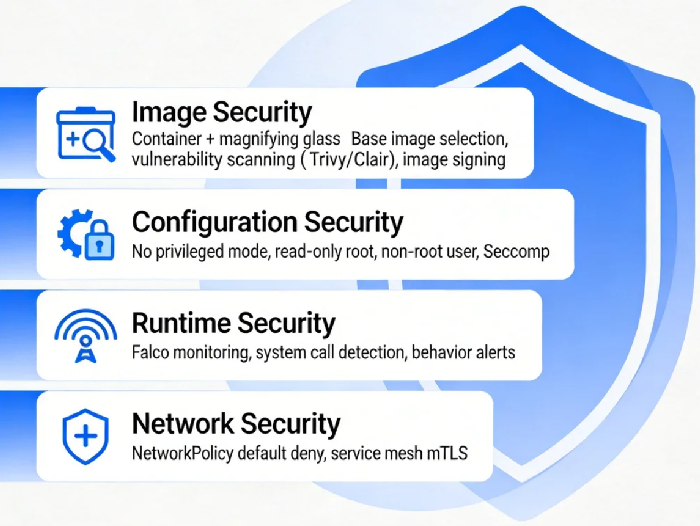
The first line of defense is in the image build phase.
Which base image do you choose?
Many people grab the latest tag from Docker Hub. This is a trap. Docker Hub has official images, but also countless third-party uploads. Quality varies wildly. Some are deliberately backdoored.
The rule: Use official images, or images from trusted private registries. If you must use third-party, scan them first.
Image scanning tools
Tools like Trivy, Clair, and Anchore scan images for known vulnerabilities. Integrate them into your CI/CD pipeline. Build runs, scan runs. If a critical vulnerability is found, fail the build.
One client's practice: they added Trivy to Jenkins with a "fail on critical" threshold. At first, builds failed constantly—base images were full of old vulnerabilities. That forced the team to update base images, upgrade dependencies. Three months later, image quality was dramatically better.
Image signing
How do you know the image you're pulling is exactly what you built—not tampered with? Image signing.
Docker Content Trust and Notary enable signing and verification. Configuration is a bit involved, but for critical workloads, it's worth it.
03 Configuration Security: Don't Leave Doors Open
A clean image doesn't guarantee a secure container. Runtime configuration matters just as much.
Don't give privileges
The most dangerous setting is privileged: true. With privilege, a container is nearly equivalent to root on the host. Escapes become trivial.
Another is allowPrivilegeEscalation: true, which allows processes to gain more permissions than their parent. Most workloads don't need it. Turn it off.
Read-only root filesystem
If your container doesn't need to write to its filesystem, set readOnlyRootFilesystem: true. Attackers can't drop files.
Don't run as root
Running as root inside containers is a historical accident. Best practice: specify a non-root user in the image, and run as that user.
In Kubernetes, set runAsNonRoot: true to enforce this.
Seccomp and AppArmor
These are Linux kernel security mechanisms that restrict which system calls a container can make. Default profiles are reasonably strict, but you can tighten them further based on your application.
04 Runtime Security: Watch for Bad Behavior
Image scanned. Configuration locked. Container running. Now what? You watch it.
Falco: The cloud-native runtime security standard
Falco is a CNCF project that monitors system calls and detects anomalous behavior. It alerts when something looks wrong.
Examples of Falco alerts:
A shell starts inside a container (possible attacker establishing a foothold)
Sensitive files like /etc/shadow are read or written
Unexpected network connections
Falco rules are customizable. Alerts can go to Slack, email, PagerDuty. Deployment is straightforward—run it as a DaemonSet.
Anomaly detection
If you have the budget, commercial tools like Aqua or Prisma Cloud add machine learning-based behavior analysis. They catch more subtle patterns.
05 Network Security: Isolation Is Everything
By default, containers can talk to each other. That's not a good thing. If one container is compromised, the attacker can move laterally to scan others.
Kubernetes NetworkPolicy
NetworkPolicy is K8s' built-in network isolation mechanism. It defines which Pods can communicate with which.
Best practice: Default deny all traffic, then selectively allow what's necessary. For example, allow frontend Pods to talk to backend Pods on port 8080, and deny everything else.
CNI plugins like Cilium and Calico support NetworkPolicy and add advanced capabilities like seven-layer policies.
Service mesh
Tools like Istio and Linkerd add mTLS encryption and access control at the application layer. For high-security environments, they're worth considering.
06 Supply Chain Security: Trust, but Verify
Vulnerabilities in images can be scanned. But some risks are harder to catch—like malicious code in third-party dependencies.
SBOM: Software Bill of Materials
An SBOM lists every component and version your application uses. When a new vulnerability is disclosed, you can quickly check if you're affected and need to upgrade.
Trusted image sources
Pull with signature verification, as mentioned earlier. Also: use a private registry as a proxy. Pull images there first, scan them, cache them. Then your clusters pull from the private registry. This gives you control and auditability.
07 A Real Story
Last year, I helped a financial services client harden their container security. They had hundreds of Pods running on Kubernetes, but security was nearly nonexistent.
We did four things:
First, added Trivy scanning to CI/CD, failing builds on critical vulnerabilities. Initially, 70% of images failed. It took three months to clean up base images and dependencies. Now the pass rate is over 95%.
Second, standardized Pod security configurations. New deployments had to meet a set of rules: no privileged containers, read-only root filesystem, non-root user. Non-compliant workloads weren't allowed.
Third, deployed Falco with key alert rules. In the first month, it caught two anomalies: one was a developer debugging by opening a shell in a container; another was a container trying to read /etc/shadow (turned out to be a misconfiguration).
Fourth, rolled out NetworkPolicy gradually. Started with critical applications, then expanded. Now 90% of namespaces have default-deny policies.
Six months later? No runtime security incidents. The security team went from "firefighting every week" to "reviewing reports monthly."
The Bottom Line
That client with the cryptomining incident? They rebuilt their container security from scratch. It took three months. What did they get?
Their security lead put it simply: "The biggest gain isn't money saved. It's being able to sleep at night."
Running containers is easy. Running them securely is hard. Image scanning, configuration hardening, runtime monitoring, network isolation, supply chain verification—each layer matters.
But you don't have to do everything at once. Start with image scanning. Close the most obvious holes. Add configuration policies. Add runtime monitoring. Add network policies. Layer by layer, you'll get there.
Where is your container cluster on this journey?
