

Before You Grow: How to Estimate Cloud Resources Needed—From Capacity Planning to Cost Forecasting
Last week, a friend who runs an ed‑tech startup took me out for coffee. They’d just closed a funding round and planned to double their user base next quarter. The CTO confidently said, “The system will handle it.” But the ops lead quietly disagreed: “We’re already at 80% capacity at peak. Double the users? No way.”
My friend asked me, “I know we need to scale. But how many more servers? How much will it cost? My boss needs a budget number—I can’t just guess.”
This is the dilemma every tech leader faces. The business wants to grow; the infrastructure must keep up. But how do you turn “double the users” into “add X instances for $Y per month”?
Today, let’s talk about capacity planning and cost forecasting. Not the “monitor and auto‑scale” fluff, but a real framework: turn business metrics into technical requirements, and technical requirements into dollars.
01 Capacity Planning Isn’t Guessing—It’s Math
Many people think capacity planning means watching CPU and adding servers when it hits 80%. That’s an operational view, not a business view.
Real capacity planning starts with business metrics, not technical ones.
How many users will you have next quarter?
What’s the expected DAU (daily active users)?
How many requests per user per day?
How fast will data grow?
Product, marketing, and sales have these numbers. Ask them. Then translate those numbers into technical requirements.
Counter‑intuitive truth: Capacity planning isn’t a technical problem—it’s a business problem. If you don’t understand the business growth curve, you can’t plan capacity.
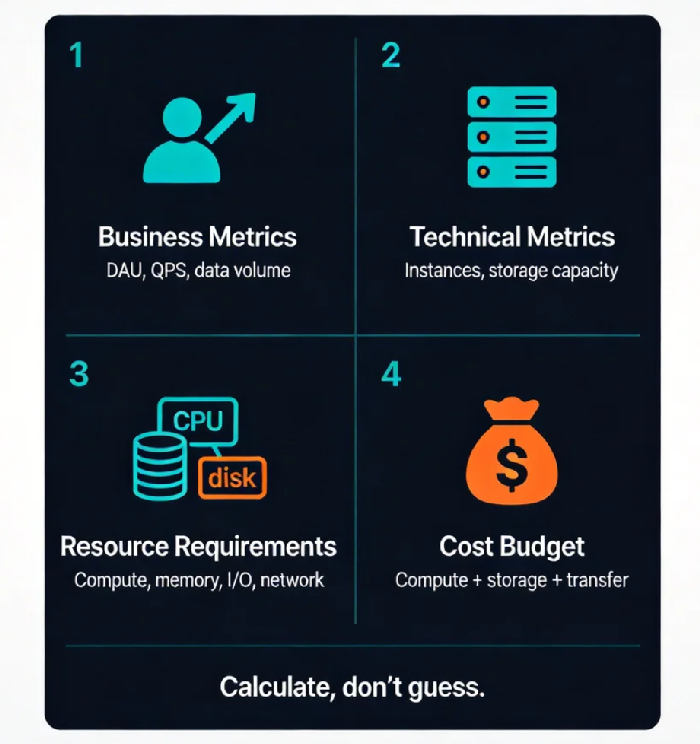
02 From Business Metrics to Technical Requirements: Four Formulas
How do you turn “double the users” into “how many servers”? These four formulas do the heavy lifting.
Formula 1: QPS = DAU × requests_per_user / 86,400
Assume 100,000 DAU, each making 100 requests daily. Average QPS = 100,000 × 100 / 86,400 ≈ 116. Peak is usually 3‑5× average. Use 5×, so peak QPS ≈ 580.
Formula 2: Concurrent connections = QPS × average response time
If average response time is 200ms, concurrent connections = 580 × 0.2 = 116. This tells you how large your connection pool needs to be.
Formula 3: Number of instances = peak QPS / per‑instance QPS capacity
Load test your service. How many QPS can one instance handle? Suppose it’s 200 QPS. Then you need 580 / 200 ≈ 3 instances. Add one for redundancy: 4.
Formula 4: Storage capacity = daily data × retention_days × replicas
If you add 1TB daily, keep 90 days, with 3 replicas, you need 1TB × 90 × 3 = 270TB. Add overhead: 300TB.
These formulas are the foundation. Once you’ve run them, you’re no longer guessing.
03 Don’t Just Look at CPU—Memory, I/O, and Network Matter Too
Many plans stop at CPU. That’s a mistake.
Different workloads have different bottlenecks.
Compute‑intensive (video transcoding, encryption): CPU is the constraint.
Memory‑intensive (caching, analytics): RAM is key—too little causes swapping or frequent GC.
I/O‑intensive (databases, logging): disk IOPS and throughput matter.
Network‑intensive (file transfers, CDN): bandwidth is the bottleneck.
So after you estimate instance count, check whether memory, I/O, and network will also scale. You might need fewer but larger instances.
Real example: A recommendation system needed only 3 instances by CPU, but each needed 64GB RAM to keep the hot data set in memory. Choosing 3 large instances was cheaper than 5 smaller ones.
04 Growth Models: Linear, Exponential, or Seasonal?
Growth isn’t uniform. Different patterns demand different planning strategies.
Linear growth (10% per month): You can scale gradually, adding capacity every couple of months.
Exponential growth (rapid expansion): You may need to scale up two or three months ahead of time because procurement and deployment have lead times.
Seasonal spikes (Black Friday, back‑to‑school): Use auto‑scaling. Buy reserved instances for the baseline; cover peaks with on‑demand or Spot instances.
Counter‑intuitive truth: Reserved instances aren’t always better. Buy too many and you waste money if growth slows. Buy too few and you pay on‑demand rates for the excess. Match your purchase to your growth curve.
Last year, a client forecast 8× traffic for Black Friday. They bought 3‑year reserved instances for their baseline and used Spot for the peak. The hybrid approach saved 40% compared to buying all reserved.
05 From Resources to Dollars
Once you know how many resources you need, the next step is turning them into a budget.
Cloud pricing has four main components:
Compute: instance type × count × hours. Reserved instances and Savings Plans can cut costs.
Storage: capacity × storage class (Standard, Infrequent Access, Archive).
Data transfer: egress, cross‑region, CDN.
Additional services: databases, load balancers, monitoring, etc.
Use your cloud provider’s pricing calculator. Plug in your resource numbers. But beware:
Reserved instance planning: 1‑year or 3‑year? Upfront or monthly?
Data transfer is often underestimated: for a typical web app, it can be 30–40% of the bill.
Hidden costs: monitoring, logging, backup storage—include them.
A practical shortcut: take last month’s bill, project growth, then adjust. If you’re doubling users, your variable costs (like compute) will roughly double, but fixed costs (like support plans, base infrastructure) won’t. Better model: Fixed cost + variable cost × growth factor.
06 A Real Story: Planning Three Months Ahead Saved 30%
Before last year’s Black Friday, an e‑commerce client asked us to help with capacity planning. They expected 3× traffic.
Here’s what we did:
First, load‑tested to find per‑instance QPS capacity. They had never tested. It turned out each instance could handle 1,500 QPS—not the 3,000 they assumed.
Second, derived business metrics. DAU would grow from 100,000 to 300,000, with the same requests per user. Peak QPS went from 1,500 to 4,500. Required instances: from 1 to 3.
Third, reassessed storage. Order data was growing; they needed to keep 180 days instead of 90. Storage capacity doubled.
Fourth, built the budget. Compute: three reserved instances, 1‑year term, monthly payment. Storage: moved older data to Infrequent Access, cutting cost in half. Data transfer: negotiated a bandwidth discount with the carrier based on projected peak.
The final budget was 30% lower than what they had guessed. On Black Friday, the system held steady, and costs stayed within forecast. Their ops lead told me: “Now I know why we need what we need, and I can tell the business exactly how much it will cost.”
The Bottom Line
Capacity planning and cost forecasting can feel like accounting work—something technical people often dismiss. But it’s the critical bridge between engineering and business.
The CEO doesn’t care about CPU percentages. They care about: “If we double users, how much more will we spend?” If you answer “maybe three more servers,” they can’t act. If you answer “Based on our projections, we need 3 more 8‑core 32GB instances. Using a mix of reserved and on‑demand, the monthly increase will be $5,000,” they can make a decision.
My friend with the ed‑tech startup used this framework to present his budget. When his boss asked how he arrived at the numbers, he walked through the formulas. The boss said, “OK, let’s go with that.”
He later told me, “I used to think my job was just keeping the system running. Now I realize my job is also translating what the system needs into language the business understands.”
Your business is about to grow. Are you ready to show them the numbers?
