

Cloud Object Storage Selection and Cost Optimization: S3, GCS, or OSS?
Last month, a client running a video‑editing SaaS sent me a screenshot of their cloud bill with a panicked note: “Our storage costs tripled. User count didn’t move. What happened?”
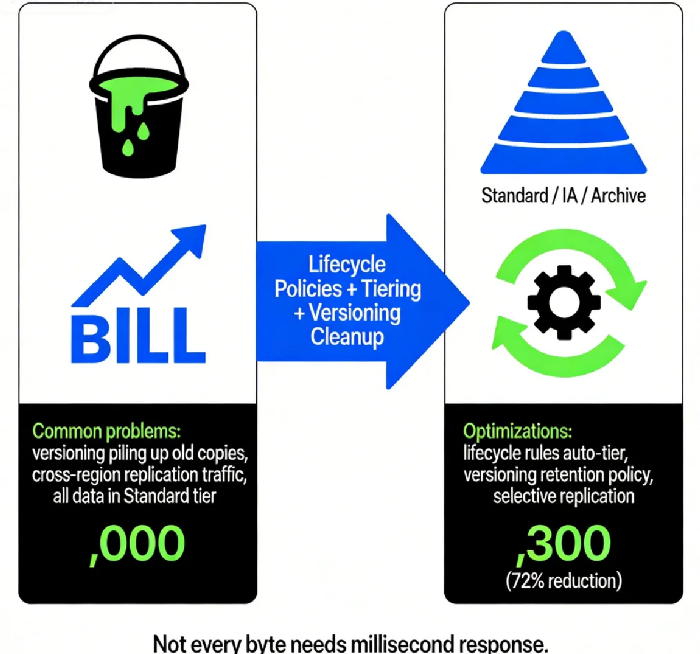
I pulled up their storage analytics and saw the story immediately. They were storing every raw video upload in Standard tier, had enabled cross‑region replication to another continent, and—worst of all—had versioning turned on without any cleanup. A single video file was silently consuming seven or eight copies in the background.
I told him: “Do three things. Move videos older than 30 days to Infrequent Access. Archive anything over a year to Glacier. Turn off the unnecessary cross‑region replication.”
He did. Next month’s storage bill dropped by 72%.
This is the dirty secret of cloud object storage: it’s cheap, it’s easy, and it’s a minefield. Configure it wrong, and your monthly bill will terrify you.
Today, let’s talk about object storage selection and cost optimization. Not the “use Standard for hot data” fluff, but the real stuff: storage classes, lifecycle policies, versioning traps, cross‑region replication costs, and how to choose between S3, GCS, and OSS.
01 Storage Classes: There’s More Than “Standard”
Most people think object storage means one thing: “Standard” storage. In reality, every cloud provider offers a spectrum from “hot” to “frozen.”
Take AWS S3 as an example, from hottest to coldest:
S3 Standard – millisecond access, best for frequently accessed data. Highest price.
S3 Intelligent‑Tiering – automatically moves data between hot and cold tiers based on access patterns. Small monitoring fee, but often cheaper than manual guessing.
S3 Standard‑IA (Infrequent Access) – data accessed rarely but needs millisecond retrieval. Lower storage cost, but you pay a retrieval fee.
S3 One Zone‑IA – stored in a single Availability Zone. Cheaper, but lower durability. Good for recreatable data.
S3 Glacier Instant – archive‑class, but retrieval in milliseconds. Even cheaper than IA.
S3 Glacier Flexible Retrieval – retrieval in minutes to hours. Very low storage cost.
S3 Glacier Deep Archive – retrieval in 12 hours. Lowest storage cost. Perfect for compliance archives.
Google Cloud Storage and Alibaba Cloud OSS have equivalent tiers: Standard, Nearline, Coldline, Archive. The principle is the same: trade access speed for storage cost.
02 Lifecycle Policies: Let Data “Cool” Automatically
Manually moving data between tiers is impractical. The solution is lifecycle policies – rules that automatically transition or delete objects based on age.
A good lifecycle strategy has two rules:
Transition rule: Move to IA after 30 days, to Glacier after 180 days, to Deep Archive after 365 days.
Expiration rule: Permanently delete after, say, 3 years.
Last year, I helped an image‑processing company that stored hundreds of millions of thumbnails. Most thumbnails were never accessed after the first week. We set up: transition to IA after 7 days, to Glacier after 90 days, delete after 2 years.
Result: monthly storage cost dropped from $12,000 to $3,500 – a 70% reduction. Retrieval time went from milliseconds to minutes, but their business model didn’t require instant access for old thumbnails.
Counter‑intuitive truth: Not every piece of data needs millisecond response. Freezing old data saves enough money to buy new application servers.
03 Versioning: A Lifesaver with a Price Tag
Versioning is a lifesaver – it protects against accidental deletion, overwrites, and ransomware. But it has a hidden cost.
Imagine a 1GB file updated daily. With versioning enabled, after one year that file consumes roughly 365GB of storage. If stored in Standard tier, the annual cost could be thousands of dollars.
How to balance safety and cost?
Set lifecycle rules to delete old versions. Keep only the last 3 versions, or versions from the last 90 days.
Apply versioning selectively. Critical data gets versioning; ephemeral data doesn’t.
Use cost analysis tools. AWS S3 Storage Lens, Azure Storage Analytics, and Alibaba Cloud’s storage analysis can pinpoint versioning waste.
One e‑commerce client had product images updated daily. Old versions were never accessed. We set a rule: “Keep last 5 versions, delete older.” Versioning stayed on, but storage cost dropped 40%.
04 Cross‑Region Replication: The Hidden Bandwidth Trap
Cross‑region replication is another cost bomb waiting to explode.
You turn on replication to sync data from Beijing to Shanghai. Looks simple. Then the bill arrives:
Cross‑region data transfer: You pay for every gigabyte moved.
Destination storage: You pay again for the copy stored in the target region.
API request fees: Each replicated object counts as a PUT request.
I worked with a global e‑commerce company that replicated data to North America, Europe, and Asia‑Pacific for “performance.” Their storage bill was $2,000; data transfer was $8,000. After the audit, they kept replication only for truly performance‑sensitive data; everything else stayed in one region and was retrieved on demand.
Counter‑intuitive truth: Cross‑region replication is not free backup – it’s expensive distribution. Only replicate what absolutely needs to be geographically close.
05 Which Vendor: S3, GCS, or OSS?
The three major providers – AWS S3, Google Cloud Storage, and Alibaba Cloud OSS – offer nearly identical core features: tiered storage, lifecycle policies, versioning, replication. The choice usually comes down to two factors.
Factor 1: Where your other cloud services live.
If you run compute on EC2 and databases on RDS, S3 is the natural fit – internal network transfer is free.
If you use GKE, BigQuery, or Dataflow, GCS integrates seamlessly.
If your business is China‑centric or you use Alibaba Cloud services, OSS is the path of least resistance.
Factor 2: Ecosystem and tooling.
S3 API is the de facto standard. Almost every third‑party backup, sync, and data processing tool supports it.
GCS has deep ties to analytics – loading data into BigQuery is trivial.
OSS offers advantages for domestic CDN acceleration, ICP compliance, and integrations with Chinese SaaS.
Price‑wise, Standard tiers are similar across providers. Infrequent Access and Archive tiers have different pricing models – always run your actual data volume through each vendor’s pricing calculator before committing.
06 A Real Story: From Standard‑Only to 72% Savings
Remember the video‑editing SaaS client? Here’s what we designed:
Raw uploads went to Standard‑IA (they needed immediate editing).
After editing, files transitioned to Glacier Instant at 30 days.
After 180 days, moved to Glacier Deep Archive for long‑term archive.
Versioning kept only the last 3 versions.
Cross‑region replication applied only to the last 30 days of active projects; older content stayed in a single region.
Three months later, their monthly storage bill fell from $12,000 to $3,300. The CEO messaged me: “We can store more raw footage now – the cost is under control.”
The Bottom Line
Object storage is a gift: virtually unlimited capacity, high durability, zero hardware management. But it’s also one of the easiest places to overspend without noticing.
The good news? Optimizing is straightforward. Spend one afternoon classifying your data by access frequency. Set lifecycle rules to automatically tier and expire. Trim unnecessary replication. Add versioning cleanup.
Next month’s bill will thank you.
Where is your data living right now – and who’s paying for it?
