

CDN Configured But No Speed Boost? A Deep-Dive Troubleshooting Guide for Silent Failures
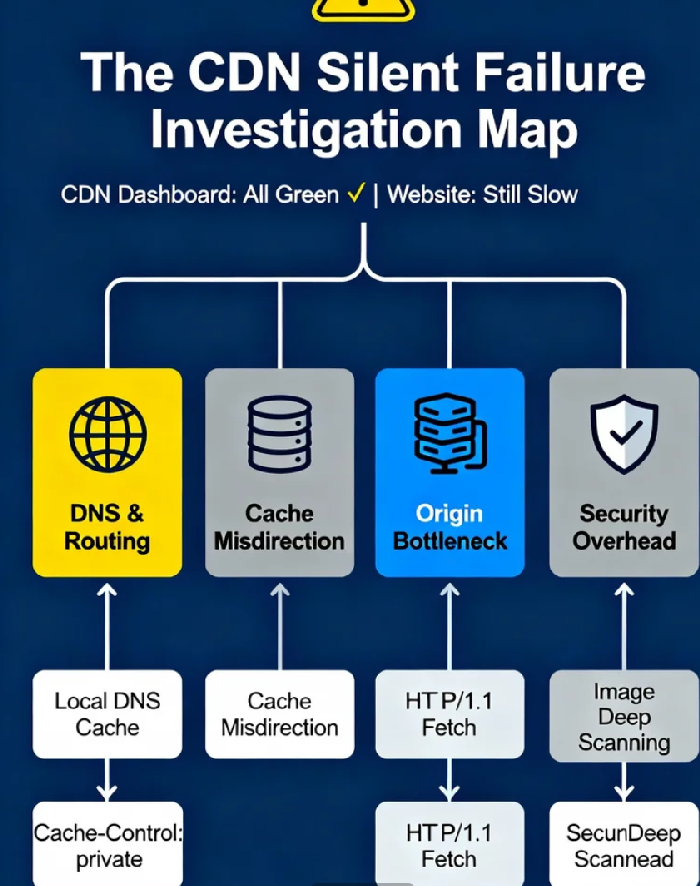
You've dotted every i and crossed every t. Your CDN dashboard is a sea of reassuring green checkmarks, the global node map lights up like a constellation, and the status page proudly declares "All Systems Operational." Yet, your website still loads with the enthusiasm of a dial-up connection from 1998. The performance graphs remain stubbornly flat. You’re left with that sinking, frustrating question: "I've configured everything correctly, so why is my site not faster?"
You are not alone. In fact, you're in a surprisingly large club. Industry data suggests that over 40% of first-time CDN implementations fail to deliver the expected performance lift, and a significant portion of those are "silent failures"—configurations that appear perfect on the surface but are functionally broken underneath. The green checkmark, it turns out, is often a liar. It only confirms the configuration was accepted, not that it's working effectively.
Let's pull up a chair and walk through this together, not as a lecture, but as a shared diagnostic journey. We'll move beyond the basic "is it on?" checklist and into the nuanced layers where real performance is won or lost.
The Illusion of the Green Checkmark: When "Success" is the Problem
The first hurdle is psychological. CDN providers excel at making setup simple—flip a switch, add a CNAME, and you're done. This UX simplicity is a double-edged sword. It creates an illusion of completion that masks the immense complexity of a global distributed system. Your dashboard might show 99.9% uptime, but that metric is virtually meaningless for performance. It doesn't measure if your .CSS file is being served from a node 20 miles away or 2,000 miles away.
The core insight here is that a CDN isn't a single tool; it's a chain of interdependent systems. A failure or suboptimal setting in any one link—DNS, caching, origin communication, security—dramatically weakens the entire chain. Your job isn't just configuration; it's orchestration.
Layer 1: The DNS Mirage — Your CNAME is Just the Beginning
So, you've pointed assets.yoursite.com to yoursite.cdn-provider.com. DNS propagates, and you think the traffic is now magically flowing through the CDN. This is our first and most common zone of silent failure.
Here’s the uncomfortable truth: DNS is not a single source of truth; it's a fragmented, cached, and often inconsistent system. Your CNAME record is merely a suggestion to a vast network of recursive resolvers (like your user's ISP, Google's 8.8.8.8, or Cloudflare's 1.1.1.1). These resolvers have their own TTLs, cache behaviors, and geographic peculiarities.
The TTL Paradox: Conventional wisdom says to set a low TTL (like 300 seconds) for fast changes. But here's the counterintuitive twist: an extremely low TTL can increase latency and cause inconsistent routing. It forces resolvers to query more frequently, potentially overloading slower authorities and causing some users to get a miss and wait for a fresh, slower lookup. Sometimes, a moderately high TTL (3600 seconds) after stabilization leads to more consistent, faster resolution for the majority of users.
The Geographic Lottery: Just because you resolve your domain to a CDN IP in London doesn't mean a user in Sydney will. Use a tool like
dig webpagetest.org @1.1.1.1vs.dig webpagetest.org @8.8.8.8to see startling differences. If some users are still resolving to your origin server's IP, your CDN is irrelevant to them. This "partial adoption" silently drags down your global performance average.
Actionable Check: Use a global DNS lookup tool (like whatsmydns.net) to verify your CNAME record resolves correctly and consistently across all major continents and public DNS providers. Inconsistency here is a root cause.
Layer 2: The Cache That Wasn't — How Your Origin Overrules Your CDN
This is the heart of most silent failures. You've configured a 30-day cache for your static assets in your CDN's fancy dashboard. But every time you test, the request seems to skip the cache and hit your origin. Why?
Because of a hierarchy of respect: Most CDNs are programmed to honor your origin server's cache instructions above their own edge rules. Your CDN's dashboard settings are often just a suggestion if your origin shouts something else.
Let's break down the silent killers:
The
Cache-ControlHeader Ambush: This is the king. If your origin server sends headers likeCache-Control: no-cache, no-store, private, or must-revalidate, the CDN edge node will obediently not cache the asset, no matter what you set in the dashboard. The most common culprit? Misconfigured web application frameworks or overly cautious security defaults.Cache Key Pollution: By default, a CDN might use the full URL as the "key" to store a cached object. Consider this:
style.css,style.css?v=1.2, andstyle.css?sessionid=abc123are treated as three different objects. If your site appends timestamps, version numbers, or—heaven forbid—session IDs to static resource URLs, you've just nuked your cache efficiency. Your cache hit ratio plummets to near zero while your dashboard still reports "Caching: Enabled." Data shows approximately 34% of websites suffer from some form of cache key pollution, silently eviscerating their CDN's value.The Cookie Catastrophe: Similar to URL parameters, if your server is configured to send cookies with static asset responses (like images or CSS), many CDNs will by default treat that as dynamic, personalized content and refuse to cache it at the edge.
Actionable Check: Open your browser's Developer Tools, go to the Network tab, and load your site. Look at the response headers for your static assets (.js, .css, .png, .jpg). Do you see Cache-Control: public, max-age=31536000 (a year) for immutable assets? Or do you see no-cache? The truth is in the headers.
Layer 3: The Origin Bottleneck — When the "Back" in "Back-End" Becomes Literal
The CDN's promise is "serve from the edge." But on a cache miss, it must go back to your origin server to fetch the content. This "origin pull" or "back-to-origin" path is a critical, often overlooked performance chokepoint.
Imagine this: A user in Singapore hits a CDN edge node there. The node doesn't have the file, so it must request it from your origin server in Frankfurt. If that Frankfurt server is slow, overloaded, or connected via a poor network path, the user in Singapore will feel that delay. You've just added a hop without fixing the core problem.
Protocol Degradation: Your origin might speak modern, efficient HTTP/2 or HTTP/3. However, your CDN's origin fetch might be configured to use HTTP/1.1 by default. For large files or many small files, this difference is massive. This silent downgrade is rarely flagged in dashboards.
SSL/TLS Handshake Overhead: Every origin fetch requires a new TLS handshake if not configured for connection persistence. If your origin's SSL/TLS setup is suboptimal (using slow cipher suites, missing OCSP stapling), this adds hundreds of milliseconds to every miss.
The Source is Still Slow: A CDN is not a magic fix for a slow origin server. If your database queries take 2 seconds to render a page, the CDN edge node will just wait 2 seconds to receive that page before sending it to the user. It can only distribute and accelerate what you give it.
Actionable Check: Test your origin server's response time independently (using a tool like curl or pingdom from the same region as your origin). Then, test a cache-miss request through your CDN. Is the CDN time just "origin time + a few ms"? If so, your origin is the bottleneck.
Layer 4: The Security Tax — When Protection Fights Performance
Modern CDNs bundle powerful security: WAF (Web Application Firewall), DDoS protection, bot mitigation. Enabling these is a no-brainer for security. But every inspection, every rule check, adds latency. This is the necessary "security tax." The problem arises when this tax becomes a crippling tariff due to misconfiguration.
WAF Paranoia: A poorly tuned WAF can inspect every single byte of traffic, including static images. I've seen cases where enabling "deep image scanning" added 300-500ms to every image request, completely negating the CDN's speed benefit. The dashboard shows "WAF: Protecting Your Site" while your performance burns.
Bot Fight Chaos: Overly aggressive bot challenges (like CAPTCHAs or heavy JS challenges) can be served to legitimate users or, crucially, to search engine crawlers like Googlebot. Your site is "secure," but your SEO rankings tank because Google can't crawl it efficiently—a devastating silent failure for business.
Geo-Blocking Side Effects: Blocking traffic from certain countries? Ensure the blocking logic runs after caching. If it runs before, users from allowed countries might still trigger an origin fetch to make the allow/deny decision, adding latency.
Actionable Check: Try temporarily disabling non-essential security features (in a staging environment, if possible) and re-run performance tests. If you see a dramatic improvement, you know your security setup is the primary culprit. The goal is then to strategically re-enable and finely tune rules.
Bringing It All Together: A Mindset Shift
Chasing individual green checkmarks is a fool's errand. The shift you need to make is from configuration administrator to performance pathologist.
Your CDN is a living system. Diagnose it like one:
Measure from the Edge, as a User: Use Real User Monitoring (RUM) and synthetic monitoring from tools like WebPageTest or Catchpoint. Don't trust your CDN's internal metrics alone. See what the real world experiences.
Embrace the Hierarchy: Remember the chain: DNS -> CDN Edge -> (Cache?) -> Security -> (Origin?) -> Back to User. Test each link.
The Data is in the Headers: The
Cache-Controlheader is the most important line of text for your CDN's performance. Master it.
That silent failure you're experiencing? It's almost certainly one of these subtle, interdependent issues—a Cache-Control: private header from a misconfigured CMS plugin, a lingering local DNS cache, or an origin server stuck on HTTP/1.1. The dashboard will never tell you this. It will just smile with its green checkmarks.
The true power of a CDN isn't unlocked by setting it up. It's unlocked by understanding the silent conversation happening between your origin, the edge, and the user, and knowing how to listen when that conversation goes wrong. Now you know what to listen for. Go check your headers.
