

Let's cut right to the chase. The phone rings. It's the Head of Sales, and she's not happy. The customer portal is "unbearably slow," deals are stalling, and the blame, as it often does, lands squarely on your infrastructure. Your gut reaction? Your mind races to the server dashboard—CPU spikes, memory leaks, disk I/O saturation. You're already mentally drafting the request for a hefty server upgrade.
Stop. Take a deep breath. You're about to fall into the most common and costly trap in performance engineering: starting the diagnosis at the deepest, most complex, and most expensive layer.
The instinct to blame the server is natural. It's the big, expensive machine at the end of the line. But in doing so, we're violating a fundamental principle of efficient troubleshooting: always start with the highest-probability, lowest-cost, and most observable points of failure. Jumping straight to the server is like hearing a strange noise in your car and immediately ordering a new engine, without checking the tires, the oil, or that loose piece of trim in the wheel well.
Here's the uncomfortable truth, backed by data from companies like New Relic and Dynatrace: In over 50% of performance complaints, the root cause is not the server's raw computational power. The real culprits are hiding in plain sight, further up the chain, in the application code, the database queries, the network calls, and the user's own browser. By fixating on the server, we waste time, burn budget, and often leave the real problem festering.
So, let's put down the server monitoring tools for a moment and walk through a better way. Think of it as a detective's handbook for the modern web.
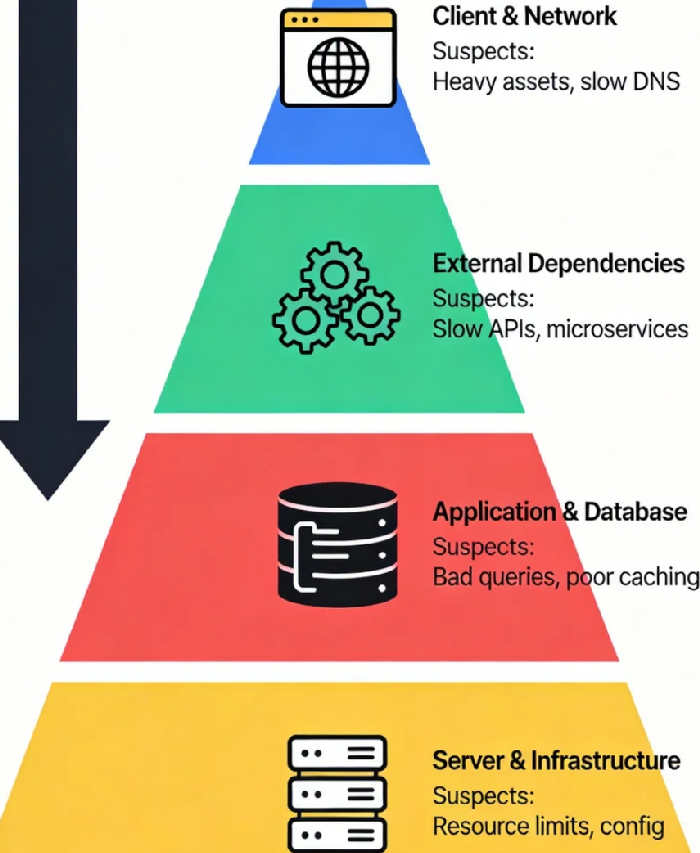
The Four-Layer Diagnostic Pyramid: Your New Investigation Map
Effective diagnosis requires a structured approach. I propose a simple, four-layer pyramid. You start at the top—closest to the user, easiest to check—and work your way down. The goal is to find the problem at the highest possible layer.
Layer 1: The Client-Side & Network Wilderness
This is where the user's experience is forged. Before a single byte of your application logic is touched, performance can be lost.
The Usual Suspects: Bloated, unoptimized assets (multi-megabyte images, monolithic JavaScript), render-blocking resources, excessive third-party scripts (analytics, widgets, ads), and slow DNS lookups.
The "Aha" Moment: Use your browser's Developer Tools (Network and Performance tabs). You'll often find that 80% of the load time is spent downloading and processing these elements, while waiting for the actual server response is a fraction of that.
Actionable Check: Run a Lighthouse audit. If your Performance score is low, your problem is likely here, not in your server farm.
Layer 2: The External Dependency Quagmire
Your application doesn't live in a vacuum. It calls other services.
The Usual Suspects: Slow API calls to external payment gateways, shipping calculators, CRM systems, or even other microservices within your own architecture that are having a bad day.
The "Aha" Moment: A single synchronous call to an external service with 2-second latency will make your entire endpoint feel slow, regardless of your server's GHz.
Actionable Check: Implement distributed tracing (with tools like Jaeger or your APM's tracer). Map the request flow. You'll quickly see if the timeline is dominated by waiting on a dependency.
Layer 3: The Application & Database Labyrinth
We're now in your code. This is where "business logic" meets "bottleneck."
The Usual Suspects: This is the king of all performance issues. The number one offender? Database queries. The "N+1 query problem," missing indexes, full-table scans on massive datasets. Next, inefficient algorithms (nested loops on large collections), poor caching strategies, and memory leaks within the application itself.
The "Aha" Moment: Your server CPU might be at 90%, but that's because it's frantically spinning on a terrible query or a greedy loop, not because it's underpowered. Throwing more CPU at bad code is like using a bigger pump to push water through a clogged hose.
Actionable Check: This is where Application Performance Management (APM) tools earn their keep. They can pinpoint the exact function or, more importantly, the exact SQL query that is consuming all the time.
Layer 4: The Server & Infrastructure Foundation
Finally, we arrive at the server. Notice it's the last layer, not the first.
The Usual Suspects: Genuine resource exhaustion (CPU, RAM, I/O), misconfigured garbage collection, incorrect kernel parameters, or hypervisor-level contention in virtualized environments.
The "Aha" Moment: The problem is here only if the upper layers are clean. The metrics will show sustained saturation across the board for a given workload, not just spikes tied to specific requests.
Actionable Check: Classic system monitoring (
top,vmstat,iostat) combined with correlation to your APM data. The question to answer is: "Is the hardware truly insufficient, or is it just struggling to execute inefficient work?"
A Real-World Case: The "Slow" Report That Wasn't
Let me illustrate with a story. A team was convinced their nightly financial report generation needed more powerful database servers. The process took hours, and CPU was pegged at 100%. The ticket was for a six-figure hardware upgrade.
Using the pyramid:
Layer 1/2: Not applicable for a backend job.
Layer 3: APM tracing revealed the culprit instantly. The report ran a central query that performed a
SELECT *on a massive table, then in the application code, it iterated over every row to calculate aggregates. This was an O(n) operation in the app, instead of an O(1) aggregate query in the database.Layer 4: The server was indeed at 100% CPU—because it was executing millions of lines of unnecessary application logic.
The fix wasn't a new server. It was a 30-minute rewrite to move the aggregation into a single, indexed SQL query. The job time dropped from hours to minutes. The cost was $0 in hardware and a bit of developer time.
Cultivating a Performance-First Mindset
The framework is a tool, but the mindset is the key. We must shift from reactive firefighting ("The server is slow!") to proactive diagnosis ("The experience is slow, let's find out where.").
Instrument Everything Obsessively: You can't fix what you can't see. APM, distributed tracing, and real user monitoring (RUM) are not luxuries; they are the foundation of a performance-aware culture.
Define "Slow" with Business Logic: Don't just measure server response time. Measure "time to cart," "dashboard load time." Tie performance metrics directly to user journeys and business outcomes.
Make Performance a Feature, Not an Afterthought: "Performance budget" should be a requirement in every sprint. How much slower can this new feature make the page? If it breaks the budget, it's not done.
Next time that call comes in, resist the primal urge to open the server graphs first. Instead, ask one simple question: "Where does the time go?"
Start from the user's screen and trace the request inward, layer by layer. You'll find that most of the monsters under the bed are not in the basement server room; they're in the code you deployed last week, the third-party script marketing added, or the database query that's been slowly degrading for months.
The most powerful performance optimization you can make today isn't a technical one—it's a change in perspective. Stop suspecting the server first. Become a detective of the full stack, and you'll not only solve problems faster and cheaper, but you'll build systems that are truly, sustainably fast. That's a win that shows up on the dashboard and on the balance sheet.
