

How to Diagnose a Slow Website: A 3-Step Guide to Finding Your Performance Bottleneck
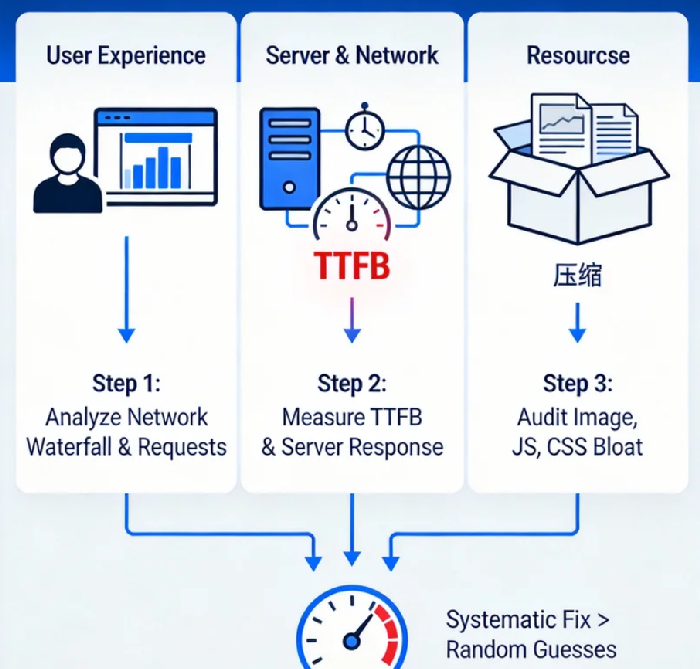
Let’s be honest: that feeling when your website takes forever to load is pure frustration. You hit refresh, stare at a loading spinner, and watch potential engagement—or sales—slip away. What if I told you that “slowness” is rarely a single, mysterious problem? It’s usually a chain reaction of small bottlenecks, and you have the power to find them.
Forget random guesses. Throwing more server power or bandwidth at the problem is expensive and often ineffective. The real solution starts with precise diagnosis. This guide will give you a structured, three-step forensic method to investigate your website’s performance, just like an expert would. We’ll move from what your user sees, down to your server’s core, and finally, to the very resources that make up your page.
Step 1: The User Experience Autopsy – Playing Detective in Your Browser
Before diving into code, start where your visitor does. Open your website in a new incognito window (to avoid cached data) and open your browser’s Developer Tools (F12 in Chrome/Firefox/Edge). Your mission is in the “Network” tab.
Perform a Hard Refresh (Ctrl+F5 or Cmd+Shift+R). Watch as the “Waterfall” chart populates. This is your first X-ray. Each bar represents a file (image, script, stylesheet). The length shows how long it took to load.
The “Killer” File: Look for the longest bar, especially any that are blocking others from starting. A single, massive JavaScript or unoptimized image can hold up the entire show.
Check the Columns: Enable columns for “Waterfall”, “Size”, and “Time”. A file that is disproportionately large for its type (e.g., a 2MB “hero” image) or takes an unusually long time to download is a prime suspect.
Pro Insight & Unexpected Data: Here’s the counterintuitive part: sometimes, the number of requests is a bigger villain than the size. The browser can only handle so many concurrent connections to a single domain. A page with 150 tiny files can feel slower than one with 10 large ones because of this negotiation overhead. Studies show that reducing requests from 100 to 50 can improve load time more than halving the total page size.
Actionable Takeaway: Your “Performance Scorecard” from this step is a list of: 1) The 3 slowest-loading resources, and 2) The total number of HTTP requests.
Step 2: The Server & Network Interrogation – Is Your Foundation Solid?
Now, let’s check the pipeline. Slow server response is a silent killer. In your Network tab waterfall, hover over the very first request (usually your HTML document). You’ll see a breakdown. The most critical metric here is TTFB (Time to First Byte).
What is TTFB? It’s the time between your browser saying “Give me the page” and the server replying “Here’s the first piece.” It includes network latency and, crucially, your server’s thinking time.
The Benchmark: A good TTFB is under 200ms. Between 200-500ms needs attention. Over 600ms is a critical bottleneck. If your TTFB is high, the problem isn’t your user’s internet; it’s your server or application logic.
The Culprits: High TTFB often points to:
Slow Database Queries: Your server is waiting for data.
Underpowered or Overloaded Hosting: Shared hosting often fails here.
Complex Backend Logic: Too much processing before sending a response.
Geographic Distance: Your server is simply too far from your visitor.
Pro Insight & Unexpected Data: A surprisingly common, overlooked issue is SSL/TLS negotiation time. Every secure (HTTPS) connection requires a handshake. If your server’s SSL configuration is inefficient or uses slow cryptographic protocols, it can add 200-500ms to your TTFB for every new visitor. This is why a well-configured SSL certificate from a provider that supports modern protocols isn’t just about security—it’s a performance tool.
Actionable Takeaway: Note your TTFB. If it’s high, use a global testing tool (like Pingdom or Dotcom-Tools) to see if it’s consistently slow everywhere (server issue) or only in distant regions (network issue).
Step 3: The Resource Optimization Audit – Trimming the Fat
You’ve identified slow files and a (potentially) slow server. Now, let’s dissect the files themselves. Modern websites are often bloated with unused code and unoptimized media.
The Image Trap: Images typically account for over 50% of a page’s weight. The standard
img.jpgis rarely optimal.Solution: Convert to modern formats like WebP (offering 25-35% smaller size than JPEG). Use responsive images (
srcsetattribute) to serve appropriately sized images to phones vs. desktops. Compress aggressively—tools like ShortPixel or Squoosh can work wonders without visible quality loss.JavaScript & CSS “Bloat”: Front-end frameworks are amazing but often ship with huge libraries for simple tasks.
Solution: Audit your bundles. Use the “Coverage” tab in Chrome DevTools to see what percentage of your CSS/JS code is actually used on the page. You might be shipping 400KB of code for 150KB of functionality. Consider code splitting and lazy-loading non-critical scripts.
Pro Insight & Unexpected Data: Here’s a revolutionary thought: The fastest byte is the byte you never send. We obsess over compression, but removing an unnecessary widget, font, or tracking script is a 100% reduction. An audit often reveals third-party scripts (chat widgets, analytics, social embeds) as top offenders. One slow-loading third-party can block your entire page. Ask: Is this absolutely necessary for the core user experience?
Actionable Takeaway: Run an audit with Google Lighthouse (built into Chrome DevTools). It will give you a performance score and a precise list of opportunities specific to your site, like “Serve images in next-gen formats” or “Remove unused JavaScript.”
Connecting the Dots: The Bottleneck Cascade
Diagnosis is about connecting evidence. A high TTFB (Step 2) means the browser is idle, waiting. Then, when resources finally start arriving, five unoptimized hero images (Step 3) clog the network pipeline. Finally, a render-blocking script (Step 1) prevents the page from showing anything until it’s fully downloaded. This is the bottleneck cascade.
Fixing just one of these might yield a 10% improvement. Fixing all three in harmony can yield a 200-300% speed boost. This is where understanding transitions into strategy. For issues rooted in geography (high TTFB globally) or the need to serve optimized resources instantly worldwide, a Content Delivery Network (CDN) isn’t just an add-on; it becomes the logical implementation of your diagnosis. A good CDN places your content on servers worldwide, drastically reducing TTFB due to distance, while automatically handling image optimization and compression.
From Diagnosis to Cure
You’ve done the hard part. You’re no longer staring at a “slow website” as a monolithic problem. You have a list: a slow server response here, three oversized images there, and a JavaScript file blocking rendering. This list is your roadmap.
Start with the biggest offender your audit revealed. Fix it, measure again, and move to the next. Performance optimization is an iterative journey, not a one-time fix. The reward isn’t just a faster number in a testing tool; it’s in the silent satisfaction of a page that snaps into place, the improved search engine ranking, and the tangible rise in user engagement and conversions. You’ve moved from feeling helpless to being in full control. Now, go and fix that first bottleneck.
