

Cloud Distributed Cache Selection and Design: Redis, Memcached, or Self‑Hosted?
Last year, a client was woken at 3 AM. Their database CPU was pegged. Connection pools were exhausted. The cause wasn't a slow query or a traffic spike. It was a single malicious attack on a non‑existent key. The cache didn't have it, so every request hit the database. The database collapsed.
They were using Redis. The configuration was reasonable. The hit rate was fine. But they had no protection against cache penetration. The attack turned their cache into a bystander.
This is the common misconception about caching: install it, and the system will magically handle high concurrency. Wrong. Without the right strategy, a cache can become useless when you need it most.
Today, let’s talk about distributed caching. Not the “cache is important” fluff, but a practical guide: Redis vs Memcached, deployment patterns, how to prevent penetration/breakdown/avalanche, and how to keep cache and database consistent.
01 Redis vs Memcached: Not Which Is Stronger, Which Fits
Both are in‑memory key‑value stores, but their design philosophies differ.
Redis
Rich data structures: String, Hash, List, Set, Sorted Set, Bitmap, HyperLogLog, etc.
Persistence: RDB snapshots + AOF logs. Data survives restarts.
Single‑threaded core (multi‑threaded I/O in v6.0+, but execution remains single‑threaded). Avoids concurrency complexity.
Mature HA: replication, sentinel, cluster.
Memcached
Simple KV only. Values are unstructured bytes.
No persistence. Restart = empty cache.
Multi‑threaded. Extremely high performance for pure KV workloads.
Cluster is client‑side consistent hashing.
Selection guide:
Need complex data structures (leaderboard, deduplication, queue) → Redis
Need persistence or HA (cannot lose data) → Redis
Pure KV, huge concurrency, can lose data (e.g., session cache) → Memcached
Want managed service → both offer it. Ops cost nearly zero.
02 Deployment Patterns: From Single‑Node to Cluster
Single node – dev/test only. Not for production. A failure means a cold cache.
Master‑replica – read‑heavy workloads. If master fails, a replica can take over, but you need manual intervention or sentinel.
Sentinel – automatic failover for master‑replica. Good for moderate consistency requirements.
Cluster – data sharding, horizontal scaling. Good for large datasets or high write throughput. Client must support cluster protocol.
Managed service – cloud providers offer managed Redis/Memcached. Automatic HA, backup, scaling. Lowest ops cost.
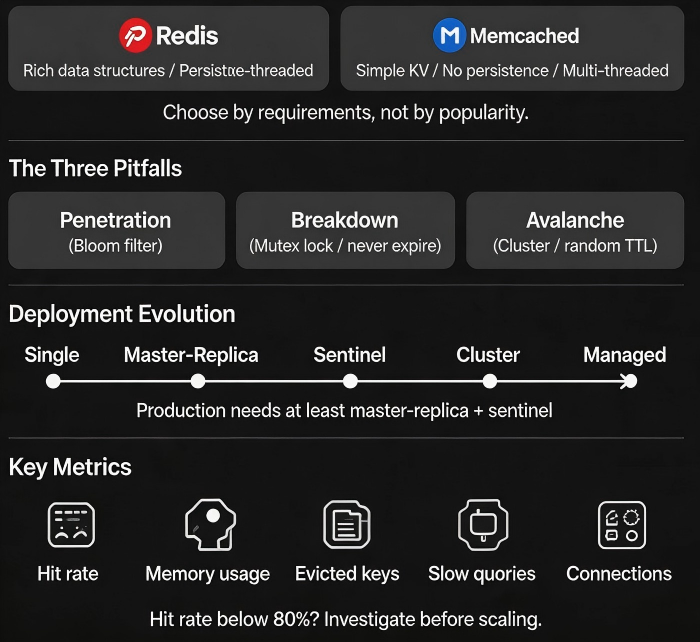
Recommendation: Production needs at least master‑replica + sentinel. For large data volumes, use cluster. If budget allows, use managed.
03 The Three Classic Pitfalls: Penetration, Breakdown, Avalanche
Penetration – queries for non‑existent data. Cache has it? No. Database has it? No. Every request hits the database. Malicious attackers can exploit this.
Solutions:
Cache null values with a short TTL.
Bloom filter – pre‑filter keys that definitely don’t exist.
Breakdown – a single hot key expires. Thousands of requests simultaneously hit the database.
Solutions:
Hot keys never expire (use logical expiration).
Mutex lock: only the first request queries the database and writes the cache; others wait.
Avalanche – many keys expire at the same time, or the entire Redis node fails. All requests hit the database.
Solutions:
Add random jitter to TTLs.
Use cluster + replica + sentinel to avoid a single point of failure.
Combine with rate limiting, circuit breaking, and graceful degradation.
The client who was attacked had no penetration protection. After adding a Bloom filter for non‑existent keys, the database recovered within minutes.
04 Cache Consistency: How to Sync Cache and Database
Dual‑writes to cache and database inevitably cause consistency issues.
Strategy 1: Update database, then delete cache (Cache Aside) – most common.
Read: check cache, if missing, read database, write cache.
Write: update database, delete cache.
Risk: What if cache deletion fails?
Mitigation: Retry via message queue + eventual consistency.
Strategy 2: Delete cache, then update database
Risk: After deletion but before the update, a read request comes in, misses the cache, reads stale data from the database, and writes it back to the cache.
Mitigation: Delayed double delete (delete, update, sleep a few milliseconds, delete again). Complex, not recommended.
Strategy 3: Subscribe to database change logs (CDC)
Tools like Canal or Debezium listen to binlogs and asynchronously update the cache. Decoupled, low latency. Recommended for high‑consistency requirements.
05 What to Monitor
Cache problems often appear suddenly. Monitor before they happen.
Hit rate: Below 80% needs investigation. Possible causes: insufficient memory, poor eviction policy, too many misses from penetration.
Memory usage: Near the eviction threshold → hit rate may drop.
Evicted keys: High eviction rate means memory is too small, or TTLs are too short.
Slow queries: Redis is single‑threaded; slow commands block everything. Avoid O(N) commands like
KEYSorHGETALLon large collections.Connections: Nearing the limit suggests application config issues or connection leaks.
06 A Real Case
Before last year’s flash sale, a client load‑tested their system. Redis hit rate was only 60%. Logs showed many requests for “product details” where keys had a 1‑hour TTL. Products changed frequently, so the cache was constantly invalidated.
We made several changes:
Extended TTL for hot products to 24 hours. On product update, the cache was explicitly deleted.
Added a Bloom filter for non‑existent product IDs.
Increased Redis cluster memory from 16GB to 64GB.
Replaced
KEYScommands withSCANto avoid blocking.
After the changes, hit rate rose from 60% to 92%. Database CPU dropped 40%. The flash sale ran smoothly.
Their ops lead said: “I used to think caching was just installing Redis. Now I know that installing is easy – using it right is the hard part.”
The Bottom Line
Choosing a distributed cache is the easy part. Redis and Memcached are both good. The hard part is using them correctly.
That client’s ops lead later summarised: “Redis or Memcached? Ask two questions: Do you need complex data structures? Do you need persistence? Everything else – penetration, breakdown, avalanche – you must handle regardless.”
Monitor hit rate. Add Bloom filters for missing keys. Use mutexes for hot keys. Jitter TTLs. And don’t forget consistency.
Is your cache actually protecting your database – or just standing by while the database takes the hit?
