

Database Connection Pool Tuning: Too Many Connections Overwhelm the DB, Too Few Starve the App
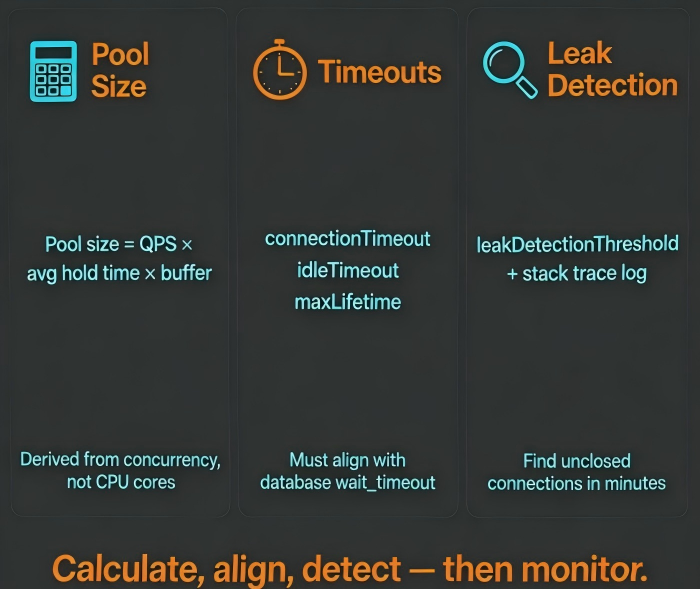
Last year, a client experienced intermittent slow queries for three months. The symptoms appeared only during peak hours and vanished quickly—too fast to catch with ad‑hoc debugging. When we finally pulled the metrics, the story was clear: the average time to acquire a connection from the pool had jumped from 5ms to 800ms. The logs were full of “Timeout waiting for connection.”
The configuration looked reasonable at first glance: maximumPoolSize = 200. But the database’s max_connections was 400. The application had four instances. Total potential connections = 800, double what the database could handle.
This wasn’t a slow query problem. It was a pool configuration problem.
A connection pool sits between your application and your database. Too small, requests wait for connections. Too large, the database drowns. Tuning it isn’t guessing—it’s math.
01 Size Isn’t Bigger = Better
Every connection in the pool corresponds to a server‑side process or thread in the database. More connections mean more context switching overhead and higher memory consumption. In MySQL, each connection uses roughly 256KB to several MB. In PostgreSQL, similar.
The correct approach is to derive the pool size from your concurrency needs.
A useful starting point is Little’s Law, adapted for database connections:
Pool size ≈ QPS × average connection hold time × safety factor
Suppose your application handles 500 QPS per instance, and each request holds a connection for 10ms on average. That’s 500 × 0.01 = 5 concurrent connections. Add a small buffer, and a pool of 15–20 is more than enough. 200 is excessive and dangerous.
HikariCP’s commonly cited rule of thumb—maximumPoolSize = 2 × CPU cores—is often too conservative for I/O‑bound workloads. The right size depends on your QPS, not on cores. Measure, then configure.
02 Timeout Parameters Must Work Together
Three timeout settings must align with each other and with the database’s own timeouts.
connectionTimeout – How long the application waits for a connection from the pool before failing. Set it too short, and healthy requests fail during brief load spikes. Set it too long, and threads block unnecessarily during faults. Typical range: 3–5 seconds, aligned with your upstream service timeouts.
idleTimeout – How long an idle connection stays in the pool before being closed. Too short: constant connection churn and increased database load. Too long: dormant connections tie up database resources. 10–15 minutes is a reasonable range, shorter than the database’s wait_timeout but longer than typical quiet periods.
maxLifetime – The maximum age of a connection, regardless of activity. Should be set slightly shorter than the database’s wait_timeout (e.g., by 10–30 seconds). This prevents the database from closing a connection while the pool still believes it’s alive.
These three values must be tuned together. Singly, each can create hidden problems.
03 Connection Leaks Are More Insidious Than Slow Queries
A slow query hurts performance. A connection leak is an availability incident waiting to happen.
HikariCP provides leakDetectionThreshold. Set it to 2–3× your expected hold time (often 2–3× connectionTimeout). When a connection is held longer than this threshold, HikariCP logs a stack trace that points directly to the code that hasn’t closed the connection.
Common leak patterns include:
Missing
close()in afinallyblockUsing
try-with-resourcesincorrectlyHolding a transaction open across HTTP calls or slow I/O
With leakDetectionThreshold enabled and a few minutes of logs, most leaks can be pinpointed to a specific code block.
04 Monitor What Matters
Even without slow queries, a misconfigured pool will eventually cause timeouts. Track these four metrics:
activeConnections – When this stays near
maximumPoolSizefor extended periods, the pool is a bottleneck.threadsAwaitingConnection – Any non‑zero value at steady state indicates demand exceeds supply.
connectionTimeoutCount – Rising steadily is a red flag.
totalConnections – Should be relatively stable near
maximumPoolSize.
If activeConnections is constantly at the maximum but database CPU is low, the problem is likely long hold times (e.g., slow transactions or chunky queries), not a pool that’s too small. Optimize the code before expanding the pool.
05 A Real Case
A SaaS company ran PostgreSQL with max_connections = 500. Their application, deployed on Kubernetes, used 20 pods, each with HikariCP’s maximumPoolSize = 100. Theoretical peak connections: 2000. The database regularly threw “remaining connection slots reserved for non‑replication superuser connections”.
Many connections were idle in transaction. The application opened transactions but didn’t commit or rollback promptly, and the database had no idle_in_transaction_session_timeout. Those idle transactions held connections for hours.
We applied three changes:
Reduced
maximumPoolSizeto 25 per instanceSet
idle_in_transaction_session_timeout = 30son the databaseRefactored code to ensure every
tryblock either commits or rolls back in afinallyclause
After the changes, active connections dropped from a peak of 600 to a steady 250. Timeout alerts disappeared. Throughput remained the same.
Their lead engineer said afterward: “We spent six months blaming slow queries. The root cause was a pool three times too large and transactions that never closed.”
The Bottom Line
Connection pool tuning is not a one‑time “set and forget” task. The three core decisions—size, timeouts, leak detection—must be data‑driven, not arbitrary.
That client eventually reduced their maximumPoolSize from 200 to 30. Database CPU dropped 20%. P99 latency fell from 150ms to 80ms.
Pool size comes from your concurrency math, not a default number. Timeouts must be co‑designed with your database. Leak detection is the safety net that catches the mistakes you haven’t made yet.
Is your pool size based on measurement, or on a guess you made years ago?
