

Cloud DNS and Traffic Steering: Domain Resolution, Intelligent Routing, and Failover
Last year, a client had built a multi‑AZ architecture. Load balancers spanned AZs. Databases replicated synchronously. They thought they were ready for any failure. Then a regional network issue hit. Their service still went down.
Why? The domain name resolved to a fixed IP address—and that IP was in the failed AZ. The load balancer could shift traffic, but users never reached it. DNS had already pointed them to the dead zone.
This is the overlooked role of DNS: it is the first traffic switch. Load balancers and disaster recovery come after it.
Today, let’s talk about cloud DNS and traffic steering. Not the “what is DNS” introduction, but a practical guide: intelligent routing, failover, TTL tuning, and how to use DNS in blue‑green and canary deployments.
01 DNS Is Not Just Domain‑to‑IP
Many people think DNS only maps www.example.com to an IP. That’s the bare minimum. Modern DNS services go far beyond that.
Basic capabilities: A, AAAA, CNAME, MX, TXT records.
Advanced capabilities:
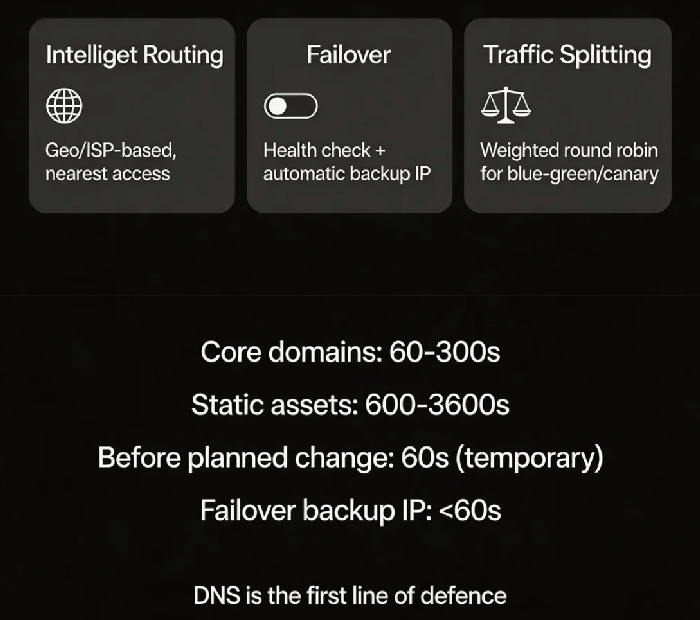
Weighted round robin – distribute traffic by weight. Good for blue‑green and canary.
Geo‑routing – different IPs for users from different regions. Enables low‑latency access.
ISP‑based routing – different IPs for China Telecom, China Unicom, China Mobile.
Failover – health checks + automatic switch to a backup IP.
That client had only a static A record. No health checks. No failover. When the region failed, DNS kept returning the dead IP.
Counter‑intuitive truth: DNS is the first line of defence in disaster recovery – before load balancers and before availability zones.
02 Intelligent Routing: Let Users Reach the Closest Entry Point
If your users are spread across a country or the globe, a single IP cannot serve everybody well. Intelligent routing returns the optimal IP based on where the query comes from.
Geo‑routing examples:
Northern China → Beijing data centre IP
Eastern China → Shanghai data centre IP
Overseas → CDN or cloud node outside China
ISP‑based routing:
China Telecom users → Telecom‑backbone IP
China Unicom users → Unicom‑backbone IP
China Mobile users → Mobile‑backbone IP
When to use:
Multi‑region deployments where users should be pinned to the nearest region.
Compliance constraints that require data to stay in a specific geography.
Reducing cross‑region data transfer costs.
A cross‑border e‑commerce company used geo‑routing to send European users to Frankfurt and US users to Virginia. Average latency dropped from 200ms to 30ms.
03 TTL: Caching Time Is a Trade‑off
TTL (Time To Live) tells resolvers how long to cache a DNS record.
Common TTL mistakes:
Too long (e.g., 24 hours) – during a failure, DNS cannot switch quickly. Users keep hitting the old IP.
Too short (e.g., 30 seconds) – query volume spikes. You may hit rate limits, and resolution latency increases.
Best practices:
Core domain names (www, api) : 60–300 seconds. Fast failover, acceptable query load.
Static asset domains (static, img) : 600–3600 seconds. IPs rarely change; longer TTL improves performance.
Backup IP for failover: set TTL lower than 60 seconds. A very short TTL allows fast cutover during failure.
Before a planned IP change: lower TTL to 60 seconds the day before. Raise it back after the change.
04 Failover: Automatic DNS‑Level Switching
DNS failover is the first layer of disaster recovery.
How it works:
Configure a primary IP and one or more backup IPs.
The DNS service runs periodic health checks (HTTP, TCP, ping).
If the primary IP fails its health check, DNS automatically returns a backup IP.
Key configuration points:
Health check frequency: 30‑60 seconds is typical. Too aggressive may cause false positives. Too slow delays failover.
Timeout: 3‑5 seconds. Adjust based on your application’s characteristics.
Failover is not instantaneous because of DNS caching, client caching, and browser caching. Keep TTL short.
After the outage, that client enabled DNS failover. When the primary region failed, DNS switched to the backup IP within a minute. Recovery time dropped from hours to minutes.
05 Using DNS for Blue‑Green and Canary Deployments
Weighted DNS records are a simple tool for traffic splitting.
Blue‑green example:
Blue environment (current version): weight 90%
Green environment (new version): weight 10%
Gradually increase the green weight until it reaches 100%
Canary example:
Send 1% of traffic to the new version. Observe. Increase step by step.
Advantage over load balancer‑based splitting:
DNS‑level splitting works for any protocol – HTTP, TCP, UDP – without LB changes.
The application does not need to know about the split.
Limitations:
Splitting granularity is by request percentage, not by user ID or header.
Changes take effect based on DNS cache expiry, which is slower than LB‑level steering.
06 A Real Story
A company used DNS for cross‑region disaster recovery with primary and backup IPs and health checks. A failure occurred, but traffic did not switch.
The health check was using ICMP (ping). The primary machine responded to ping, but its service was dead. DNS thought the primary was healthy and kept returning its IP.
They changed the health check to HTTP, verifying a specific URL returned HTTP 200. The next failure triggered a clean failover.
Their ops lead said: “I used to think DNS health checks were just a box to tick. Now I know – what you check and how you check it determines whether failover actually works.”
The Bottom Line
DNS is the first switch in your traffic path. Load balancers and disaster recovery sit behind it. If DNS is misconfigured, no amount of downstream resilience will get users in.
That client’s ops lead later said: “I used to think DNS was just the name service that came with my domain registration. Now I see it’s the first layer of our traffic governance system.”
TTL, geo‑routing, failover, health checks – every piece you configure right brings your service one step closer to staying up when things go wrong.
Is your DNS just doing basic resolution, or is it participating in your disaster recovery?
