

Traffic Spike Coming? Auto Scaling and Capacity Warming – Don’t Let Cold Starts Ruin the Sale
Last Singles’ Day, an e‑commerce client thought they were ready. They had done capacity planning and scaled up ahead of the event. At midnight, traffic tripled – and they handled it. Then at 12:30 AM, a sudden pulse hit. Traffic doubled again in seconds. Their auto‑scaling rule saw the CPU spike and added instances. But new instances took nearly three minutes to start and become ready. During those three minutes, requests timed out. Orders were lost.
After the sale, they ran the numbers. Their cooldown timer was 120 seconds. Their metrics sampling period was 30 seconds. Add instance startup and warm‑up – it really did take almost three minutes.
This is the hidden flaw of reactive auto‑scaling: by the time your metrics trigger a scale‑up, you’re already late.
Today, let’s talk about auto scaling and capacity warming. Not the “auto scaling is great” fluff, but a practical guide: metric‑based vs scheduled vs predictive scaling, cooldown tuning, scale‑in protection, and how to warm up capacity before a traffic spike.
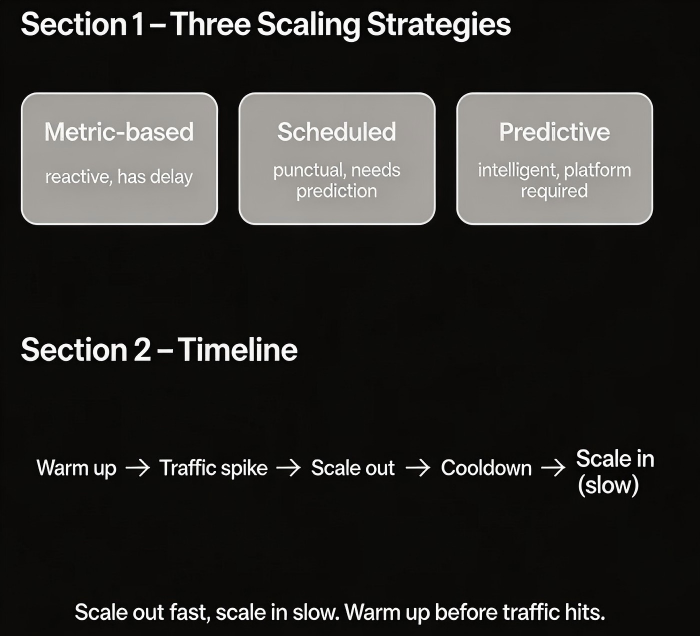
01 Three Scaling Strategies – Reactive Isn’t the Only Way
Many people think of auto scaling as “scale out when CPU is high.” That’s just one strategy – and often the most passive.
Strategy 1: Metric‑based scaling
Scale based on real‑time metrics: CPU, memory, queue depth, requests per second.
Pro: Adaptive. No need to predict the future.
Con: There is always a delay – sampling, evaluation, instance startup, warm‑up.
Best for: Normal daily traffic fluctuations where a few minutes of lag is acceptable.
Strategy 2: Scheduled scaling
Scale up and down at specific times based on known patterns.
Pro: Punctual. For a 12:00 AM spike, instances are ready at 11:55 PM.
Con: Requires you to know the pattern. Doesn’t handle surprises.
Best for: Flash sales, predictable peaks (morning rush, weekends), and holidays.
Strategy 3: Predictive scaling
Use machine learning to forecast future traffic based on historical patterns and scale proactively.
Pro: Smarter than scheduled scaling. Adapts to growth trends.
Con: Requires platform support (e.g., AWS Predictive Scaling).
Best for: Workloads with strong periodicity and clear growth patterns.
That client used metric‑based scaling. The post‑mortem revealed the obvious: they should have switched to scheduled scaling for Singles’ Day. With scheduled scaling, the extra capacity would have been warmed up and ready before the spike hit.
02 Cooldown Periods: Don’t Let the System Oscillate
A cooldown period prevents another scaling action from starting too soon after the previous one.
Purpose: Let the new instances stabilise. Avoid continuous scaling loops.
Too short: The system may scale again before the current batch is ready. Wasted resources and potential instability.
Too long: Misses the next wave of traffic.
Rule of thumb: Set the cooldown timer slightly longer than your instance warm‑up time. That client’s instances took about two minutes to become ready. Setting cooldown to 180–200 seconds gave them a safety margin.
Scale‑in cooldown should be even longer than scale‑out cooldown. Traffic might drop temporarily and come back. Don’t tear down capacity too aggressively.
03 Scale‑In Protection: Don’t Remove Ammo Too Early
Traffic falls, and auto‑scaling removes instances to save money. Scale in too aggressively, and a traffic rebound will break you.
Common scale‑in mistakes:
Cooldown too short: Traffic dips for five minutes, and you cut capacity. Half an hour later, it comes back, and you don’t have enough instances.
Threshold too sensitive: CPU below 30% triggers scale‑in. A normal afternoon drop triggers it even when the system is healthy.
One‑step removal: Removing too many instances at once is dangerous if traffic bounces.
Protection strategies:
Set scale‑in cooldown longer than scale‑out cooldown (e.g., 600 seconds vs 300 seconds).
Define a minimum instance count. Keep a base capacity even when there is no traffic.
Step‑down scaling – remove a small percentage of capacity at a time, then wait and observe.
After the post‑mortem, that client changed their scale‑in policy: minimum instance count = 5, scale‑in cooldown = 600 seconds, and each scale‑in removed at most 20% of capacity. The system became much more stable.
04 Capacity Warming: Polish the Gun Before You Need It
Warming is the most overlooked step. Many people assume that once an instance is running, it can immediately handle production traffic. In reality:
A Java application takes 30–60 seconds to start, and JIT warm‑up needs minutes.
Caches are cold. Connection pools are empty. The first few requests will be slow.
How to warm up capacity:
Scheduled scaling – Scale up 30 minutes before the traffic spike, not one minute before. Let the new instances warm up.
Readiness probes (Kubernetes) – Delay when the pod receives traffic until it is truly ready.
Load balancer slow start – New instances receive only a small percentage of traffic at first, increasing gradually.
That client had no warm‑up strategy. New instances received full traffic immediately after joining the load balancer. Cold JVMs caused high error rates. After they enabled slow start – new instances got 10% traffic for the first 30 seconds, then full load – error rates dropped by 80%.
05 A Real Story: Three Lessons from a Flash Sale
An e‑commerce client learned three painful lessons during a large sale.
Lesson 1: Cooldown too short
Their scale‑out cooldown was 60 seconds. New instances hadn’t finished starting before another scale‑out triggered. Instances were created and terminated repeatedly. The monitoring graph looked like an ECG. They raised cooldown to 180 seconds.
Lesson 2: Scale‑in too aggressive
Traffic fell off in the early morning. Auto‑scaling reduced capacity to the minimum. Then a late‑morning surge hit. They had no spare capacity, and scaling up took too long. They increased the scale‑in cooldown to 600 seconds and raised the minimum instance count from 2 to 5.
Lesson 3: No warming
New instances went live cold and immediately received full traffic – slow responses, timeouts, and unhappy users. Adding slow start fixed most of these issues.
After those changes, their system sailed through the next big sale. Their ops lead said: “We used to treat scaling as firefighting. Now we treat it as shift scheduling – we plan ahead, warm up before the busy time, and ease down after.”
The Bottom Line
Auto scaling is not about reacting when the CPU spikes. It’s about knowing when traffic will arrive and preparing ahead of time.
That client’s ops lead later made up a short mantra: “Metric‑based for everyday. Scheduled for known spikes. Predictive for growth. Cooldown longer than warm‑up. Scale‑in slower than scale‑out. And always, always warm up.”
Before your next traffic spike, ask yourself: will your scaling be reactive or proactive? Will your new instances be cold or ready? The answer could mean the difference between a successful sale and lost orders.
