

Cloud Configuration Management: Stop Blaming Config Errors for Outages
Last year, a client called me at 3 AM. Voice shaking. “The entire system is down. Nothing can connect to the database.”
I asked: “What changed recently?”
“We changed one config value. Connection pool size from 50 to 200. Wanted to improve performance. Then we restarted, and everything broke.”
The engineer who made the change was frustrated: “It was just one number. How did that kill everything?”
Most operations teams have lived this story. One config change, entire system down. The person who made the change is clueless. Configuration gets the blame.
Today, let’s talk about cloud configuration management. Not the “be careful with configs” fluff, but a practical guide: why configs cause so many problems, how to manage them so they don’t, and how to make config changes as safe as code changes.
01 Why One Number Can Crash a System
Changing the connection pool from 50 to 200 seems harmless. Just a bigger number.
But the result: each application instance would now try to open 200 connections to the database. Ten instances = 2000 connections. The database’s max_connections was 500. The database rejected all new connections. Every service failed.
The config wasn’t wrong. The mistake was not understanding the chain reaction.
Configurations are dangerous for three reasons:
First, config changes often have wide impact. Changing one number can affect an entire cluster, a whole database, or a complete business flow.
Second, configs are tightly coupled to environments. A value that works perfectly in dev might break production. A pool size of 50 is fine in testing. Production traffic is 10x larger. 200 might still be too little – but blindly changing it to 200 without understanding the database’s limit crushed everything.
Third, configs are separate from code. Code changes go through testing, review, and staged rollouts. Config changes often take effect immediately, with no review and no testing.
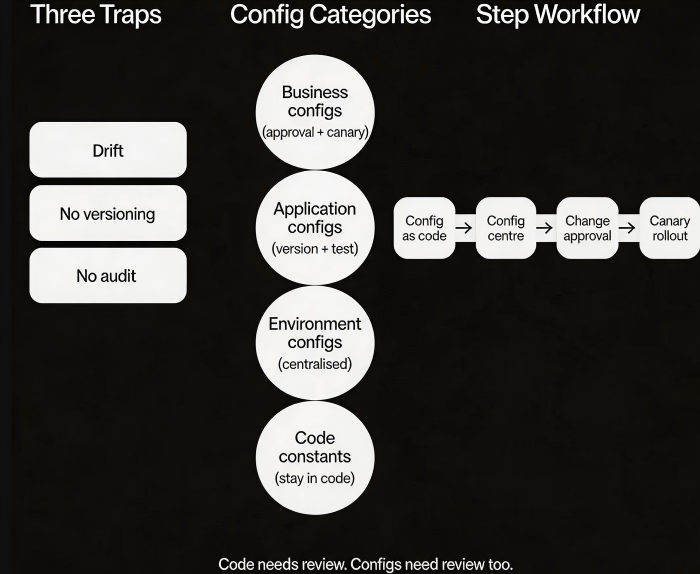
02 The Three Big Traps of Configuration
Trap 1: Configuration drift
You think all servers have the same configuration. Then one day you discover that one machine has a different value. Who changed it? When? No idea.
That’s configuration drift. One machine goes rogue. Consistency is lost.
Trap 2: No version history
You change a config value. The system crashes. You want to roll back. But you don’t remember what the old value was. No history, no versioning. Rolling back is a guess.
Trap 3: No audit trail
Your manager asks: “Who changed the rate limit last week?” You say: “I don’t know. No one logged it.” Changes are made, no one knows why, and when things break, no one knows who to ask.
These traps aren’t technical failures – they’re process failures. Without tools and workflows, you rely on memory and luck. Eventually, luck runs out.
03 Classifying Configs: Not All Are Equal
Configurations should not be treated the same. Classify them by impact and change frequency.
Category 1: Business configs (e.g., discount rate, rate‑limit threshold). High impact, changes frequently. Requires approval workflow and canary rollout. Roll out to one instance first, observe, then expand.
Category 2: Application configs (e.g., log level, connection pool size). Medium impact, changes occasionally. Needs versioning and testing in a pre‑production environment. Must be rollback‑able.
Category 3: Environment configs (e.g., database address, cache endpoint). High impact, changes rarely. Best managed through environment variables or a configuration centre. Never hard‑code these.
Category 4: Code constants (e.g., mathematical coefficients). Almost never change. These belong in code, not in config, to prevent accidental modifications.
04 Four Best Practices for Configuration Management
Practice 1: Configuration as code
Put configuration files in Git, alongside your code. Every change requires a pull request, review, and approval. You get history, blame, and rollback.
Terraform, Ansible, and Kubernetes YAML are all forms of configuration‑as‑code.
Practice 2: Use a configuration centre
Replace local config files with a configuration centre.
Changes take effect immediately – no restart required.
One place to manage configurations across all environments.
Supports canary rollouts (push to one instance first, then gradually to all).
Cloud tools: AWS AppConfig, AWS Config Manager, Alibaba Cloud ACM, Nacos.
Practice 3: Require approvals for high‑risk changes
High‑impact configs (connection pools, rate limits, database connection limits) must be approved.
Who requested, who approved, when the change will happen, and the rollback plan.
After approval, the change is automatically pushed to the configuration centre.
Audit logs are automatically archived.
Practice 4: Test config changes with canary rollouts
Config changes should be rolled out like code. Change one instance first. Observe for 30 minutes. Monitor metrics. If everything looks good, roll out to the full fleet.
That client who changed the connection pool? If they had changed it on one instance first, they would have seen the database connection count spike and known not to push it further.
05 A Real Story
A company wanted to prepare for a flash sale. An engineer changed the rate‑limit threshold from 1000 to 5000. No approval. No canary. Pushed to all instances immediately.
When the flash sale started, traffic surged. The database crashed. The rate limit wasn’t working – because the config had changed, but the application hadn’t restarted. The old threshold stayed active. Halfway through the sale, they discovered the problem. Restarted the services. By then, the damage was done. The first two hours of the sale were almost unusable.
What they fixed afterward:
Switched to a configuration centre. Changes take effect immediately – no restart needed.
High‑risk configs require approval.
All config changes must be validated in a staging environment.
Production rollouts start with one instance (canary), then expand.
Their ops lead said: “I used to think config changes were trivial. Now I treat them with the same respect as code changes.”
The Bottom Line
Configuration management isn’t as glamorous as high availability or disaster recovery. But config mistakes cause outages far more often than those exotic failures.
That ops lead later summed it up: “A code bug gives you a 500 error. A config bug can bring down the entire site.”
Code needs review. Configs need review too. Code needs versioning. Configs need versioning too. Code needs canary rollouts. Configs need canary rollouts too.
Next time you change a configuration, ask yourself three questions:
How wide is the impact?
Can I change just one instance first?
If this breaks, how do I roll back?
Think before you click.
