

Cloud Health Checks and Auto‑Recovery: Building Systems That Heal Themselves
Last year, a client was woken at 3 AM. Their application was hanging. The process was still running, but it wasn't handling requests. Monitoring showed CPU and memory were normal. The load balancer was still sending traffic. Users saw nothing but timeouts.
After hours of debugging, they found the problem: a deadlock in the application. All threads were blocked. The process was alive, but it couldn't do any work. The load balancer's health check was just a TCP connection test. The port was open, so the check passed. The load balancer kept sending traffic to a dead application.
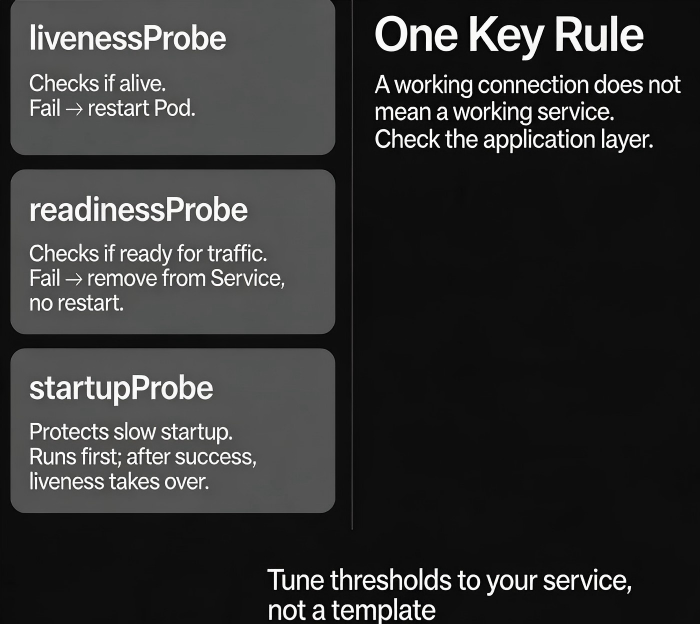
This is the classic health check mistake: a working connection does not mean a working service.
Today, let’s talk about health checks and auto‑recovery. Not the “health checks are important” fluff, but a practical guide: how to check what actually matters, how to tune thresholds, and how to let your system recover without waking you up at 3 AM.
01 TCP Is Alive ≠ Service Is Working
Many load balancers and Kubernetes clusters default to TCP probes. They just check if the port is open. If yes, the target is marked “healthy.”
But real‑world failures often have nothing to do with the port:
Application deadlock – port is still open
Database connection pool exhausted – port is still open
Internal dependency fails – port is still open
Memory leak with constant GC – port is still open
TCP being alive does not mean the service can do useful work.
Counter‑intuitive truth: A health check should verify that the service can actually serve requests, not just that the port is listening.
That client switched from a TCP check to an HTTP check, calling a /health endpoint. The endpoint checked the database connection, dependency health, and thread pool status. If anything was unhealthy, it returned HTTP 500. The load balancer stopped sending traffic to the failing node.
After the change, broken nodes were automatically removed from rotation. No more 3 AM debugging of “dead but not dead” servers.
02 Three Types of Probes: Liveness, Readiness, Startup
Kubernetes has three probes for different stages of a container’s life.
livenessProbe
Determines if the container is still alive. If it fails, Kubernetes kills the container and restarts it.
Good for: deadlocks, infinite loops, or any case where the process is stuck.
Not good for: dependency failures (restarting won’t fix a broken database connection).
readinessProbe
Determines if the container is ready to receive traffic. If it fails, the container is removed from the Service and receives no requests. It is not restarted.
Good for: slow startup, dependency loading, warm‑up periods.
When readiness fails, traffic stops. The container stays alive to finish whatever it is doing.
startupProbe
Designed for applications that take a long time to start. It runs during initial startup. Once it succeeds, the livenessProbe takes over.
Good for: Java applications with long startup times, or any service that needs >30 seconds to become ready.
Prevents the livenessProbe from killing the container while it is still starting up.
03 Tuning Thresholds: Too Sensitive or Too Slow?
Threshold settings directly affect stability.
Key parameters:
initialDelaySeconds– How long to wait after container start before starting probes. Too short: the service may not be ready. Too long: delays failure detection.periodSeconds– How often to run the probe. Shorter = more load. Longer = slower detection.timeoutSeconds– Max time for a probe response. Too short: slow‑starting services are marked as failed.failureThreshold– How many consecutive failures before the container is considered unhealthy. Too small: temporary glitches cause restarts. Too large: real failures take too long to detect.
Recommended defaults for Kubernetes (adjust based on your service):
| Probe | initialDelay | period | timeout | failureThreshold |
|---|---|---|---|---|
| liveness | 30‑60s | 10s | 5s | 3 |
| readiness | 0‑10s | 5s | 5s | 3 |
| startup | 0s | 5s | 5s | as needed (e.g., 30) |
Key principle: Readiness can be fast – you want to remove bad nodes quickly. Liveness should be more tolerant – avoid killing containers that are just momentarily slow.
04 Auto‑Recovery Is Not Just About Restarting
Many people think auto‑recovery means “restart when something fails.” But restarting is not a cure‑all.
What restarting can fix:
Memory leaks (restart frees memory)
Deadlocks (restart breaks the deadlock)
Transient state corruption
What restarting cannot fix:
Configuration errors (restarting doesn’t fix wrong settings)
Dependency failures (the downstream service is still down)
Data corruption (restart won’t repair bad data)
Auto‑recovery strategies:
Traffic draining (readiness failure) – Remove the node from rotation without restarting. Good for dependency failures; when the dependency recovers, the node reconnects and becomes ready again.
Restart (liveness failure) – Kill and recreate the container. Good for deadlocks or process failures.
Instance replacement – Kubernetes reschedules the pod, possibly on a different node.
Alert + human intervention – Some problems cannot be auto‑recovered. After a few restart failures, escalate to a human.
That client later designed a layered recovery strategy:
Database connection failure → only drain traffic (restart would not help)
Application deadlock → restart (liveness failure)
Three consecutive restarts → alert a human
05 Common Pitfalls and How to Avoid Them
Pitfall 1: The health check depends on external services
The /health endpoint checks the database, Redis, and downstream APIs. During a database restart, /health returns 500, and all pods become NotReady. The entire service goes down even though only the database is having a brief issue.
Solution: The health check should only verify the process itself. Dependency health should be handled by the caller or by circuit breakers, not by the health check.
Pitfall 2: initialDelaySeconds is too short
A Java application takes 40 seconds to start. initialDelaySeconds is set to 15 seconds. Liveness checks begin while the app is still starting up. After three failures, the container is restarted. It never reaches a running state.
Solution: Use a startupProbe to protect long startup times, or increase initialDelaySeconds appropriately.
Pitfall 3: failureThreshold is too low (1)
A 2‑second network blip causes a timeout. failureThreshold=1 triggers an immediate restart. Production networks are never perfect.
Solution: Set failureThreshold=3 to tolerate short‑lived glitches.
06 A Real Story: The Missing Startup Probe
A company’s cluster had a readinessProbe with initialDelaySeconds=5 and failureThreshold=3. The application took 30 seconds to start. During the startup window, the readiness probe ran repeatedly. It failed three times. The pod was marked NotReady and removed from the Service. A few seconds later, the application finally became ready, but the outage window had already caused user‑visible failures.
The fix:
Added a
startupProbewithfailureThreshold=30andperiodSeconds=5, giving the app up to 150 seconds to start.Only after the
startupProbesucceeded did thereadinessProbeandlivenessProbebegin.No more mis‑reads during startup.
The Bottom Line
Health checks and auto‑recovery are the foundation of a self‑healing system. But misconfigured, they can do more harm than good.
That client’s ops lead later said: “A health check isn’t a checkbox. You have to tune it to your service. Too strict, and you restart unnecessarily. Too loose, and you stay down without noticing.”
Is your health check truly telling you if your service is working – or just that the port is open?
