

Can’t Reach Your App? Which of DNS, Load Balancer, or CDN Is Blocking the Way?
It’s 2 AM. Users are reporting they can’t reach your app. You log into your server. Everything looks fine. CPU is normal. Memory is fine. Logs show no errors. You ping the domain – the IP resolves correctly. The service is up. So why can’t users get in?
After 30 minutes of hunting, you find the problem: the CDN origin configuration was wrong. Someone changed the origin IP yesterday but forgot to update the CDN. Users’ requests reached the CDN edge, but the edge couldn’t reach the origin. 502 errors everywhere.
This is the most frustrating kind of outage: each layer thinks it’s working, but together they fail.
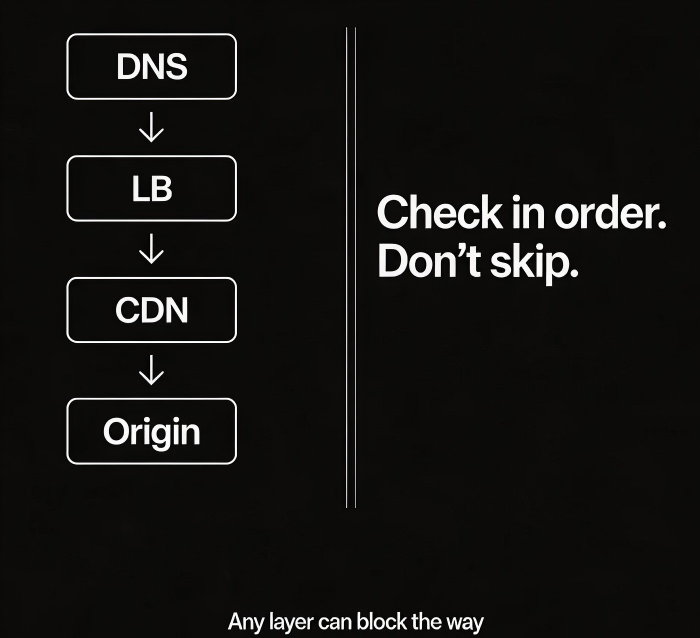
Today, let’s walk through the three traffic entry points – DNS, load balancer, and CDN. When users can’t reach your app, one of these layers is likely the culprit. Let’s see how to check each one.
01 First Layer: DNS
DNS is the first hop. The user types your domain into a browser. DNS resolves the domain to an IP address. Only then does the browser connect.
Common problem 1: Resolution fails
Check with nslookup or dig. If resolution fails, possible causes:
Domain name expired
DNS provider outage
Local DNS cache issue (try public resolvers like 8.8.8.8 or 114.114.114.114)
Common problem 2: Wrong IP
The domain resolves, but to an old IP address or 127.0.0.1. Possible causes:
A record misconfigured
Geo‑routing or ISP‑based routing rule points to the wrong region
DNS hijacking (rare)
Common problem 3: TTL too long
You changed the DNS record, but users still get the old IP. Check the TTL (time to live). If it’s 600 seconds, it will take up to 10 minutes for the change to propagate. Before making a change, lower the TTL. After the change, raise it back.
Commands to check:
nslookup yourdomain.comdig yourdomain.comdig @8.8.8.8 yourdomain.com(bypass local cache)
02 Second Layer: Load Balancer
The user’s browser has the IP. Next stop: the load balancer. The load balancer forwards the request to a healthy backend server.
Common problem 1: Listener misconfiguration
Is the listener on the correct port (80 for HTTP, 443 for HTTPS)?
Is the protocol correct (HTTP vs TCP)?
Has the SSL certificate expired? (Browsers will show a security warning)
Common problem 2: Unhealthy backends
The load balancer’s health checks have marked all backends as unhealthy. Check the health check configuration:
What port and path does it check?
Are the timeout and threshold too strict?
Manually curl the backend instance to see if it’s really healthy.
Common problem 3: Security groups / firewall
Is the security group between the load balancer and the backend configured correctly?
Can the client reach the load balancer’s listener port?
What to check:
Load balancer metrics: backend health status, request counts, error counts
Bypass the load balancer – access a backend instance directly (if permitted)
03 Third Layer: CDN
If you use a CDN, the DNS resolves to a CDN edge node IP, not your origin. The user goes to the CDN edge, and the edge fetches content from your origin.
Common problem 1: Origin misconfiguration
Is the origin IP correct?
Is the origin port and protocol correct?
Does the origin security group allow traffic from CDN edge IPs?
The edge can’t reach the origin. The user sees 502 or 504 errors.
Common problem 2: Cache policy issues
Some assets never hit the cache; every request goes to the origin, overloading it.
Cache TTL is too long; users see stale content.
Dynamic content (APIs) is cached when it shouldn’t be.
Common problem 3: Domain binding
Does the CDN configuration include the exact domain name the user is visiting?
Does the CDN’s SSL certificate cover that domain?
What to check:
curl -vand look at response headers – doesX-CachesayHITorMISS?CDN metrics: hit ratio, origin error rate, top error codes
Bypass the CDN – access the origin directly to see if it works
04 A Quick Troubleshooting Table
| Symptom | Likely problem | Check method |
|---|---|---|
| Domain doesn’t resolve | DNS provider, expired domain | nslookup, dig |
| Resolves but can’t ping | Network path, security group | ping, telnet |
| Ping works, browser fails | Port, protocol, certificate | curl -v, check HTTP status |
| Works sometimes, fails sometimes | Health checks, unstable backends | Load balancer metrics |
| Static assets slow | CDN miss, slow origin | CDN hit ratio |
| Old content after update | CDN cache, browser cache | Purge CDN, hard refresh browser |
05 A Real Story
Before a flash sale, an e‑commerce company had users reporting that they couldn’t access the site from certain regions. A long debugging session found:
DNS was resolving correctly
The load balancer was healthy
CDN hit ratio was normal
The deeper investigation revealed: the CDN was trying to reach the origin over IPv6, but the origin was only configured for IPv4. Some users’ DNS queries returned an IPv6 address. The CDN edge used IPv6 to contact the origin, and the origin didn’t respond.
Users saw 502 errors. The fix was either to add an IPv6 address on the origin or force the CDN to use IPv4 for origin fetch. A single IPv6 configuration mistake made the site unreachable for a subset of users for an entire day.
The Bottom Line
When users say they can’t reach your app, don’t immediately blame the application code. Start from the entry. Check DNS first. Then the load balancer. Then the CDN. Follow the path.
That e‑commerce ops lead later said: “We used to assume an outage meant the server was down. Now we know – any of the three entry layers can fail, and the symptom looks the same.”
Next time you hear “the site is down,” walk the path. Start at the front door. Work your way in.
