

In 2019, Capital One suffered one of the largest data breaches in U.S. banking history. 106 million customer records were stolen. The cause? Not a sophisticated zero-day exploit. Not a nation-state actor. A misconfigured firewall and an over-privileged IAM role.
The attacker exploited a SSRF vulnerability in the firewall, tricked that over-privileged role into handing over temporary credentials, and walked away with 106 million records.
Here's the uncomfortable truth: Your biggest security threat isn't the hacker outside—it's the uncontrolled permissions inside.
Let's talk about IAM for multi-cloud. Not the "principle of least privilege is important" kind of talk. The "how to actually prevent waking up to a breached account" kind of talk.
01 Why Multi-Cloud IAM Spins Out of Control
If you're running on a single cloud, IAM is already complicated enough. AWS alone has IAM roles, policies, permission boundaries, service control policies—enough concepts to make your head spin.
Now add Azure. Add Google Cloud. Add Alibaba. Each platform has its own terminology, its own mental model, its own way of configuring access. AWS Roles aren't Azure Roles. The JSON policy syntax is different everywhere.
Here's how chaos creeps in:
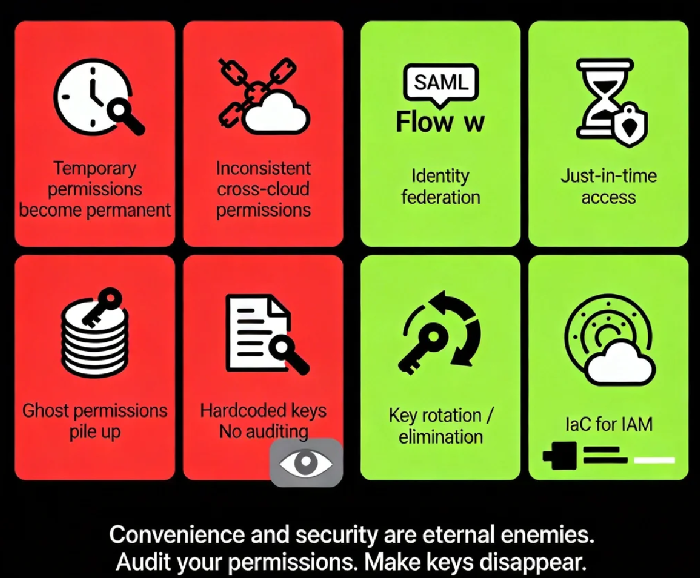
Temporary permissions become permanent: A developer asks for S3 access to debug something. Three months later, the permission is still there.
Inconsistent permissions across clouds: You strictly enforce least privilege on AWS, but someone got lazy on Azure and handed out wildcards.
Ghost permissions pile up: People leave the company. Permissions don't. Projects end. Service accounts live on.
Keys everywhere: AccessKey hardcoded in config files, committed to GitHub, scanned by crawlers within hours.
One major cloud provider's internal data shows: Over 60% of cloud accounts contain permissions unused for 30+ days. These "zombie permissions" are swords hanging over your head.
02 Least Privilege: Don't Mistake It for "As Small as Possible"
The principle of least privilege has been preached for decades, but most people get it wrong.
It's not "as small as possible." It's "just enough to do the job."
What's the difference? "As small as possible" breaks your business. Developers need to write code. Ops needs to configure environments. Analysts need to query data. Everyone needs some permissions. If you choke them, they'll find ways around—hardcoding keys, disabling audit logs, sharing accounts.
This is the first paradox of IAM governance: Security and efficiency sit on opposite ends of a seesaw. You can't have both maxed out.
The right approach:
Layered authorization: Give developers "manage dev environment" permissions, not "manage production."
Just-in-time access: For high-privilege operations, require approval for temporary elevation. Auto-revoke when done.
Automate permission management: Don't hand out permissions manually. Use Infrastructure as Code (Terraform, etc.) to make changes traceable and auditable.
Counter-intuitive truth: Allowing reasonable permissions is safer than chasing perfect least privilege. Because reasonable gets followed. Perfect gets bypassed.
03 Identity Federation: One Identity to Rule Them All
The biggest pain of multi-cloud: every cloud has its own user directory. Developers remember three passwords. Admins configure permissions across three consoles.
The solution is identity federation—using your existing corporate identity system (Active Directory, LDAP, Okta) to log into cloud platforms.
How it works:
Your company runs an Identity Provider (IdP). Employees authenticate there.
The IdP sends a SAML assertion to the cloud platform saying: "This user is authenticated and belongs to these groups."
The cloud platform maps the assertion attributes to local roles and grants permissions.
Benefits:
One-click offboarding: Employee leaves? Disable them in the IdP. Access to all clouds dies instantly. No hunting through three consoles.
Centralized permission management: Control who accesses which cloud from a single place.
Unified MFA: Enforce multi-factor authentication once, not per cloud.
Yet many companies still use shared accounts—one root AWS account, ten people sharing it. This is a disaster waiting to happen.
04 Key Management: Make AccessKeys Disappear
Cloud platform AccessKeys are like your house keys. Lose them, and someone walks in.
But how are AccessKeys actually managed?
Written in config files, committed to GitHub with the code.
Stored as plain text on servers.
One key used for three years, never rotated.
Dev, test, and production share the same key.
GitHub crawlers scan code repositories constantly, looking for AccessKeys. Once found, they're exploited within hours—crypto miners spun up, data exfiltrated.
Best practices:
Use temporary credentials instead of long-term keys: AWS STS issues credentials valid for hours to days. Expire automatically. Lose them? No problem.
If you must use long-term keys, rotate them automatically: Every 90 days. Automated, not manual.
Never hardcode keys: Use Secrets Manager, Parameter Store, or similar services.
Disable root account AccessKeys entirely: Root accounts are too powerful. They should never have keys.
Counter-intuitive truth: Many teams obsess over "how to protect keys." The better answer is "make keys unnecessary." Use IAM Roles instead of keys. EC2, Lambda, EKS—they can all assume roles directly. No keys required.
05 Permission Auditing: Don't Wait for a Breach
In multi-cloud environments, permissions change constantly. A bucket opened today. A policy added tomorrow. Someone leaves next week. Three months later, your permission landscape is unrecognizable.
You need continuous auditing, not "audit once a year."
What to look for:
Unused permissions: A role not assumed in 90 days? Kill it.
Over-privileged accounts: Who can do ":"? Who has "AdministratorAccess"?
Cross-account trust: Which external accounts do you trust? Can they still access your resources?
Key hygiene: Which keys haven't been rotated in 90 days? Which were recently used?
Cloud providers offer tools: AWS IAM Access Analyzer, Azure AD Privileged Identity Management. Use them.
Open-source options: CloudMapper, Scout Suite can scan your environments and find configuration risks.
Startling data: One security firm's report found that 95% of cloud accounts have at least one "over-permissive" configuration. 80% have "zombie permissions" unused for over a year. These numbers sound scary. But you're probably thinking: "We might be in that 95%."
Yes. You probably are.
06 A Three-Month Roadmap to Saner IAM
Don't try to fix everything at once. Here's a realistic three-month plan:
Month 1: Inventory
List every cloud account, every sub-account, every service account.
Export all current permissions. Make a spreadsheet if you have to.
Identify every account with ":" permissions. Flag them for immediate review.
Month 2: Shrink the Attack Surface
Enable MFA on root accounts. Disable their AccessKeys.
Rotate every AccessKey older than 90 days.
Delete unused IAM users and roles.
Turn on your cloud provider's access analysis tools. Follow their recommendations to tighten permissions.
Month 3: Build Mechanisms
Configure identity federation. Use your corporate IdP to log into clouds.
Move IAM management into IaC. No more manual permission changes.
Schedule automated permission audits. Monthly reports.
Establish a permission request workflow. High-privilege access requires approval.
Three months in, you won't be perfect. But you'll be ahead of 90% of companies.
The Bottom Line
Remember the Capital One breach? Post-incident analysis revealed that the over-privileged role shouldn't have existed. It had far more permission than anyone needed. It was granted "just for convenience."
Convenience and security are eternal enemies.
Multi-cloud strategy gives you flexibility. It also gives you complexity. IAM chaos isn't a question of if. It's a question of when. That "temporary" permission you granted today might be the entry point exploited tomorrow.
A security veteran once told me: "IAM isn't a technology problem. It's an organizational problem. Technology shows you who has permissions. Only culture decides who should have them."
Your cloud keys are in how many hands right now? Do they all still need them?
Go check tonight.
