

CDN Selection Guide: Beyond Price—How to Evaluate Performance and Total Cost
Last week, a friend running a startup vented to me: their site had been live for six months, and users kept complaining it was slow overseas. So they bought CDN from a big-name vendor—figured the brand alone was worth it. Price wasn't cheap.
A month later, the bill arrived. Three times higher than expected. And the site wasn't noticeably faster.
I dug into it and found three problems:
They'd picked a static acceleration plan, but their site was mostly dynamic APIs
Hit ratio was 40%—60% of requests went back to origin, racking up extra fees
They bought a 500GB plan, used 300GB, and the remaining 200GB expired next month
He asked me: "How do you actually choose a CDN? I can't keep paying tuition every time."
Today, let's talk about CDN selection. Not the "pick a big brand" kind of advice, but how to figure out: Does the CDN actually work? How do you calculate the real cost? And how do you avoid the traps?
01 First, Understand What CDN Actually Accelerates
Most people think CDN is just "put files closer to users," so they only care about node count.
That's half true.
CDN accelerates three types of content. Pick the wrong type, and you're wasting money.
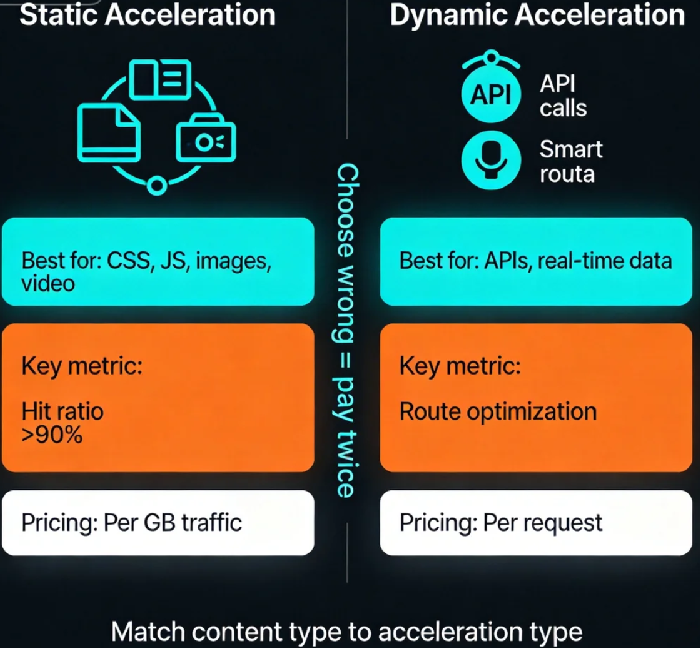
Type 1: Static content. Images, CSS, JS, video files. This content doesn't change, so it's perfect for caching at edge nodes. This is CDN's oldest, most mature capability.
Type 2: Dynamic content. APIs, real-time data, personalized pages. This content can't be cached because each request might return different results. Dynamic acceleration relies on optimizing network paths—routing traffic through the vendor's smart network instead of congested public internet.
Type 3: Mixed content. Most sites are mixed: HTML pages are static, but the API data embedded in them is dynamic. Many CDN plans specialize in only one type. Pick wrong, and you're paying without getting the benefit.
My friend's mistake? He bought a static acceleration plan for a tools site whose core was API calls. No matter how many static nodes you add, APIs stay slow.
02 Not All Nodes Are Real Nodes
Every CDN vendor's website says "XXX global nodes." But nodes aren't created equal.
Self-built nodes: The vendor rents their own data centers, bandwidth, and hardware. Quality is controlled, but costs are high. Only major players and long-time specialists have these.
Leased nodes: Servers rented from local providers, then rebranded as the vendor's own. Quality varies wildly—during peak hours, they might be slower than the public internet.
P2P nodes: Use users' devices as nodes (like uploading video to others while watching). Costs near zero, but stability is a gamble.
How to tell real from rebranded? A crude method: pick IPs in target regions and trace the route. If there are many hops, or ownership traces to someone else, they're probably leased.
03 Hit Ratio Is Your First Cost Defense
CDN pricing has a core logic: Edge node requests are cheap. Origin requests are expensive (they consume your origin bandwidth and egress).
That's why hit ratio matters—the percentage of requests served directly from edge nodes.
Static content should hit 90% or higher
Dynamic content can't be cached, so hit ratio is naturally 0. That's why dynamic acceleration should be priced by request count, not bandwidth
If you buy a static plan but have mostly dynamic content, your hit ratio will tank. Say it's 40%. That means 60% of requests go back to origin. You're not just paying for origin bandwidth—you're paying for it at full price, with none of CDN's cost benefits.
Real example: An e-commerce site bought from a major CDN. Monthly traffic 10TB, hit ratio 55%. Origin fees accounted for 40% of the bill—nearly double what they expected. They switched to a vendor with stronger dynamic acceleration. The per-unit price was higher, but hit ratio improved, and total cost dropped 30%.
04 Total Cost, Not Unit Price
CDN pricing comes in many flavors:
Traffic packages (100GB, 1TB, 10TB)
Peak bandwidth (monthly per Mbps)
Per-request (common for dynamic)
Hybrid (base package + overage)
How to compare? Don't look at unit price. Run tests.
Pick 2-3 candidates. Run a week of real traffic on trial. Then compare:
Total cost
Hit ratio
Average latency
Hidden fees (HTTPS request fees, log export fees, cross-region retrieval fees)
When I help clients with selection, I often find: Vendor A's unit price is lower, but add-ons make total cost higher than Vendor B. Vendor C's traffic package looks great, but expires in a month—waste what you don't use. Vendor D's dynamic acceleration costs more per unit, but total cost is lower because hit ratio is better.
Traffic packages have another trap: expiration. Many vendors reset monthly. If your traffic fluctuates, you might buy too much one month and too little the next. Packages with longer validity (like one year) give you much more flexibility.
05 Features That Actually Matter
Beyond basic acceleration, CDNs offer many features. The key is matching them to your needs:
HTTPS support: Table stakes now. But some old plans still charge extra or lack modern TLS.
Dynamic acceleration: As discussed—essential if you have APIs.
Edge compute: Run code at the edge (rewrite headers, A/B tests). Saves round trips to origin.
Security: WAF, DDoS protection, CC mitigation. If your site gets attacked, this can be cheaper than buying separate security.
Real-time logs: Essential for analysis. Some vendors charge extra or delay logs by hours.
API management: Can you purge cache dynamically? Adjust configs via API? Important for automation.
One hidden trap: Cache purge and pre-warming fees. Some vendors give a small free quota, then charge per request. If you update content frequently, this can add up.
06 A Four-Step Selection Framework
Step 1: Define your requirements
Where are your users? Domestic, Southeast Asia, global?
What's your content type? Static (images/video), dynamic (APIs), or mixed?
What's your traffic volume? Peak?
Security requirements?
Step 2: Shortlist candidates
Pick 3-5 vendors, including major players and specialists focused on your target regions. Don't just look at name recognition—look at node coverage matching your user distribution.
Step 3: Test with real traffic
Run a week of real traffic on trial accounts. Compare:
Latency and availability by region
Hit ratio
Actual bill
Feature fit
Technical support responsiveness
Step 4: Check contract details before signing
Traffic package validity period?
Overage pricing?
Hidden fees?
SLA guarantees and refund policies?
Migration assistance if you leave?
07 One More Thing: The Exit Cost
Nobody talks about this, but it matters: How hard is it to switch later?
Can you export your logs and analytics data?
Are configurations portable, or locked into proprietary APIs?
Will the vendor help with migration, or leave you on your own?
CDN is infrastructure. You might switch in a year or two. Make sure you're not building on quicksand.
That startup friend eventually switched to a different vendor—one with strong Southeast Asia coverage, solid dynamic acceleration, and annual traffic packages. Three months later, he told me: monthly CDN costs down 40%, overseas load times from 3 seconds to under 1 second.
He said something I haven't forgotten:
"I used to think CDN was just buying a plan. Now I realize—choosing a CDN is like choosing a partner. You need to know what you want first, then find the right match."
CDN selection isn't about "best." It's about best fit. Best fit means: where your users are, what your content is, what your budget looks like, and what your team can handle.
Figure those out first. Then compare prices, run tests, and make your choice. You'll avoid most of the traps.
How's your CDN working for you?
