

Cloud CI/CD and DevOps in Practice: Automating the Full Pipeline from Code Commit to Production Deployment
Last month, a friend who runs a fintech startup called me, exasperated. “We’re deploying once a week, and it’s always a circus,” he said. “The build breaks, the tests fail, and the deployment script needs manual tweaking every time. Our CTO says we need to move faster, but every release feels like playing Jenga with production.”
I asked him: “What does your pipeline look like?”
He paused. “What pipeline?”
This is the reality for many teams: they have code, they have servers, but they don’t have a reliable, automated path from one to the other. Deployments are stressful, rollbacks are terrifying, and developers spend more time fighting the release process than writing code.
Today, let’s talk about continuous delivery and DevOps in the cloud. Not the “automate everything” slogan, but a practical guide: how to build a pipeline that takes code from commit to production automatically, reliably, and safely.
01 Why Your First Pipeline Shouldn’t Be Jenkins
A common misconception: CI/CD means installing Jenkins on a VM and wiring up a few shell scripts. That works—until it doesn’t. The moment your team grows beyond three people, the Jenkins server becomes a pet: you patch it, back it up, worry about disk space, and suddenly you’re running a mini‑infrastructure just for your build system.
In the cloud era, CI/CD is a commodity. Every major cloud provider offers managed services that handle the heavy lifting:
AWS: CodeCommit, CodeBuild, CodeDeploy, CodePipeline
Azure: Azure DevOps, GitHub Actions
Google Cloud: Cloud Build, Cloud Deploy
Alibaba Cloud: Cloud Efficiency, Container Service CI/CD
GitHub Actions alone is now used by over 10 million developers. It’s not just a tool—it’s a platform where your pipeline lives next to your code.
Counter‑intuitive truth: The best CI/CD tool is the one that disappears into your workflow. If you’re spending hours maintaining your build system, you’re not moving fast.
02 The Core Components: What a Modern Pipeline Looks Like
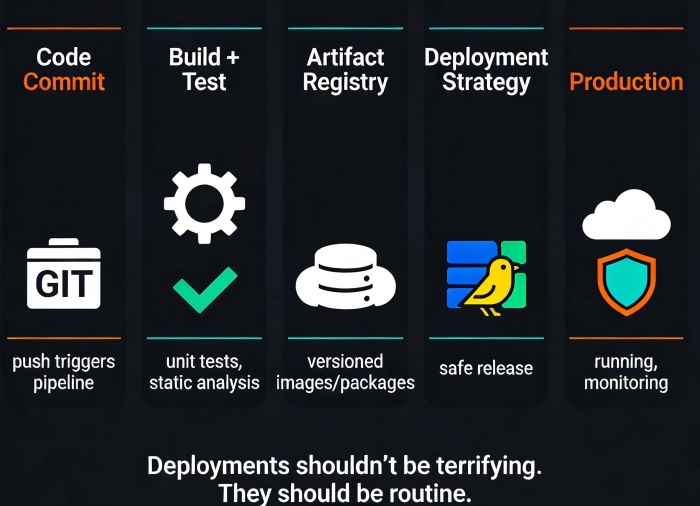
A production‑ready pipeline has four essential parts:
1. Source control – GitHub, GitLab, CodeCommit. The single source of truth. Every commit triggers the pipeline.
2. Build and test – Compile code, run unit tests, static analysis, security scans. Fail fast. If tests fail, the pipeline stops.
3. Artifact storage – Store build outputs (container images, binaries, packages) in a registry. Docker Hub, ECR, ACR, or GAR. These artifacts are immutable—every build gets a unique version.
4. Deployment – Take the artifact and deploy it to target environments (dev → staging → production). Use strategies like rolling updates, blue‑green, or canary to minimize risk.
When these four pieces are wired together, a developer pushes code, and minutes later it’s running in production—without a single manual step.
03 Deployment Strategies: How to Release Without Breaking Things
The most overlooked part of CI/CD is how you deploy. Push a new version, replace the old one, and pray—that’s the old way.
Modern pipelines use safer strategies:
Rolling update: Gradually replace old instances with new ones. Minimal infrastructure cost, but during the update, two versions run simultaneously. Works if your application handles version mixing well.
Blue‑green: Keep two identical environments (blue = current, green = new). Switch traffic instantly by updating the load balancer. Rollback is one click. Requires double the infrastructure during the switch, but it’s the safest.
Canary release: Route a small percentage of traffic (e.g., 5%) to the new version, monitor for errors, then gradually increase. If something goes wrong, you impact only a few users. This is how Netflix deploys thousands of times per day.
Counter‑intuitive truth: The deployment strategy matters more than the tool. You can have the fanciest pipeline, but if you replace all instances at once, you’re still at risk.
4 The “Shift Left” Mindset
“Shift left” means moving quality and security activities earlier in the pipeline. Why wait until staging to find a bug when you can catch it in the commit?
What to shift left:
Unit tests: Run them on every push. Fail the build if coverage drops.
Static analysis: Linters, security scanners (e.g., SonarQube, Snyk). Catch SQL injection patterns or hardcoded secrets before they leave the developer’s machine.
Container scanning: If you build images, scan them for known vulnerabilities (Trivy, Grype) before pushing to your registry.
Infrastructure checks: Use tools like checkov or tfsec to validate Terraform code.
A client once had a secret key hardcoded in their repository for six months. They only discovered it during a security audit—because their pipeline didn’t scan for secrets. After adding a simple gitleaks step in the CI job, they caught the next secret within hours.
Shift left is not just about catching bugs earlier. It’s about creating a safety net that makes developers confident to deploy often.
05 From Manual to Fully Automated: A Real Journey
I worked with a media startup that was stuck in manual‑deployment hell. Their process:
Developer commits code
Manual code review
Manual build on a shared dev server
Copy artifacts to staging over SFTP
Run a set of handwritten SQL scripts on production
Pray
Deploys happened once a week, often on Friday evenings. If something broke, the weekend was ruined.
We redesigned their pipeline in three phases:
Phase 1: Build automation – Moved code to GitHub, set up GitHub Actions to run tests and build Docker images on every push. Pushed images to ECR.
Phase 2: Deployment automation – Created a staging environment in ECS. Used CodeDeploy to automatically deploy the latest image to staging after tests passed. Added a manual approval gate for production.
Phase 3: Safe deployment – Switched to a blue‑green deployment strategy in production. Added smoke tests that ran automatically after deployment. If tests failed, the pipeline automatically rolled back.
Within three months, they went from weekly painful deploys to multiple deploys per day with zero downtime. Deployment‑related incidents dropped by 90%. Developers stopped dreading releases and started celebrating them.
Their CTO said: “I used to think CI/CD was about tools. Now I see it’s about creating a system where deploying is boring.”
06 Security and Compliance in the Pipeline
CI/CD pipelines are a prime target for attacks. If an attacker injects malicious code into your pipeline, they can reach production. So treat your pipeline infrastructure as critical.
Use secrets management: Never store credentials in code. Use AWS Secrets Manager, Azure Key Vault, or GitHub Secrets. Rotate them regularly.
Least privilege: The pipeline’s IAM role should only have the permissions it needs—no blanket admin access.
Audit logs: Enable logging for all pipeline actions. Know who triggered a deployment and when.
Sign artifacts: Use Docker Content Trust or Notary to sign images. Verify signatures before deployment.
A simple practice: configure your repository to require signed commits. This prevents someone from impersonating a developer and pushing malicious code.
07 Start Small, Then Expand
You don’t need to build a Netflix‑scale pipeline on day one. Start with the smallest loop:
One repository.
One test (unit tests) on every push.
One deployment to a staging environment.
Once that loop is solid, add more: integration tests, security scans, production deployments with canary, automated rollback.
The goal is not perfection. The goal is consistency. A pipeline that works reliably, even if it’s simple, is infinitely better than a complex pipeline that nobody trusts.
The Bottom Line
That friend with the fintech startup? We started small. They moved their code to GitHub, set up GitHub Actions to run tests, and used AWS CodeDeploy to push to staging. Two weeks later, they deployed to production with a blue‑green switch for the first time. No one noticed. No one got paged.
He texted me afterward: “I’ve been here five years, and this is the first time a deployment didn’t scare me.”
CI/CD is not a project you finish. It’s a muscle you build. Every commit, every test, every deployment makes the process stronger. And when the day comes that you need to push a critical security fix at 2 AM, you’ll be grateful that the pipeline just works—because you built it that way.
What’s blocking your team from deploying confidently today?
