

Cloud VPC Design in Practice: Subnets, Route Tables, Security Groups, and NAT Gateways
Last year, a client spent two months moving their business to the cloud. Everything was running smoothly—until one day, their database stopped responding. After hours of troubleshooting, they found the problem: their VPC subnet had run out of IP addresses.
They had casually picked a /24 CIDR block, thinking 256 IPs would be plenty. But with Kubernetes nodes, RDS instances, Redis clusters, load balancers, and NAT gateways, the pool was exhausted. The worst part? You can’t change a VPC’s CIDR after creation. They had to rebuild the entire VPC and migrate dozens of services—a full week of work.
The client told me later: “If I had spent 30 minutes planning the network, I wouldn’t have lost a week rebuilding it.”
This is the classic cloud networking tragedy: click first, cry later.
Today, let’s talk about VPC design. Not the “what is a VPC” introduction, but a practical guide: CIDR selection, subnet division, route tables, security groups, NAT gateways—how to get it right so you don’t pay for it later.
01 Choose Your CIDR Carefully—Don’t Just Pick a /16
The first step in creating a VPC is choosing a CIDR block (IP address range). Many people pick 10.0.0.0/16 or 172.31.0.0/16 because “big enough.”
But there are traps.
Trap 1: Conflict with on‑premises networks
If your office uses 10.0.0.0/8, and you pick 10.0.0.0/16 for your VPC, you’ll never be able to connect them via VPN or Direct Connect—overlapping ranges won’t route. Ask your networking team what ranges they use, and avoid them.
Trap 2: Too small to scale
A /24 gives you 256 IPs. Subtract network, gateway, and broadcast addresses, and you have about 253 usable. That sounds like a lot, but cloud services consume IPs faster than you think. Each EC2 instance needs at least one primary IP. Load balancers, NAT gateways, and RDS instances all take IPs. Kubernetes alone can eat dozens of IPs per node. A few hundred IPs can vanish in a year or two. And you can’t expand a VPC’s primary CIDR.
Trap 3: Too large wastes routing efficiency
A /8 gives you over 16 million IPs, but route tables have limits. Extremely large CIDRs can lead to sparse routing entries and performance issues. Also, other cloud services (like VPN gateways) may conflict with your IP pool.
Recommendation: Choose a /16 (e.g., 10.0.0.0/16 gives you 65,536 IPs). That’s enough for most companies for years. If you must avoid on‑prem conflicts, use 172.16.0.0/12 or 192.168.0.0/16. Never use /8.
02 Subnets: Separate Different Types of Resources
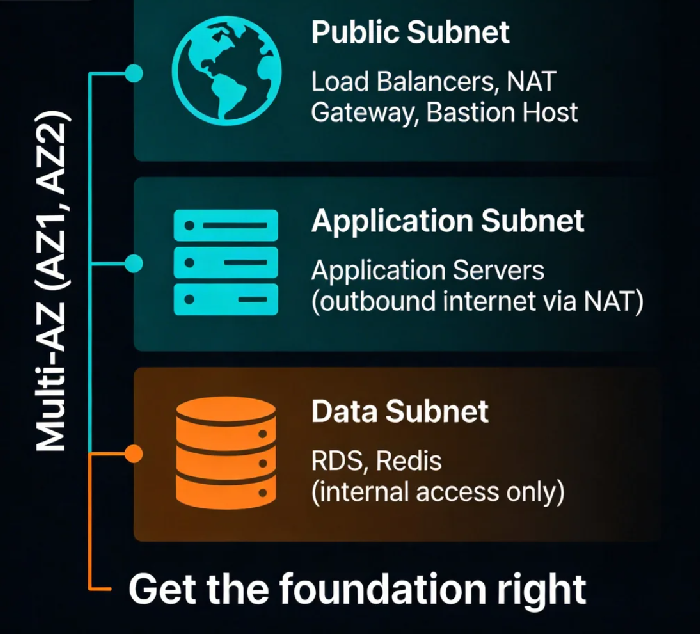
After you create the VPC, you divide it into subnets. The principle is simple: put different types of resources into different subnets.
At a minimum, create three layers:
Public subnets: For load balancers, NAT gateways, bastion hosts. These need direct or indirect internet access.
Application subnets: For your application servers. They shouldn’t be directly reachable from the internet, but they can reach out through a NAT gateway to download patches.
Data subnets: For databases, Redis, caches. No internet access at all—only allow traffic from the application subnets.
Repeat these three layers in each Availability Zone for high availability.
A classic three‑tier architecture: traffic flows from the load balancer in the public subnet to the EC2 instances in the application subnet, then to the RDS database in the data subnet. Each layer is isolated. If an attacker compromises an application server, they still can’t reach the database.
Counter‑intuitive truth: More subnets aren’t better. Some teams create a separate subnet for every microservice. That leads to routing table explosion and high maintenance overhead. Three layers (public, app, data) per AZ is usually enough.
03 Route Tables: Where Traffic Flows
Every subnet has a route table that tells traffic where to go.
The default route table has only one entry: local, which allows communication within the VPC.
You’ll likely need to add:
Public subnets: Add a route
0.0.0.0/0pointing to an Internet Gateway. This allows load balancers to receive traffic from the internet.Application subnets: Add a route
0.0.0.0/0pointing to a NAT gateway. This lets application servers download patches, but they can’t be reached from the internet.Data subnets: No default route—only VPC‑internal communication.
VPN or Direct Connect subnets: Add routes pointing to the VPN gateway or Direct Connect gateway to reach on‑premises networks.
The design principle: deny by default, allow only what’s necessary. Don’t add default routes unless you truly need them. Each added route is a potential risk.
04 Security Groups vs Network ACLs: Two Firewalls
Many people confuse security groups and network ACLs, or use them interchangeably.
Security groups: Instance‑level firewall. Stateful—if you allow outbound traffic, the return traffic is automatically allowed. Supports only “allow” rules (no explicit deny). An instance can belong to multiple security groups.
Network ACLs: Subnet‑level firewall. Stateless—you must define both inbound and outbound rules. Supports both “allow” and “deny.” A subnet can have only one network ACL.
How to use them:
Security groups are your primary tool. Write most rules here.
Network ACLs are for special cases, such as explicitly blocking a specific IP address (which security groups can’t do).
A common configuration: the application subnet’s security group only allows traffic from the load balancer; the data subnet’s security group only allows traffic from the application subnet.
Counter‑intuitive truth: Fewer security group rules are better. Too many rules become hard to maintain, and order‑of‑operation issues can accidentally allow unintended traffic. If you need more than 10 rules, step back and rethink your architecture.
05 NAT Gateways: Letting Private Instances Reach the Internet
Instances in private subnets don’t have public IPs. But sometimes they need to reach the internet—to download patches, call external APIs, etc.
A NAT gateway solves this. You place it in a public subnet, and add a route in the private subnet’s route table pointing 0.0.0.0/0 to the NAT gateway. Traffic goes out, but nothing can initiate a connection back in.
The hidden costs of NAT gateways:
Expensive: You pay for the gateway itself, plus data transfer fees. If your private instances download large volumes, the bill can be shocking.
Single point of failure: A NAT gateway lives in one Availability Zone. If that AZ fails, your private instances lose internet access. You need a NAT gateway in each AZ, plus routing logic to fail over.
Alternatives to NAT gateways:
VPC endpoints: If your private instances only need to access AWS services (S3, ECR, CloudWatch, etc.), use VPC endpoints. Traffic stays within the AWS network, cheaper and more secure.
Self‑managed NAT: Run your own NAT on EC2 instances using iptables. Cheaper, but you must manage high availability yourself.
06 A Real Story: The Cost of a /24
Remember the client who ran out of IPs? Their story is worth telling in full.
They chose 10.0.1.0/24 because “256 IPs is plenty.” At first, it was. But as their business grew, so did their Kubernetes cluster. Nodes grew from 3 to 20. Each node consumed one primary IP, plus a few auxiliary IPs. Add RDS, Redis, load balancers, a NAT gateway, and they hit the limit.
We evaluated two options:
Option 1: Rebuild the VPC with a
/16CIDR (10.0.0.0/16). This required a full migration of all services—a planned downtime window and a week of engineering effort.Option 2: Add a secondary CIDR to the existing VPC (supported by some cloud providers). Old resources stay in the crowded
/24; new resources go into the new range. This avoids downtime but doesn’t solve the underlying scarcity in the old subnet.
They chose Option 1. One week of migration, zero sleep. The tech lead later said: “If I had just picked a /16 from the start, this would have been a non‑issue.”
The Bottom Line
VPC design seems like a few clicks during initial setup. But once it’s built, changing it is painful. Wrong CIDR? Too few subnets? Messy route tables? Every layer of your architecture will have to live with those decisions.
Spend an hour planning. The time you save later could be weeks.
That client rebuilt their VPC with a /16, six subnets across multiple AZs, clean route tables, and well‑documented security groups. Two years later, they’ve never had a networking‑related outage. The tech lead told me:
“I used to think networking was operations’ problem. Now I know—it’s the foundation. If the foundation is wrong, nothing above it is right.”
How solid is your cloud foundation?
