

Cloud Cost Anomaly Detection and Alerting: Don’t Wait for the Bill to Regret
Last month, a startup CTO messaged me with a screenshot of their cloud bill. “Does this look normal to you?”
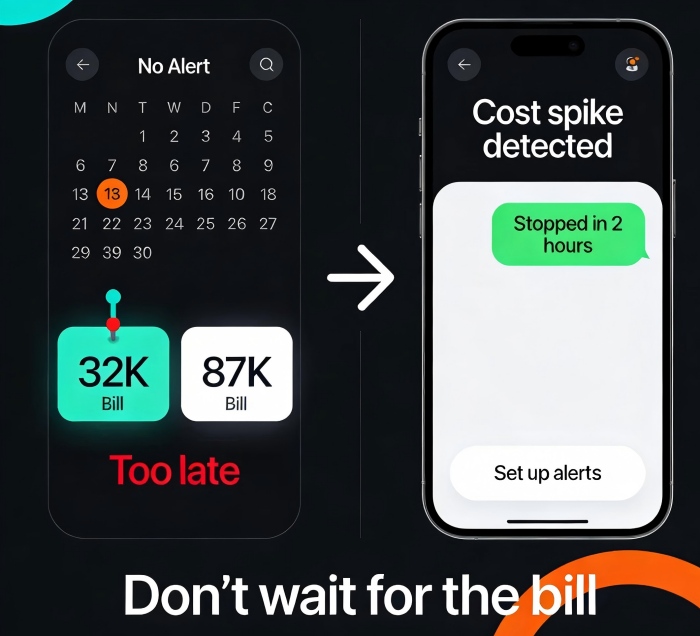
I opened it. Last month: $32,000. This month: $87,000. He followed up: “Our business didn’t grow that much. The CEO is losing his mind.”
It took me three days to investigate. The culprit? A Kubernetes cluster in their test environment. Someone had planted a cryptominer, and the CPUs had been running at 100% for an entire month. No one noticed—because they had no cost alerts.
The bill arrived. The damage was done. The money lost that month would have paid for a year of cost alerting tools.
This is the painful truth about cloud cost management: You will never catch an anomaly before the bill arrives—unless you set up alerts.
Today, let’s talk about cloud cost anomaly detection and alerting. Not the “cost is important” fluff, but a practical guide: how to proactively detect cost spikes, how to set up alerts, and how to stop the bleeding before the bill shocks you.
01 Don’t Wait for the Monthly Bill—It’s Already Too Late
Many teams manage cloud costs by glancing at the monthly bill, comparing it to last month, cursing a bit, and moving on.
But the lag in cloud billing means that by the time you see the problem, the money is already spent.
A cryptomining attack can burn thousands of dollars in hours.
A developer forgets to shut down a test environment—another month of charges.
A misconfigured CDN doubles your data transfer fees, and you only notice at month end.
Counter‑intuitive truth: Cost alerts aren’t about saving money. They’re about avoiding surprises. Knowing you’re about to blow your budget is far better than seeing the damage after the fact.
02 What Does a Cost Anomaly Look Like?
Let’s walk through the common types of anomalies so you know what to watch for.
Type 1: Resource leak
The most common. An instance left running. A test environment that never got shut down. A classic example: an intern spun up a GPU instance for a model training job, forgot to terminate it, and added nearly $1,000 to the monthly bill.
Type 2: Unexpected traffic
An attack, a scraper going wild, a misconfigured CDN. Traffic spikes, and costs spike with them. A DDoS attack doesn’t just take your service down—it can blow up your bill.
Type 3: Configuration mistake
Turning on cross‑region replication by accident. Setting log level to DEBUG everywhere. Changing backup retention to “forever.” Each of these bleeds money silently.
Type 4: Business growth mistaken as anomaly
This one is subtle. A 50% cost increase might be perfectly normal if your user base doubled. Your alerting system needs to distinguish between growth and anomaly, or you’ll be flooded with false alarms.
03 How to Detect Anomalies: Three Methods
Cloud providers offer several ways to detect cost anomalies. Pick what fits.
Method 1: Budget‑based alerts
The simplest. Set a monthly budget, say $10,000. Alert at 80% and 100%. The downside: by the time you hit 80%, you’re already deep into the month.
Method 2: Day‑over‑day or week‑over‑week alerts
Compare today’s cost to yesterday, or this week to last week. If it jumps 30%, send an alert. This catches problems much earlier.
The challenge: natural business growth can trigger false positives. You’ll need to tune the threshold.
Method 3: Machine learning anomaly detection
Cloud providers now offer intelligent detection that learns your historical spending patterns and automatically flags anomalies. AWS Cost Anomaly Detection and Azure Cost Alerts are examples.
Your cost usually follows a pattern: higher on weekdays, lower on weekends; higher early in the month, lower later. ML models learn these patterns and reduce false alarms.
Counter‑intuitive truth: ML‑based detection often has a lower false‑positive rate than fixed thresholds. Because your cost is never perfectly flat. Fixed thresholds are hard to tune; ML adapts.
04 Where and How to Set Up Alerts
Too many alerts cause alert fatigue. Too few, and you miss the real problems.
Key alerts to consider:
Daily cost increase >30% day‑over‑day – sudden spikes almost always indicate a problem.
Monthly budget threshold (80% and 100%) – early warning before you blow the budget.
Spike in a single service – for example, an RDS instance’s cost suddenly doubles.
New region or new service – someone turned on something they shouldn’t have.
Where to send alerts:
Team chat (Slack, Teams, Discord) – ping the responsible person.
Critical alerts via SMS or phone call – don’t let them sit in email.
Include a runbook: what to check first, which dashboard to open, who to contact.
One client practice: they routed cost alerts to their operations channel and @mentioned the cost owner. The first time they got a “daily cost up 40%” alert, they traced it to a test environment left running and shut it down within two hours, saving hundreds of dollars.
05 Tooling: Native or Third‑Party?
Cloud providers all offer cost anomaly detection tools:
AWS Cost Anomaly Detection: ML‑based, monitors by service, account, or tag. Free (requires Cost Explorer to be enabled).
Azure Cost Alerts: Budget alerts + anomaly detection (preview).
Google Cloud Budget & Alerts: Budget‑focused; anomaly detection is weaker.
Alibaba Cloud Cost Manager: Cost analysis + anomaly alerts.
Native tools are sufficient for most teams. Easy to set up, tightly integrated with billing data. The downside: they don’t unify across multiple clouds.
Third‑party tools like CloudHealth, Spot, and Vantage offer multi‑cloud support and advanced features (e.g., automated recommendations). They’re more expensive.
Start with native. If you run a multi‑cloud environment or need advanced automation, consider third‑party.
06 A Real Story: Stopping the Bleed in Two Hours
A client received a cost alert at 2 AM: their daily spend had spiked to 5× normal in the last two hours. They logged into the console and found dozens of unfamiliar GPU instances running at 100% CPU.
A developer’s test IAM key had been leaked. An attacker used it to spin up instances for cryptomining. They terminated the instances, revoked the key, and had the situation under control within two hours.
Without that cost alert, the mining operation would have run for a month. The bill would have been tens of thousands of dollars higher.
Their ops lead told me afterward: “I used to think cost alerts were nice to have. Now I think they’re a lifeline.”
The Bottom Line
The biggest trap in cloud cost management isn’t high prices. It’s not knowing you’re overspending until the bill arrives.
By then, it’s too late. An attack can burn thousands in hours. A forgotten test environment can cost you a month of charges.
Setting up cost alerts takes an hour. The money it can save you might pay for years of cloud bills.
That client who got hit by the cryptominer? They now have cost alerts wired to their on‑call system. Last month, another alert fired—a sudden CDN cost spike. They traced it to a misconfiguration and fixed it within 30 minutes.
Their lead said: “Now I don’t fear the bill. I fear the alert not going off.”
Do you have cost alerts yet? If not, start today. An hour of setup could save you a month of regret.
