

Beyond CPU and Memory: Cloud Business Metric Monitoring and Custom Alerting in Practice
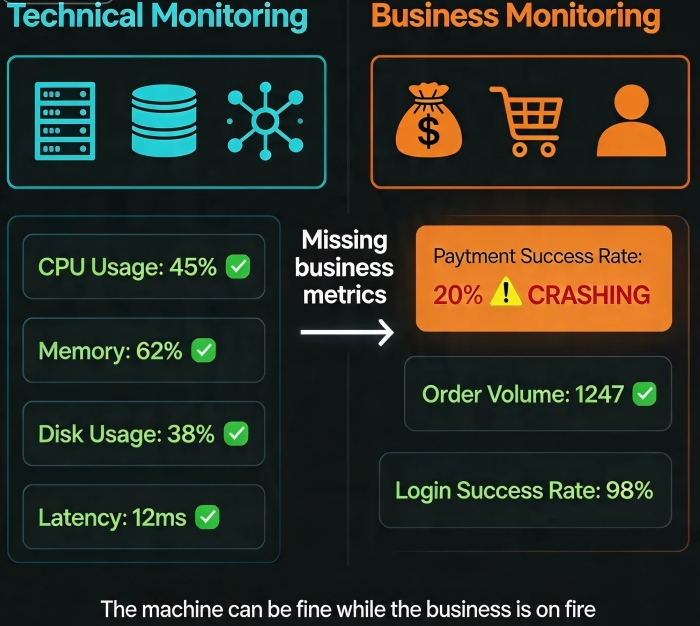
During last year’s Black Friday, an e‑commerce client’s dashboard was all green—CPU normal, memory normal, disk normal. But their customer support line was flooded: “I can’t pay!”
The tech team was confused. Every technical metric looked fine. How could there be an outage?
After 30 minutes of digging, they found the problem. The payment gateway had introduced a new error code. The application code didn’t handle it. Payments failed silently. But the HTTP status code was still 200. Their monitoring saw “success” everywhere.
This is the blind spot of technical monitoring: Your metrics can be green while your business is bleeding.
Today, let’s talk about business metric monitoring. Not the “monitoring is important” fluff, but a practical guide: which business metrics matter, how to collect them, how to alert on them, and how to catch problems before your customers scream.
01 Technical Monitoring Sees the Machine, Not the Business
CPU, memory, disk, network—these tell you how the hardware is running. They don’t tell you how the business is doing.
CPU normal, but users can’t log in. Technical monitoring doesn’t see it.
Memory normal, but payment success rate drops from 99% to 50%. Technical monitoring doesn’t see it.
Disk normal, but add‑to‑cart rates plummet. Technical monitoring doesn’t see it.
Counter‑intuitive truth: Green technical metrics don’t mean a healthy business. Sometimes, the business is already on fire while the dashboard stays green.
That e‑commerce client had perfect infrastructure monitoring. But no one was watching business metrics. The payment gateway changed its API, added a new error code, the code didn’t handle it, payments failed—and because the HTTP status was 200, the monitoring system logged “success.”
Business metrics are the thermometer for your revenue. Technical metrics are the thermometer for your machines. You need both.
02 Which Business Metrics Actually Matter?
Business metrics fall into three categories, ranked by importance.
Category 1: Revenue metrics
Directly tied to money. Daily GMV, hourly order value, average order value.
These are the most sensitive. If GMV suddenly drops by half, you have a problem—long before customers complain.
Category 2: Conversion metrics
Reflect the user behavior funnel. Login success rate, search click‑through rate, add‑to‑cart rate, checkout success rate, payment success rate.
A sudden drop in conversion rates is often the earliest sign of trouble—a bug, a broken third‑party API, a failing page. Users get stuck before they even reach the payment step.
Category 3: Traffic metrics
Reflect user activity. Page views, unique visitors, QPS, concurrent users.
A sudden traffic spike could be an attack or a viral event. A sudden drop could be a DNS failure or a CDN issue.
That e‑commerce client later added “payment success rate” and “checkout success rate” to their main dashboard. During the next flash sale, those numbers twitched—and they knew something was wrong before support calls flooded in.
03 How to Collect Business Metrics
Business metrics aren’t in your system metrics. You have to instrument them.
Method 1: Code instrumentation
The simplest and most direct. Add a line of code at key business points.
Payment success → increment a counter. Payment failure → increment another counter. Expose these counters to your monitoring system.
Method 2: Log parsing
If you can’t change code, parse logs. Payment logs, checkout logs, login logs. Write a scheduled job to count events.
Downside: less real‑time. High log volume can be expensive to parse.
Method 3: Middleware interception
Intercept requests at the API gateway, message queue, or service mesh level. Good for collecting metrics across many services without per‑service instrumentation.
Tooling choices:
Prometheus + Grafana: The open‑source standard. Counter, Gauge, Histogram—enough for most business metrics.
Cloud‑native: CloudWatch custom metrics, Azure Monitor custom metrics, ARMS. Tighter integration with cloud services, but pricing is per‑metric.
That e‑commerce client used Prometheus. Their payment service exposed a payment_success_total counter, incremented on every successful payment. Grafana showed a per‑minute rate. Clear, simple, effective.
04 Alerting: Don’t Let Metrics Become Noise
You’ve collected the metrics. You’ve built dashboards. Now you need alerts. But more alerts aren’t better.
Three principles for good alerting:
Principle 1: Alert only when a human must act immediately.
“Payment success rate below 95%” at 3 AM? Yes, wake someone up. “Page views 5% lower than yesterday”? That can wait until morning.
Principle 2: Use dynamic thresholds, not static numbers.
A static “payment success rate below 99%” alert might fire every night during maintenance windows. Change it to “rate dropped more than 5% compared to 10 minutes ago.” That catches real problems without false alarms.
Principle 3: Combine conditions to reduce false positives.
“GMV is dropping” AND “error logs are increasing” → almost certainly a real problem. “GMV is dropping” but everything else is normal → might be the end of a sales event.
That e‑commerce client set up these alerts:
Payment success rate drops more than 10% in 5 minutes → P0, phone alert.
Checkout success rate below 95% → P1, team chat alert.
Orders per minute below 50% of historical baseline → P1.
When the payment gateway had another hiccup later, the alert fired in 3 minutes. The team fixed it before most users noticed.
05 A Real Story: From Technical Metrics to Business Metrics
A SaaS client had excellent technical monitoring. CPU, memory, latency, error rates—everything was instrumented. But the CEO was unhappy: “I look at the dashboard and have no idea if the business is healthy.”
We helped them make the leap.
First, identified three core business metrics: daily active tenants, API success rate (for their core integration), and trial‑to‑paid conversion rate.
Second, added code instrumentation. Logins, API calls, payment webhooks—each exposed Prometheus counters.
Third, rebuilt the main Grafana dashboard. Technical metrics moved to a secondary tab. The default view showed business metrics. The CEO could see “active tenants” and “trial conversions” at a glance.
Fourth, set up business alerts. Active tenants below normal for 30 minutes → alert. API success rate below 99.5% → alert.
Three months later, a business alert caught a problem that technical monitoring missed. Over a weekend, API success rate dropped to 98% (normal was 99.9%). It turned out a batch job was consuming all database connections. Technical metrics didn’t flag anything unusual—CPU and memory were fine. But the business alert triggered. They fixed the job. The CEO said: “We used to learn about problems from customer complaints. Now our monitoring tells us first.”
The Bottom Line
Technical monitoring tells you how your machines are running. Business monitoring tells you how your business is running. You need both.
Don’t wait until CPU spikes to know something is wrong. Put payment success rate, checkout conversion, login success rate—those numbers—on your main dashboard. Add them to your alert rules.
That e‑commerce client’s ops lead summed it up: “I used to think monitoring was for engineers. Now I think monitoring is for the business. The machine can be fine while the business is on fire. That’s the real outage.”
Does your dashboard have a thermometer for your business today?
