

Cloud Change Management: From Manual Approvals to Automated Deployments – Stop Blaming Changes
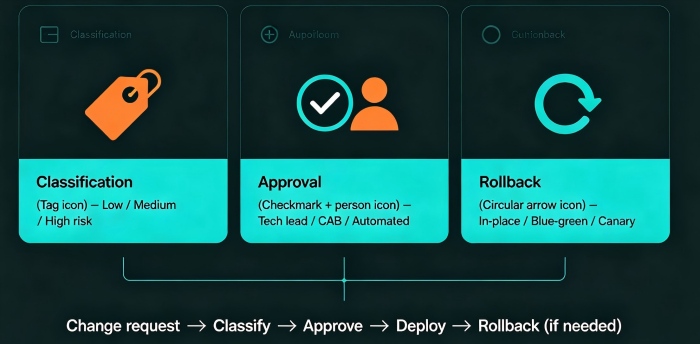
Last year, a client made a change on a Friday afternoon. One line of configuration. That change triggered a cascade of failures. The entire weekend was spent fighting fires. Monday's post‑mortem asked the usual questions: Who approved this? Why no review? Where was the rollback plan?
The conclusion: “Change management failure.”
This is the story of most companies. Until something breaks, nobody cares about change management. After it breaks, everyone blames it.
Today, let’s talk about cloud change management. Not the “follow the process” fluff, but a practical guide: how to classify changes, design approval workflows, use automation to reduce risk, and stop treating changes as the scapegoat.
01 Not Every Change Needs a Human Approval
Many people equate change management with “get a signature before deploying.” That’s a dangerous misunderstanding.
The purpose of change management is to control risk, not to create bureaucracy. Different risks need different paths.
Low‑risk changes – automated execution, post‑hoc audit
Non‑critical config tweaks, routine ops tasks, standard releases
No human approval required. But every action is logged: who, what, when.
Medium‑risk changes – lightweight approval, automated execution
Core config changes, new feature releases, scaling operations
Tech lead approval required. Execution is still automated.
High‑risk changes – strict approval, planned window, mandatory rollback plan
Database migrations, architecture changes, core system refactoring
Change Advisory Board (CAB) approval. Scheduled window. Rollback plan documented.
The Friday afternoon change that broke the client’s system was high‑risk—they modified core routing. But they treated it like a routine config change. No approval. No window. No rollback.
Counter‑intuitive truth: More approvals aren’t always better. Over‑approving low‑risk changes encourages people to bypass the process, which is far more dangerous.
02 Change Windows: Obsolete or Essential?
Traditional ITIL introduced “change windows” – specific time slots when changes are allowed (e.g., Thursdays 2‑4 PM).
Modern DevOps preaches continuous delivery – deploy anytime. Are these two ideas in conflict?
Not really. High‑risk changes need windows. Low‑risk changes don’t.
Database migration, core architecture change → schedule it during low traffic, with enough time to roll back.
Routine feature release → deploy anytime, as long as rollback is fast.
The client’s mistake was treating a high‑risk change as a routine release. Friday afternoon, no window, no rollback. They paid for it with a ruined weekend.
The value of a change window isn’t to restrict you. It’s to force you to think about your rollback plan. If you believe you can “deploy anytime,” that also means “break anytime.”
03 Rollback Is Not a Backup Plan – It’s the Plan
The core of change management isn’t “how to go live.” It’s “how to go back.”
Every change must answer three questions before approval:
If it fails, how do we revert?
How long will the rollback take?
Will we lose data during rollback?
If you can’t answer these, the change doesn’t happen.
Common rollback strategies:
In‑place rollback: Revert to the previous version. Fast, but database changes may be incompatible.
Blue‑green: Two environments (blue = live, green = new). Switch traffic. Rollback is flipping the switch back. Second‑fastest. Requires double resources during the switch.
Canary (or “canary withdrawal”): Route only a small percentage of traffic to the new version. If problems appear, stop the canary. Lowest risk, but takes longer.
The client’s Friday change had no rollback plan. When it broke, they didn’t know how to go back. They had to fix forward while the site was down.
Counter‑intuitive truth: A change without a rollback plan isn’t a change – it’s a gamble.
04 Approvals: Who Decides and How?
An approval process isn’t about adding gatekeepers. It’s about matching risk to the right decision‑maker.
Example approval matrix:
| Change risk | Approver | Method | Example |
|---|---|---|---|
| Low | None | Automated logging | Change log level on a non‑core service |
| Medium | Tech lead | Chat/email confirmation | Routine feature release |
| High | Change Advisory Board (CAB) | Scheduled review meeting | Database migration, architecture change |
The CAB doesn’t need to meet daily. A weekly “change review” meeting works. Review high‑risk changes scheduled for the coming week.
After their incident, the client established a CAB. High‑risk changes required three signatures: tech lead, operations lead, security lead. The CAB met every Wednesday. Approved changes were scheduled for Thursday.
The first month, the CAB rejected two changes that lacked rollback plans. Both submitters grumbled. Both later admitted the CAB had saved them from potential disasters.
05 Automated Deployment + Human Gates
Modern change management isn’t “manual” or “fully automated.” It’s automated execution with human decision gates.
Build, test, and deployment are fully automated (CI/CD).
At key points, insert a human approval: after staging tests, before production cutover, before traffic switch.
Benefits:
Humans make decisions; machines execute (no typos, no forgotten steps).
Every action is logged and auditable.
Emergency changes can skip gates, but the skip is recorded.
The client rebuilt their pipeline this way: CI/CD built and deployed to staging automatically. The tech lead clicked “approve” in Slack. The pipeline then deployed to production. Every step logged. Every approval timestamped.
The ops lead said: “Before, I was the deployment script – error‑prone and tired. Now I just decide. The machine does the rest.”
06 A Real Story: From Chaos to Control
A financial client had no change management. Anyone could push to production. No approvals, no windows, no rollback plans. Three major outages in one year. Every post‑mortem blamed “human error.”
We helped them build a change management process from scratch.
Step 1: Classify changes. Every type of change was labeled low, medium, or high risk.
Step 2: Build an approval matrix. Medium risk → tech lead. High risk → CAB. Low risk → automatic.
Step 3: Define change windows. High‑risk changes only on Tuesdays and Thursdays, 2‑4 PM. Outside those windows, the pipeline blocked high‑risk deployments.
Step 4: Automate execution. CI/CD pipeline. Humans only clicked “approve.”
Step 5: Maintain a change calendar. All changes, planned and executed, on a shared calendar. Monday: review the week’s planned changes. Thursday: review what actually happened.
Six months later, change‑related outages dropped from three per year to zero. Their tech lead said: “I used to see change management as bureaucracy. Now I see it as a shield – protecting the system from bad changes and protecting engineers from blame.”
The Bottom Line
Change management can feel heavy. But at its core, it’s simple: classify risk, match the right approval, always have a rollback, automate the execution.
That client’s ops lead summed it up: “A change isn’t just a deployment. It’s a hypothesis. You hypothesize that the new version is better. The rollback plan is your way to test that hypothesis safely.”
Your changes – are they hypotheses backed by a rollback plan, or just blind deployments waiting to break the weekend?
