

Alert Fatigue? Cloud Alert Noise Reduction and Smart Alerting in Practice
Last year, a client told me, “We get over 500 alerts every day. Nobody reads them anymore. We’ve muted the alert channel. Now we only find out about real outages when customers complain.”
I asked, “How do you know which alerts matter?”
He paused. “Luck. Sometimes we get lucky.”
This isn’t an isolated story. Alert fatigue is the silent killer of operations teams. Too many alerts → team ignores them → real emergencies get missed.
Today, let’s talk about alert noise reduction and smart alerting. Not the “alerts are important” fluff, but a practical guide: how to reduce noise, how to prioritize, and how to make your team actually want to look at alerts again.
01 More Alerts ≠ Better Coverage
Many people think setting more alerts means catching more problems.
Wrong.
More alerts mean lower signal‑to‑noise ratio. Important alerts get buried. The team becomes fatigued. Eventually, no one looks at any alert.
Counter‑intuitive truth: Alerts aren’t better when there are more of them. They’re better when there are fewer of the right ones.
That client had 500 daily alerts. Most were things like “CPU >80% for 1 minute.” Transient spikes woke people up at 3 AM. Soon the whole team muted the channel. Then a real emergency hit: the database connection pool exhausted. An alert fired, but it was lost in the noise. By the time customers complained, 30 minutes had passed.
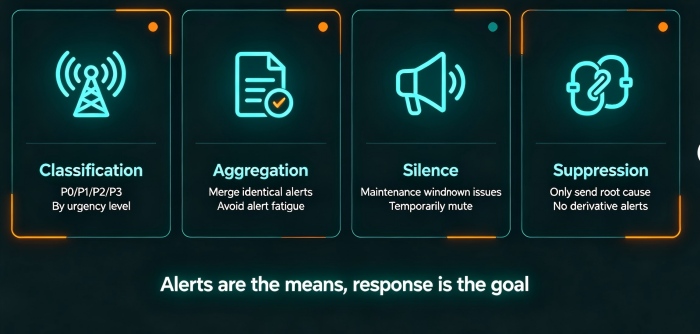
02 First Step: Classify – P0, P1, P2, P3
The first step in alert reduction isn’t deleting rules. It’s classification.
Group alerts by urgency and impact:
P0 (Emergency): Core business down, data loss, security breach. Must act immediately. Phone + SMS + chat. SLA: 5 minutes.
P1 (Critical): Core feature impaired, widespread slowdown. Respond quickly, but not necessarily 3 AM. SLA: 30 minutes.
P2 (Warning): Non‑core issue, potential risk. Handle during working hours. SLA: 4 hours.
P3 (Info): Routine fluctuations, resource forecasts. No action needed. Dashboard only.
That client reclassified every alert. P0 was reserved for only three things: payment success rate below 95%, core database down, security alert. Everything else dropped to P2 or P3.
The result? P0 alerts dropped to fewer than five per week. The team un‑muted the channel.
03 Three Noise‑Reduction Techniques: Aggregation, Silence, Inhibition
Classification alone isn’t enough. You need three specific techniques.
Aggregation: Merge identical alerts
Ten alerts for the same problem in one minute? Merge them into one message: “This happened 10 times.” Don’t flood the channel.
Prometheus Alertmanager and cloud alert centers support grouping. Group by alert name or labels. One alert, with a count.
Silence: Shut up temporarily for known issues
A known outage is being fixed. Stop sending alerts about it for, say, 30 minutes.
During maintenance windows, schedule silences in advance. Avoid alert storms during planned work.
Inhibition: Suppress child alerts
A server goes down. That triggers dozens of “service unreachable” alerts. Those are symptoms, not the root cause. Configure inhibition: if “server down” fires, suppress all alerts that depend on it. Send only the root cause.
After the client added inhibition rules, P0 counts didn’t change, but P2/P3 alerts dropped from 500 per day to 50. Their ops lead said, “I can finally see what matters.”
04 Smart Alerting: Dynamic Thresholds and Anomaly Detection
Static thresholds are always wrong. CPU >80% might be normal during business hours. CPU <50% might be abnormal at 3 AM when it should be 10%.
Smart alerting uses dynamic thresholds and anomaly detection.
Dynamic thresholds: The system learns the last 7‑30 days of data. It sets different thresholds for different times of day. CPU >50% at 2 AM may be an anomaly; CPU >80% at 2 PM may be normal. Automatically adapts to your business pattern.
Anomaly detection: The system learns “normal” behavior and alerts when patterns deviate. A sudden spike in error rate, even if the absolute value is low, can indicate a problem.
Predictive alerting: The system predicts that a disk will fill up in one hour. It alerts you now, so you can act before it fills.
Major cloud providers offer these: AWS DevOps Guru, Azure Anomaly Detector, Alibaba Cloud Smart Alerting. Use them. They save your team’s sanity.
05 Alert Governance Is Ongoing
Reducing noise isn’t a one‑time project. You need continuous governance.
Regular reviews: Every week, look at which alerts fired and were ignored. Downgrade them, change their rules, or delete them.
Track response rates: P0 alerts should have 100% response. If not, something is wrong: either the classification is off, or you don’t have enough people on call.
Track MTTA (Mean Time to Acknowledge): Goal: P0 < 5 minutes, P1 < 30 minutes. Measure it. Improve it.
That client added alert governance to their weekly operations meeting. Each week they reviewed three things: how many alerts fired, P0 response rate, and which rules needed adjustment. After three months, total alerts dropped from 500 to 50 per day, and P0 response rate rose from 40% to 100%.
The Bottom Line
More alerts don’t mean better coverage. Noise hides signal.
That client eventually renamed their alert channel from “Alert Notification” to “On‑Call Response.” Their ops lead said: “The new name reminds us: this channel isn’t for watching alerts. It’s for responding to problems.”
Alerts are a means. Response is the goal. Don’t let noise drown out what matters.
Is your alert channel a place where real problems are caught—or just another muted chat room?
