

Cloud Scheduled Jobs and Batch Processing: Don’t Let Your Scripts Run Unattended for Years
Last year, a client called me at midnight. Their database was down. Not an attack, not a traffic spike—the disk was full. We dug deeper. There was a log cleanup script in their crontab, supposed to run daily. But three years earlier, the server had been migrated. The crontab entry didn’t make it across. The script hadn’t run in three years.
No one noticed. Because no one was watching the logs. The cleanup script didn’t run, so logs kept accumulating. Three years later, the disk filled up.
This is the quiet tragedy of scheduled jobs: When it runs, no one cheers. When it stops, no one notices—until something breaks.
Today, let’s talk about cloud scheduled jobs and batch processing. Not the “cron is important” fluff, but a practical guide: how to make jobs reliable, how to retry failures, how to monitor them, and how to stop flying blind.
01 Cron Is Not an Operations Platform—It’s a Trigger
Many people treat crontab as a complete scheduling system. Write a line, add a script, and it will run every day—case closed.
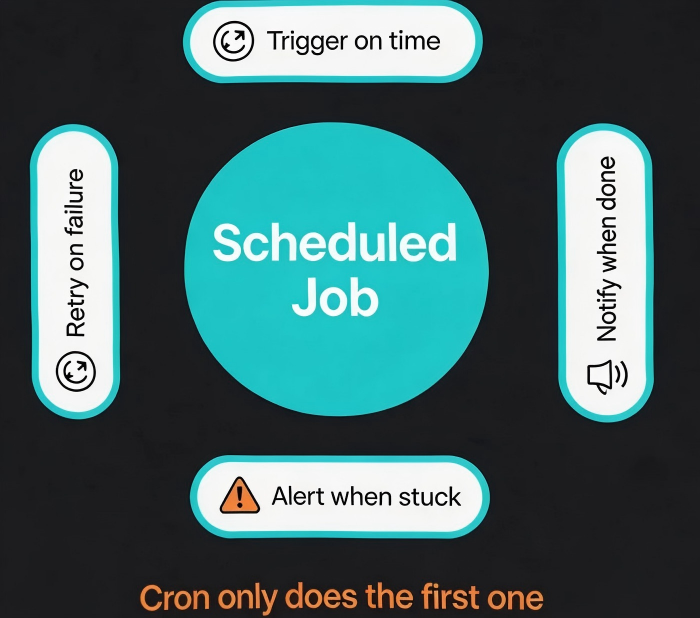
But cron does exactly one thing: execute a command at the right time. It does nothing about:
Retries (if it fails, it fails)
Concurrency (if the previous run hasn’t finished, the next one still starts)
Dependencies (Job B can’t wait for Job A)
Monitoring (no logs, no alerts, no visibility)
Counter‑intuitive truth: Cron is not a scheduling platform. It’s a timer. A real platform needs retries, monitoring, and dependency handling.
That client’s log cleanup script used plain cron. No monitoring. No alerting. When the crontab didn’t survive migration, the script went silent. Years passed. The disk filled. The database stopped. The first sign of trouble was the outage itself.
02 Cloud‑Native Options: What to Use Instead
The cloud offers much better ways to run scheduled work.
Option 1: Serverless functions + scheduled triggers
AWS Lambda + EventBridge, Azure Functions + Timer Trigger, Google Cloud Scheduler + Cloud Functions
Good for: short‑running jobs (minutes), lightweight, stateless work
Pros: No servers to manage, built‑in retries (configurable)
Cons: Execution time limits (Lambda has a 15‑minute max)
Option 2: Managed batch processing
AWS Batch, Azure Batch, Google Cloud Batch
Good for: large‑scale batch jobs, data processing, long‑running workloads
Pros: Managed compute, pay only for what you use
Cons: More configuration than serverless functions
Option 3: Self‑hosted job orchestrators
Apache Airflow, DolphinScheduler, Jenkins
Good for: complex DAG dependencies, rich UI, fine‑grained control
Pros: Powerful retry logic, dependency management, built‑in monitoring
Cons: You must run and maintain the platform
Option 4: Cron with monitoring (the minimal upgrade)
Keep cron, but add heartbeats. At the end of the job, send a “still alive” signal to your monitoring system. If the signal doesn’t arrive, fire an alert.
That client eventually moved their log cleanup to AWS Lambda + EventBridge. Lambda retries failed invocations automatically (twice by default). CloudWatch tracks execution counts and alerts on sustained failure. Their ops lead said: “We used to run blind. Now we know if the job even ran.”
03 Reliability Design: Assume It Will Fail
First principle of scheduled job design: Assume every run will fail at some point. Design for it.
Retries
Transient failures (network blips, downstream timeouts) → automatic retry with exponential backoff.
Permanent failures (code bug, misconfiguration) → retry won’t help. Alert a human.
Idempotency
Running the same job twice should produce the same outcome. This prevents duplicate charges, double notifications, or corrupted data.
How: record the last processed offset, use unique request IDs, check before writing.
Timeouts
A job must not run forever. Set a timeout. If it exceeds the limit, terminate it and send an alert.
Concurrency control
Prevent the next run from starting while the previous one is still running. Use a lock (Redis, database) or a queue.
The client’s log cleanup had none of these. No retry, no idempotency, no timeout. Fortunately, the problem was “it never ran” rather than “it ran wrong.” But either case would have been invisible until the disk filled.
04 Monitoring and Alerting: Make the Silent Speak
The worst thing about scheduled jobs is silence. You don’t know if it succeeded, failed, or ran at all.
What to monitor:
Scheduled trigger: Did the job start on time?
Success/failure: Did it complete without error?
Duration: Is it getting slower over time?
Data volume: Did it process the expected number of records?
Alerting rules:
Job failure → alert immediately
Job timeout → alert
Job didn’t trigger on schedule (e.g., 10 minutes late) → alert
Consecutive failures (e.g., 3) → escalate alert
Tools:
AWS: EventBridge logs schedule triggers; CloudWatch monitors Lambda executions.
Airflow: Built‑in job monitoring and alerting.
Generic: Send a heartbeat (e.g., a custom metric to Prometheus) at the end of every run. Alert if the heartbeat is missing for longer than the expected schedule.
That client added one line to the end of their cleanup script: echo "cleanup completed" | aws sns publish --topic-arn xxx. Every successful run sent an SNS message. CloudWatch monitored the SNS topic. If no message arrived within 24 hours, an alert fired. They’d never again wonder, “Did it run?”
05 Job Dependencies: When One Job Waits for Another
Simple jobs can run independently. Complex workflows have dependencies.
For example: data sync finishes → data cleaning runs → report generation runs.
How to implement dependencies:
Orchestration tools: Step Functions, Airflow, DolphinScheduler. They model dependencies natively.
Event‑driven: The upstream job publishes a “done” message to a queue. The downstream job listens to the queue.
Polling (least elegant): The downstream job periodically checks the status of the upstream job.
That client had a morning report that needed data up to 8 AM. The data sync finished at 8:15 AM, but the report ran at 8 AM anyway, using stale data. After switching to Step Functions, the report ran only after the sync completed. Always fresh, no gaps.
The Bottom Line
Scheduled jobs and batch processes are the invisible gears of your system. They clean logs, sync data, and send reports. When they work, no one thanks them. When they break, the damage is often silent—until it’s catastrophic.
That client’s ops lead later said: “I used to think cron was a solved problem. Now I know: cron isn’t the problem. Not monitoring it is.”
Do you know if your scheduled jobs ran today? Or are you hoping?
