

Multi-AZ Disaster Recovery and Failover: Can Your Business Survive a Data Center Outage?
Last year, a cloud provider had a power failure in one of its Availability Zones (AZs). It lasted four hours. Dozens of businesses that were deployed in a single AZ went down for the full four hours. One client called me at 3 AM: “We lost hundreds of thousands of dollars. Another company using the same cloud didn’t go down at all. How?”
I asked: “Are you single‑AZ?”
“Yes.”
“And they are multi‑AZ?”
Silence.
This is the brutal truth about cloud disaster recovery: Data centers will fail. The only question is whether your architecture is built to survive it.
Today, let’s talk about multi‑AZ disaster recovery and failover. Not the “distribute your workloads” fluff, but a practical guide: how to deploy across AZs, how to detect failures, how to shift traffic, and how to keep your data consistent.
01 Multi‑AZ Is Not Automatic Disaster Recovery
Many people think that simply placing resources in multiple AZs means they are disaster‑ready. That’s a dangerous misconception.
Multi‑AZ gives you the potential for resilience. But you must actively configure it.
What you actually need:
Load balancer spanning AZs: Traffic must be distributed across AZs. When one AZ fails, the load balancer stops sending traffic to its instances.
Database across AZs: A primary in one AZ, a replica in another, with automated failover.
Stateless applications: No user sessions bound to a single AZ. Otherwise, when traffic shifts, users are logged out.
The client who lost four hours had EC2 instances in multiple AZs. But their load balancer wasn’t configured for cross‑AZ traffic. Their database had no replica in the second AZ. When AZ‑A failed, the EC2 instances in AZ‑A died, but traffic didn’t shift to AZ‑B. The LB didn’t know how to send it there. All that multi‑AZ spending was useless.
Counter‑intuitive truth: Putting machines in multiple AZs is not doing DR. You must make the entire call chain cross‑AZ.
02 Three Multi‑AZ Deployment Patterns
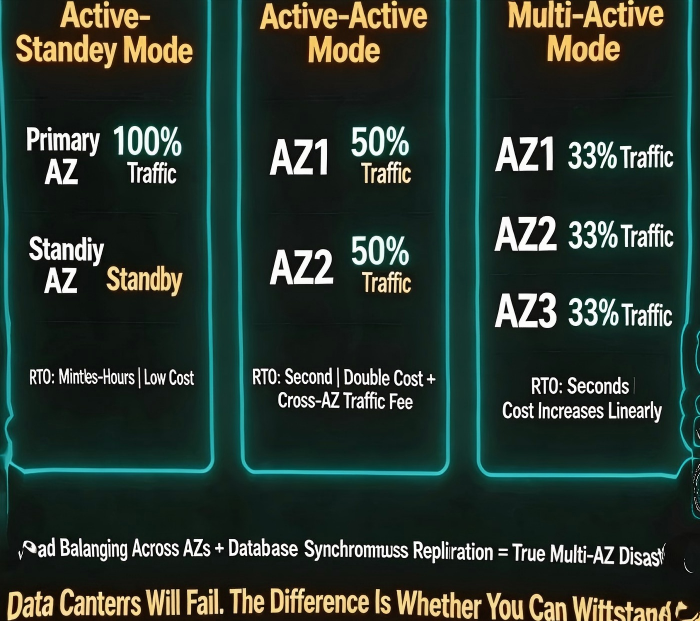
Different patterns offer different RTO (Recovery Time Objective) and cost.
Pattern 1: Active‑Passive
Active AZ: Runs 100% of traffic.
Passive AZ: Instances are deployed but receive little or no traffic.
On failure: Traffic is shifted to the passive AZ, either manually or automatically.
RTO: Minutes to hours.
Cost: Lower. The passive AZ can run with minimal capacity.
Pattern 2: Active‑Active
Both AZs handle traffic, typically 50% each.
On failure: The surviving AZ takes 100% of the traffic.
RTO: Seconds (load balancer shifts automatically).
Cost: Higher. You need full capacity in each AZ, plus cross‑AZ data transfer fees.
Pattern 3: Active‑Active‑Active
Three or more AZs share traffic.
Suitable for very large scale or extreme availability requirements.
RTO: Seconds. Cost scales linearly.
After the outage, that client switched to active‑active: a cross‑AZ load balancer, primary‑replica database with synchronous replication, and 50% traffic in each AZ. When the next AZ failure occurred, traffic shifted automatically. Users never noticed.
03 Failure Detection and Automated Failover
The key to DR is automation, not human intervention.
Load balancer health checks:
The LB periodically pings each target. After N consecutive failures, the target is marked unhealthy and removed from rotation.
Cross‑AZ switching: If the LB itself is in a single AZ, that AZ’s failure will take the LB down too. Use a multi‑AZ LB or a cross‑AZ configuration.
Database failover:
Synchronous replication: The replica stays in sync with the primary.
Automatic promotion: When the primary fails, the replica is promoted to primary automatically. The application must be able to reconnect.
That client’s database had no replica. When AZ‑A failed, they couldn’t start a database in AZ‑B because there was no up‑to‑date replica. After the incident, they added a cross‑AZ replica with synchronous replication. RPO dropped to near zero, RTO to minutes.
04 Data Replication: Sync or Async?
The hardest part of multi‑AZ DR is often data synchronization.
Synchronous replication
A transaction is committed only after it is written to both the primary and the replica.
Pro: No data loss (RPO = 0).
Con: Higher latency. Cross‑AZ network latency is usually 1‑5 milliseconds—acceptable for most workloads.
Asynchronous replication
The primary commits immediately. Data is copied to the replica in the background.
Pro: Better performance.
Con: On AZ failure, you may lose a few seconds or minutes of data.
How to choose?
Core data (orders, payments): Synchronous replication.
Non‑core data (logs, analytics): Asynchronous replication.
The e‑commerce client used synchronous replication for their order database. Cross‑AZ latency was about 2ms—barely noticeable. Their log database used asynchronous replication; losing a few seconds of logs was acceptable.
05 The Cost Argument Is Weak
Many teams avoid multi‑AZ DR because “it’s expensive.”
Let’s do the math:
Single‑AZ: Cost = X.
Active‑active: Cost ≈ 2X + cross‑AZ data transfer (usually $0.01‑$0.02 per GB).
Now compare that to the cost of an outage. Four hours of downtime cost that client hundreds of thousands of dollars. That would have paid for years of cross‑AZ data transfer.
Their ops lead said after the incident: “I thought multi‑AZ was expensive. Then I learned what expensive really means.”
06 A Real Story: AZ Failure, Zero Impact
Last year, another cloud provider had an AZ failure that lasted two hours. One of my clients had zero impact.
What did they do?
Stateless applications: Sessions were stored in a cross‑AZ Redis cluster.
Cross‑AZ load balancer: Automatically removed unhealthy instances from the failed AZ.
Database: Multi‑AZ with synchronous replication and automated failover.
Redis: Cross‑AZ cluster with automatic failover.
Regular drills: Every quarter, they simulated an AZ failure.
When the real failure happened, their monitoring dashboard showed a single alert: “AZ‑1 unavailable. Traffic shifted to AZ‑2.” No customer impact. No lost data.
The Bottom Line
An AZ failure is not a “maybe.” It’s a “when.” The difference between surviving it and losing millions is preparation.
That client who lost four hours? They later rebuilt all their core systems as active‑active across AZs. Their ops lead said: “I used to see multi‑AZ as a cost. Now I see it as insurance. Not to prevent failure—to survive it.”
Can your business survive a data center going dark today?
