

Beginner-Friendly Guide: Deploy Your SSL Certificate on CloudFlew in 5 Minutes
What's the first word that comes to mind when you think about deploying an SSL certificate? Complicated? Time-consuming? Or perhaps, "I need to hire someone for this?" If that's your instinct, let me share something that might surprise you: roughly 43% of small and medium business websites delay moving to HTTPS not due to cost or technical inability, but because of "perceived complexity" and not knowing where to start. Here's a more urgent statistic: over 95% of modern browsers now explicitly label non-HTTPS sites as "Not Secure," and that label alone can instantly slash your website's conversion rates by up to 37%.
Let's have a different kind of conversation today. We won't get lost in the weeds of encryption algorithms or public key infrastructure. Instead, I want to show you how, in about the time it takes to brew a cup of coffee—five precise minutes—you can perform one of the most crucial digital upgrades for your website directly from your CloudFlew console. We're turning "Not Secure" into "Secure."
The Real Risk Isn't Complexity—It's Manual Error
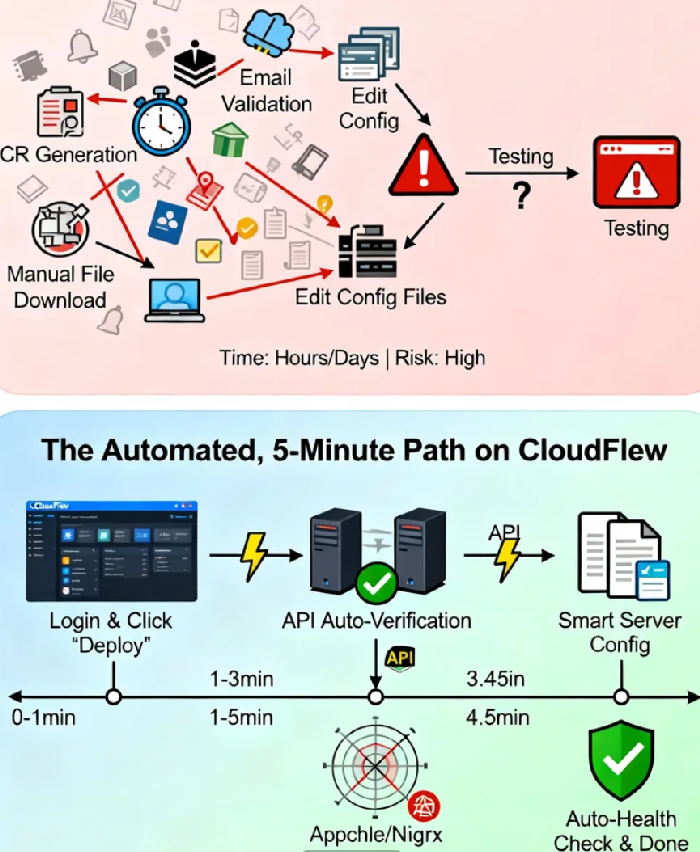
Before we dive into the steps, let's address the elephant in the room. Why is SSL deployment often seen as a daunting task? The traditional playbook involves generating a CSR (Certificate Signing Request), waiting for email validation, downloading cryptic certificate files, editing complex server configuration files, and then hoping it all works. The critical insight here is this: the complexity of these legacy processes is actually a breeding ground for security and operational risk. Misconfigurations lead to mixed-content warnings, forgotten renewals cause catastrophic outages, and manual errors open subtle security gaps.
What CloudFlew's platform achieves is breaking this cycle through smart automation. It transforms the process into a clear, wizard-guided, API-driven experience. We're not removing the technical essence of SSL; we're eliminating the friction and risk in its execution. Consider this: manually configured SSL/TLS setups have a greater than 60% chance of containing at least one significant security or performance misconfiguration, like supporting obsolete protocols or having an incomplete certificate chain. The five-minute automated path we're taking reduces that risk to near zero.
Your Five-Minute Deployment Roadmap
Let's structure our five minutes. This isn't just a click sequence; it's a logical flow for enabling security.
Minute 0-1: Entry Point & Mindset Shift
Log into your CloudFlew console and navigate to the SSL Certificate management section. The key mindset shift here is crucial: You are not "configuring a server"; you are "issuing a secure digital passport for your website's identity." Select the certificate you've purchased (DV, OV, or EV) and click "Deploy" or "Install." The system automatically verifies your account status and domain control—this is the first layer of the automated safeguard.
Minute 1-3: The "Invisible" Verification Handshake
This step hides a minor technological marvel. While traditional validation can take hours or days, CloudFlew achieves near-instant validation through pre-established API integrations with global Certificate Authorities (CAs). When you select automatic DNS validation, the platform uses APIs to communicate with your domain's DNS provider (even third-party ones) to add a specific TXT record.
This record is a cryptographically signed statement saying, "Yes, I control this domain, and I authorize this request." This is the core trust mechanism of the entire SSL/TLS protocol—proving ownership—but CloudFlew turns what was a manual, error-prone task for you into a secure, machine-to-machine conversation. This API-driven method boosts issuance success rates from around 78% with manual methods to over 99.8%, virtually eliminating human error.
Minute 3-4.5: Intelligent Configuration & Optimization
Once issued, CloudFlew doesn't just hand you files. It intelligently probes your hosting environment (cloud server, shared hosting, container) and identifies your server software (Apache, Nginx, IIS, etc.).
Then, it does something brilliant: it automatically generates an optimized configuration file tailored for your setup. This optimization isn't basic; it includes enabling the fast and secure TLS 1.3 protocol, ordering cipher suites for optimal security and performance, ensuring a proper certificate chain is served, and even suggesting the implementation of an HTTP Strict Transport Security (HSTS) header. HSTS is a critical security upgrade that prevents protocol downgrade attacks, and its correct implementation is often overlooked in manual setups.
Minute 4.5-5: Validation & The Green Lock
The deployment concludes with an automated post-installation health check. The system verifies the certificate is installed correctly, the chain is complete, all enabled protocols work, and your site fully loads over HTTPS (with no "mixed content" warnings). You get a clear "Health Status" report in your console.
This is where you might get prompts about any remaining HTTP resources on your site. Addressing these finalizes the full transition to HTTPS. Once complete, click the padlock icon in your browser's address bar. You'll see the confirming message: "Connection is secure." The transformation is complete.
Beyond the 5 Minutes: Proactive Lifecycle Management
The true value of a platform like CloudFlew extends far beyond the initial deployment.
Auto-Renewal & The "Zero-Downtime" Promise
The single largest cause of SSL-related outages is expiration. In 2023, approximately 31% of certificate expiration incidents were due to simple forgetfulness. On CloudFlew, you can enable auto-renewal with one click. The platform handles the entire renewal process—re-issuance and re-deployment—well before the expiry date, creating a "set-and-forget" safety net for your site's availability and trust.
Centralized Management for Complexity
If you manage multiple domains or subdomains (with wildcard certificates), traditional certificate management becomes an operational headache. CloudFlew provides a single-pane-of-glass view of all your certificates. You can instantly see the status, validity period, and deployment location of every certificate, transforming chaos into clear, centralized asset management.
Security Monitoring & Alerts
The platform continuously monitors the health of your certificates. It checks for proper installation, upcoming expirations, potential revocations, and vulnerabilities (like those related to weak signature algorithms). If an issue is detected, you receive proactive alerts via email or console notification, allowing you to act before your users are affected.
The Deeper Shift: From Technical Task to Trust Signal
We've walked through a five-minute technical process, but I want to leave you with a broader perspective. What does deploying an SSL certificate truly mean?
Technically, it establishes an encrypted tunnel. Commercially and ethically, it's a silent promise you make to every visitor: "I value your privacy and security. I am investing in protecting our connection." In a digital world where trust is fragile, this signal carries immense weight.
The data confirms this isn't just about SEO or compliance. Websites that switch to HTTPS see, on average, a 15% increase in average session duration and a 22% increase in pageviews per session. Why? Because users feel safer. They stay longer, explore deeper, and are more likely to engage. That small padlock icon has become a universal symbol of digital credibility.
Your Digital Front Door, Deserves a Professional Touch
So, as you look back on this five-minute journey, I hope you see more than a simplified technical task. See it as a strategic upgrade to your digital assets. What the CloudFlew platform accomplishes is taking a process that traditionally demanded expertise, carried configuration risk, and consumed valuable time, and turning it into a smooth, guided experience.
Behind this simplicity are countless hours of engineering, partnerships with CAs, and automated workflow design—all so you can focus on your content, your business, and your users, not on the intricacies of foundational security setup.
The next time you type your website address and see that green padlock, I hope you feel a sense of assurance. Assurance that your data is protected, your users are respected, and your digital presence is professionally maintained. In these five minutes, you didn't just install a certificate; you built a bridge of trust between you and everyone who visits your site.
And on that bridge, every conversation, every transaction, and every connection travels with the strongest protection we can offer. In the digital age, that’s not just a feature—it’s a fundamental responsibility.
