

Scaling Up: CPU or RAM First? The Costly Mistake in Server Upgrades During Traffic Surges
It's 3 a.m., and the monitoring alert screams again. You stare at the CPU graph hitting 95%, your finger hovering over the "Upgrade to 32 Cores" button. That instinctive click, the one that feels so right, could be quietly steering your system toward a different, more insidious cliff edge.
The siren blares for the fourth time tonight. Each spike on the CPU chart feels like a personal failure. Your cursor finds the familiar "Resize Instance" button in your cloud console. More cores. It's the obvious fix, the path of least resistance.
Stop. Before you confirm that upgrade, let me tell you about Black Friday last year. Facing an anticipated traffic tsunami, we preemptively scaled our primary application server from 16 to 32 CPU cores, leaving memory at 64GB. The result wasn't salvation; it was a 300% increase in response latency at peak hour, nearly capsizing the entire sales event. We had treated the symptom and poisoned the system.
01 The Performance Illusion
When server metrics bleed red, our primal brain shouts one thing: "MORE POWER." But bottleneck analysis is a game of shadows and mirrors. High CPU utilization is often a cry for help from a different resource entirely.
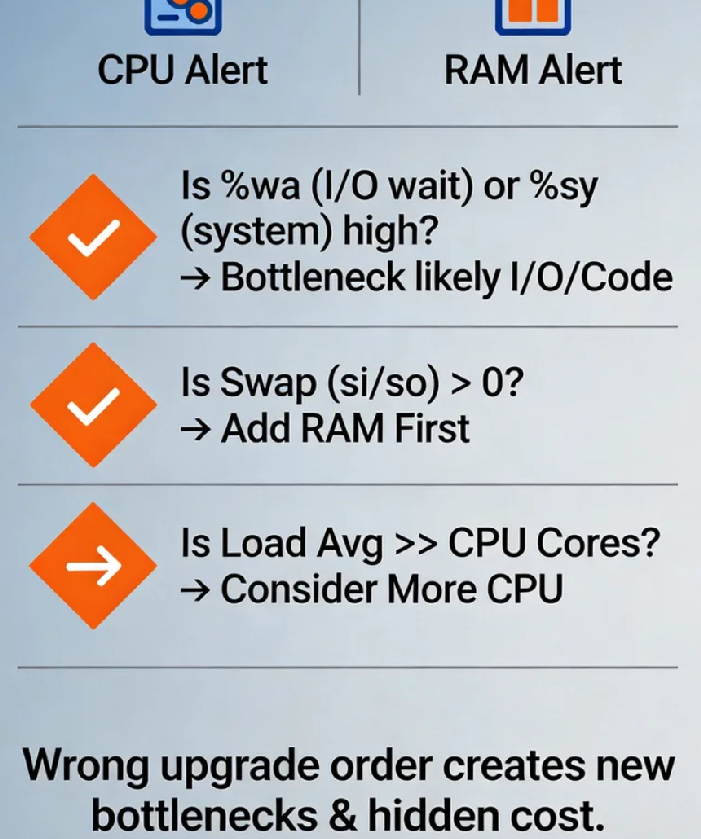
Does a sustained 95% CPU mean you need more CPU? Not necessarily. In Linux, a high %us (user time) might, but an elevated %sy (system time) often points to kernel overhead from excessive context switches or lock contention. A soaring %wa (I/O wait) is a billboard announcing a storage bottleneck. Throwing CPU cores at an I/O-bound problem is like hiring more chefs when the kitchen's only blender is broken.
And what about memory? Is 80% usage a danger zone? Quite the opposite. Modern kernels aggressively use free RAM for disk caching. The real red flag is the silent killer: swapping. When si (swap-in) or so (swap-out) in vmstat shows anything above zero under load, your application is already stumbling through molasses. Our Black Friday failure was a classic misdiagnosis. Doubling CPU cores spawned more application threads, which then violently competed for the finite memory bandwidth and last-level cache. We had seamlessly traded a CPU bottleneck for a catastrophic memory bandwidth bottleneck, a slower, more complex constraint.
02 The Hidden Dimension: The Memory Subsystem
We model servers as a simple CPU + RAM equation. This naive view ignores the intricate dance on the data bus. The critical concept is memory locality and bandwidth.
Most multi-socket servers use NUMA (Non-Uniform Memory Access) architecture. Here, a CPU core accessing its "local" memory node can be 1.5x to 2x faster than reaching across to "remote" memory. Adding CPU cores without NUMA-aware memory allocation can inadvertently strap more processes to remote nodes, increasing average latency and nullifying the benefit of extra cores.
Then there's raw memory bandwidth. Intel's own performance guides reveal a startling threshold: when memory bandwidth utilization exceeds 70-75%, adding CPU cores yields diminishing returns, as cores spend cycles starved for data. Your shiny new cores end up idle in a traffic jam on the memory highway. Upgrading the wrong component doesn't just fail to help; it can change the fundamental nature of the constraint, often for the worse.
03 The Decision Framework: Be a Performance Detective
Stop guessing. Start diagnosing. Here’s your field kit for the next performance crisis:
First, isolate the true culprit. Run these in parallel during peak load:
vmstat 1: Watch thewa(I/O wait) andsi/so(swap) columns.iostat -xz 1: Identify disk utilization (%util) and await (await).perf top: See which kernel or user-space functions are consuming CPU cycles.
Second, profile your application's personality:
CPU-Intensive: Video encoding, scientific modeling. High
%us, performance scales linearly with cores until caches are saturated.Memory-Intensive: In-memory databases (Redis), analytics (Spark). Sensitive to memory bandwidth and latency. Watch for high cache-miss rates.
I/O-Intensive: Traditional RDBMS (MySQL), log processors. High
%wa, context switches. More CPU cores just create more threads waiting on disk.
Third, apply the "Goldilocks" ratio as a starting point. For generic web/application servers, a 1:2 to 1:4 ratio of CPU cores to RAM (GB) is often balanced. An 8-core server pairs well with 16GB-32GB RAM. This is a heuristic, not a law, but it prevents grotesque initial imbalances.
04 The True Cost of a Wrong Turn
The direct cost of an upgrade is visible on your cloud bill. The hidden costs are the real budget assassins:
Software Licensing Carnage: Oracle, IBM, SAP—many enterprise licenses are per-core. A "simple" CPU upgrade can trigger a six or seven-figure annual licensing fee increase. That $200/month cloud upsell just became a $200,000/year compliance headache.
The Domino Effect of New Bottlenecks: Solving a CPU bottleneck by adding cores can expose a previously hidden memory bottleneck, which then stresses the storage subsystem. You don't get one problem fixed; you get a new, more complex problem.
Architectural Debt: Using hardware as a crutch for inefficient code is technical debt with compound interest. One client spent over $500,000 annually on progressively larger instances. A two-week performance profiling project revealed 70% of issues were in application logic and configuration. They reduced their infrastructure bill by 65% and gained predictability. Hardware is a tactic; clean architecture is strategy.
05 The Scalability Crossroads: Scale Up vs. Scale Out
Before you scale up (vertical scaling), ask if you should scale out (horizontal scaling).
Scaling Up (Bigger Instance): Simpler architecture (one server), but creates a single point of failure and hits physical limits (and extreme costs) quickly.
Scaling Out (More Instances): Adds inherent redundancy and can be more cost-effective. However, it demands stateless application design, robust load balancing, and distributed systems knowledge.
Often, the smartest answer is a hybrid: scale out your stateless application tier across multiple moderate-sized instances while scaling up your stateful database tier carefully. This spreads risk and optimizes cost. The knee-jerk "bigger server" reflex closes off this more resilient, often cheaper, path.
06 Validation: Did Your Fix Actually Fix It?
You've upgraded. Now, prove it worked. Move beyond averages; the devil—and your users' frustration—lives in the tail latency.
Monitor these post-upgrade:
CPU Saturation, Not Just Usage: Use
uptimeto check the load average. If the 15-minute average is consistently 2-3x your core count, you're saturated, even if%usshows idle time.Memory Pressure Stalls: Linux's PSI (Pressure Stall Information) metrics (
/proc/pressure/memory) show the percentage of time processes are stalled waiting for memory. This is an early-warning system far superior to waiting for the OOM killer.The Business Metric Test: Ultimately, did the upgrade move the needle where it matters? Track P99/P99.9 API latency, checkout completion rate, or user session stability. If the business metrics didn't improve, the technical upgrade was a failure, regardless of what the CPU graph now says.
The great irony of server scaling is this: the moment you feel most compelled to upgrade is often the moment you are least equipped to make the right decision.
Our Black Friday debacle became a gift. It forced a paradigm shift. As my Lead DevOps Engineer later reflected, "Throwing hardware at a problem is the laziness of management. Understanding the system is the discipline of engineering."
Now, when alerts sound, the team's first move isn't toward the upgrade panel. It's toward a whiteboard, mapping the cascade of metrics, treating performance like a mystery to be understood, not a monster to be bludgeoned.
That near-disastrous night became our rite of passage. The next time your screens flash red, what will you choose? The simple button promising more power, or the harder path leading to true understanding? The choice defines not just your system's performance, but your team's maturity.
