

From Zero to Secure: A 10-Point Security Hardening Checklist for Your New Server (With One-Click Script)
2:17 AM. An alert pops up on your security dashboard: "SSH login successful" from an IP address in a country you've never done business with. A cold realization hits—that brand-new server you provisioned last week and planned to configure "sometime next week" is now likely mining cryptocurrency for a botnet.
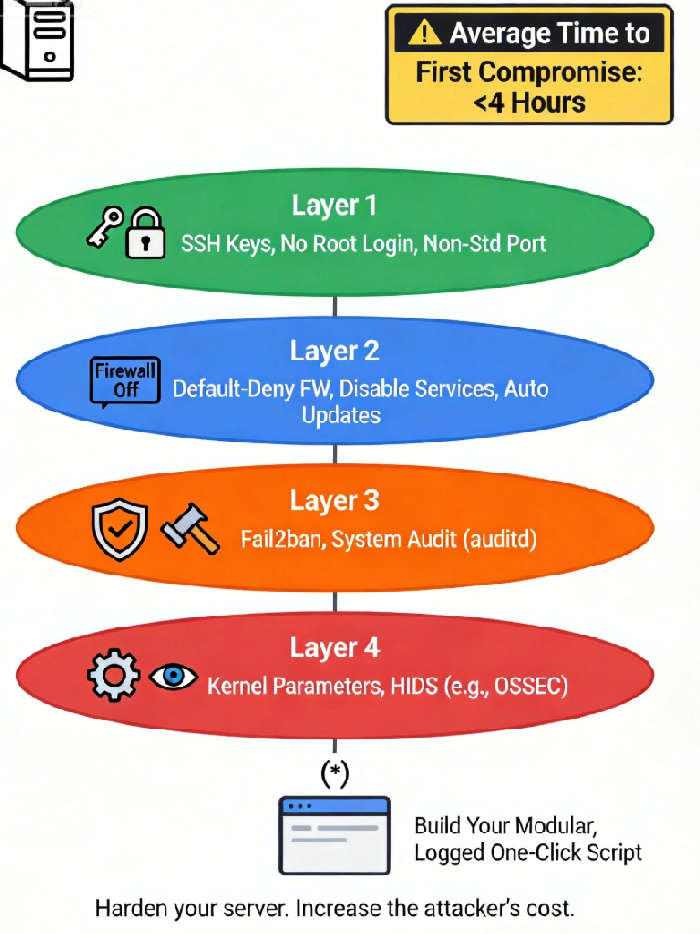
This isn't a scare tactic; it's the default reality. According to the 2024 Global Threat Landscape Report, a fresh, internet-facing Linux server with default configurations survives for an average of just 4 hours before its first successful, automated compromise. The record is a staggering 17 minutes. The attack scripts don't wait for your to-do list.
And you are standing at the starting line of that countdown. The control panel of your new server gleams with potential, like a shiny new car left unlocked on a dark street. Let's lock it up, systematically.
01 The Myth of Default Security: Your Out-of-the-Box Setup Is an Attack Blueprint
We operate under a costly, deeply ingrained illusion: that technology products, especially from major cloud providers, are "secure" by default. This is perhaps the most expensive misconception in the digital age.
The standard image provided by your cloud vendor is a compromise of the greatest common denominator. It enables every possible service, keeps generic users and permissions, all in the name of maximum usability. To an attacker, this is a well-marked map. They know every default port, every preset account, every unchanged key.
The first step of hardening is a cognitive reset. You must abandon the fantasy of "default security." Assume this pristine virtual machine is the most attractive target on your subnet. True security begins the moment you accept that you are completely, utterly insecure by default.
02 The 10-Point Hardening Checklist: Engineering "Cost" for the Attacker
This checklist is engineered through an attacker's lens, creating layered defenses that transform your server from "low-hanging fruit" into a "cost-intensive target." The goal isn't just to block attacks, but to make the cost of attacking you prohibitively high, redirecting the automated script to an easier victim.
Layer 1: Absolute Control Over Identity & Access (Stopping the Script Kiddies)
1. Kill the Password: Enforce SSH Key Authentication
The Why: Over 70% of automated attacks start with brute-force attempts on port 22. Passwords, especially weak or default ones, are trivial to crack with modern dictionaries.
The Action: Generate a dedicated key pair (
ssh-keygen -t ed25519), upload the public key, and in/etc/ssh/sshd_config, set:bash
PasswordAuthentication no
PubkeyAuthentication yes
One-Click Script Core:
bash
sed -i 's/^#*PasswordAuthentication.*/PasswordAuthentication no/' /etc/ssh/sshd_configsed -i 's/^#*PubkeyAuthentication.*/PubkeyAuthentication yes/' /etc/ssh/sshd_config
2. Disable Remote Root Login
The Why: 'root' is the crown jewel. Removing its remote access privilege doesn't hide it, but it locks the main gate to the throne room.
The Action: In the same config file, set
PermitRootLogin no.The Counter-Intuitive Win: This doesn't hinder administrative work. Log in with a dedicated user and use
sudo. This adds a crucial layer of accountability and logging.
3. Change the Default SSH Port
The Why: Moving from port 22 to a random high port (e.g.,
59222) instantly filters out over 90% of mindless, automated scan traffic.The Action: Change the
Portdirective and update your firewall rules accordingly.The Caveat: This is "security through obscurity" and is not a standalone measure. But as a first filter, its efficacy is undeniable.
Layer 2: Aggressive Reduction of Attack Surface
4. Implement the "Principle of Least Service"
The Why: Every running service (an old mail daemon, an unused file-sharing protocol) is a potential door. If you don't actively need it, it shouldn't be running.
The Action: Use
systemctl list-unit-files --type=serviceto audit. Disable anything not critical (e.g.,bluetooth,cups).Script Logic: Maintain a "service blacklist" and loop through it to disable and stop.
5. Configure a Ruthless Firewall: Default Deny
The Why: This is your network border guard. Modern tools like
ufw(Uncomplicated Firewall) make this simple.The Action: Set default policy to
deny, then explicitly allow only what's necessary (your custom SSH port, web ports 80/443). For internal services like databases, restrict by source IP.One-Click Snippet (
ufw):bash
ufw default deny incoming
ufw default allow outgoing
ufw allow 59222/tcp comment 'Custom SSH'ufw allow 80,443/tcp comment 'Web'ufw --force enable
6. Enable Automatic Security Updates
The Why: The majority of breaches exploit vulnerabilities for which patches already exist. Automation is your highest-ROI defense.
The Action: Configure
unattended-upgrades(Debian/Ubuntu) oryum-cron(RHEL/CentOS) to apply security updates automatically.The Controversial Truth: The perceived risk of an update breaking your application is far lower than the catastrophic certainty of a breach through a known, unpatched hole.
Layer 3: Kernel and Proactive Defense
7. Harden Key Kernel Security Parameters
The Why: The kernel is the core. Tweaking it can block entire classes of attacks.
The Action: Use
sysctlto set:bash
net.ipv4.icmp_echo_ignore_all = 1 # Ignore ping probeskernel.exec-shield = 1kernel.randomize_va_space = 2 # Enable full ASLR
The Confusion Factor: This is low-level, systems-level defense against exploits targeting memory management.
8. Deploy Fail2ban: The Automated Bouncer
The Why: It dynamically responds to aggression. After detecting multiple failed login attempts from a single IP (for SSH, web apps, etc.), it temporarily bans that IP at the firewall level.
The Action: Install
fail2banand create a custom "jail" to monitor your new SSH port and web server error logs.The Effect: It turns brute-force attacks from a low-cost gamble into a likely path to getting locked out.
9. Enable Comprehensive Auditing with auditd
The Why: Defense is only half the battle. You need an immutable record of "who did what" for forensic analysis.
The Action: Enable the
auditdservice. Create rules to watch critical files (-w /etc/passwd -p wa) and log all use of privilege (-a always,exit -F arch=b64 -S execve).The Insight: Auditing isn't about spying on your team; it's about having the data to exonerate them or pinpoint the exact breach source.
Layer 4: The Final Bastion & Automation Philosophy
10. Consider a Host-Based Intrusion Detection System (HIDS)
The Why: Tools like OSSEC or Wazuh act as your server's immune system. They perform file integrity monitoring, rootkit detection, and log analysis, offering deep, proactive threat visibility.
The Action: More complex to set up but provides the deepest layer of internal defense.
The Ultimate Tool: Philosophy of the One-Click Script
I won't paste a 200-line monolithic script here. Blind copy-pasting is the enemy of security. Instead, here is the framework to build your own:
#!/bin/bash
# Server Security Hardening Bootstrap v1.0
# WARNING: TEST IN A NON-PRODUCTION ENVIRONMENT FIRST!

set -euo pipefail  # Strict mode: catch errors, undefined vars, pipe failures

LOG_FILE="/var/log/hardening_$(date +%Y%m%d_%H%M%S).log"
exec > >(tee -a "$LOG_FILE") 2>&1

echo "=== Server Hardening Started: $(date) ==="

# Module 1: SSH Fortification
echo "[1/10] Hardening SSH..."
# ... (sed commands from above) ...
systemctl reload sshd
echo "SSH hardened. ***VERIFY CONNECTIVITY BEFORE DISCONNECTING***"

# Module 2: Service Pruning
echo "[2/10] Disabling non-essential services..."
SERVICES_TO_DISABLE="bluetooth cups isc-dhcp-server nfs-server rpcbind"
for svc in $SERVICES_TO_DISABLE; do
    if systemctl is-active --quiet "$svc" 2>/dev/null; then
        systemctl disable --now "$svc"
        echo "Disabled: $svc"
    fi
done

# ... Continue with other modules (FW, kernel, packages) ...

echo "[10/10] Base hardening complete."
echo "Log saved to: $LOG_FILE"
echo "Next: 1) Test new SSH access. 2) Reboot for kernel changes. 3) Deploy application."
The power of this script isn't in its commands, but in its philosophy: modular, idempotent (safe to re-run), thoroughly logged, and built for your specific environment. You must own and understand each line.
The essence of server hardening is not to achieve an unbreakable myth—that doesn't exist. It's to systematically engineer "cost" for the adversary.
When automated scripts bounce off your custom firewall rules, puzzle over your non-standard SSH port, fail at the public key authentication wall, and finally get banned by Fail2ban, they will move on. Like water, they follow the path of least resistance, flowing past your hardened server toward the next default-configured, easy target.
What you've done with this checklist is to quietly douse the brightest lights on your digital profile in the dark forest of the internet. You've put on camouflage. You won't be invisible, but you will be overlooked by the vast majority of predators.
True operational security begins the moment you accept that default security is an oxymoron, and then commit to the meticulous, sometimes tedious, work of closing every door you didn't even know was open. Now, go build your script. Your four-hour countdown started the moment your instance got an IP address.
