

2:00 AM, and you refresh the cloud billing dashboard again. CPU utilization averages 11%, but your monthly bill is up 23% from last month. You stare at those rows of 24/7 instances and realize the painful truth: your auto-scaling has been "on" this whole time, but it's never saved you a penny.
Take a breath. You're not alone.
Research shows that over 60% of organizations see far less cost savings from auto-scaling than they expected . It's not that the technology doesn't work. It's that most of us use it wrong. Let's fix that.
01 Auto-Scaling Isn't "Set and Forget"
Most people treat auto-scaling like a smart thermostat—set a target and let it save you money. Wrong. Default auto-scaling configurations often cost you more .
Here's a real example: An e-commerce platform enabled auto-scaling with CPU > 70% scale up, CPU < 30% scale down. The result? Every traffic fluctuation triggered frantic scaling. New instances took 3-5 minutes to become ready. By the time they were up, the spike was over—but they got billed anyway. When they finally scaled down, the next mini-spike forced another cycle. The "oscillation cost" doubled their monthly bill.
Three counter-intuitive truths you need to know:
1. The Scaling Lag Trap
From the moment a metric triggers to the moment a new instance is truly ready, there's a 3-5 minute delay . Monitoring collection, decision time, instance startup, service registration—it all adds up. If your scale-down rules are too aggressive, a slight traffic rebound forces another expensive scale-up cycle.
2. Scale-Down Is Harder Than Scale-Up
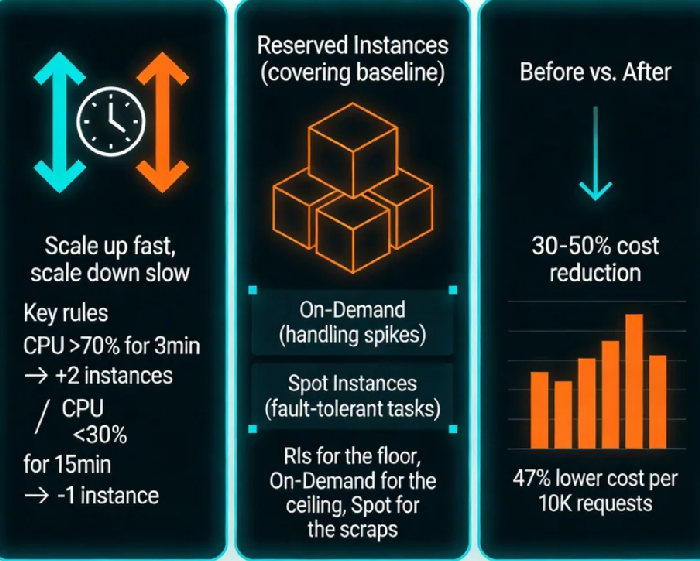
Scale-up failure means slow performance. Scale-down failure means service collapse. The rule of thumb: scale up fast, scale down slow . Something like:
Scale-up threshold: CPU > 70% for 3 minutes → add 2 instances
Scale-down threshold: CPU < 30% for 15 minutes → remove 1 instance
3. Single Metrics Are a Trap
CPU alone will fool you. Real scaling should combine multiple signals :
Application layer: QPS, P99 latency, error rates
Middleware: Queue length, connection pool usage
System layer: CPU, memory, network I/O
02 The Three Pricing Models You Need to Understand
Cost optimization isn't about picking the "cheapest" model. It's about matching the right workloads to the right pricing models .
The core strategy: Use RIs/Savings Plans for the "floor," On-Demand for the "ceiling," and Spot for the "scraps" .
03 Reserved Instances: The Math Matters More Than Intuition
Reserved Instances are simple in concept: you trade a commitment for a discount. But how many to buy? That's where most teams get it wrong.
The most common mistake: buying for peak
"What if traffic spikes? Better buy extra RIs." This thinking means you're prepaying for capacity you might use—and probably won't.
Analyze the last 30-60 days of actual usage . Find your baseline load—the minimum your system runs even at 3 AM.
Cover 70-80% of that baseline with RIs or Savings Plans (leave room for safety).
Cover the rest with On-Demand + auto-scaling.
1-year commitments: For moderately predictable workloads, growing services
3-year commitments: For absolute core systems that won't change
Compute Savings Plans (not instance-specific): For environments with instance type flexibility
One practitioner's rule: "A 60% 1-year, 40% 3-year Savings Plan mix maximizes savings while limiting risk" .
04 Spot Instances: Turning "May Vanish" Into an Advantage
Spot instances offer 70-90% off On-Demand prices . The catch: they can be reclaimed with 2 minutes' notice . So the question isn't "can I use them?" It's "how do I use them safely?"
Three principles for safe Spot usage :
Stateless by design: Never store critical data locally
Retry-friendly: Design jobs that can resume if interrupted
Diversify your pool: Specify 3-5 fallback instance types to reduce reclamation probability
What cloud providers offer:
Reclamation warnings: 2-minute heads-up before回收 (AWS)
On-Dand fallback: Auto-switch to On-Demand if Spot capacity vanishes
Capacity-optimized allocation: Picks instance pools with lowest interruption rates
05 Practical: A Complete Cost Optimization Framework
Here's how to apply all this to your actual infrastructure :
Step 1: Tier Your Workloads
Classify everything into three buckets:
Tier A (Core Online): Checkout, payments, streaming → RIs/Savings Plans + minimal On-Demand
Tier B (Elastic Online): Product pages, comments → On-Demand + aggressive auto-scaling
Tier C (Offline/Batch): Log analysis, model training → Spot instances
Step 2: Tune Your Scaling Rules
Default parameters won't cut it. Design two rule sets :
Peak hours (e.g., 2 PM - 10 PM): Lower thresholds, more aggressive scale-up
Off hours (e.g., 10 PM - 8 AM): Higher thresholds, more aggressive scale-down
Multi-metric triggers: CPU > 70% for 3 minutes OR QPS jump > 30% for 2 minutes → scale up 20%
Step 3: Build Your Hybrid Purchase Model
Example: An online education platform's actual strategy
Baseline: 10 general-purpose instances (3-year Savings Plans), covering 70% of steady traffic
Elastic: On-Demand pool + auto-scaling for evening peak
Batch: Video transcoding jobs all on Spot, cost dropped from $1,200/month to $180
Result: Peak traffic handled at 300% of normal volume, monthly cost reduced 47%.
06 Monitor, Review, Repeat
Cost optimization isn't a one-time project. Build these habits :
Quarterly resource audit: Any instance running >30 days with CPU <10%?
RI/SP utilization check: Are your commitments fully used? Any "wasted commitments"?
Spot interruption tracking: Which instance types get reclaimed most? Adjust your mix.
QPS per core (normalized efficiency metric)
Cost per 10K requests (business-aligned cost measure)
Idle resource percentage (instances with CPU <5% for a week)
The Bottom Line
I once asked a 10-year cloud architect: "What's your proudest cost optimization achievement?"
He said: "Not the money I saved. It was the first time a client truly understood what they were actually paying for."
Auto-scaling, Reserved Instances, Savings Plans—they're just tools. The real value is understanding your business: What workloads must run 24/7? What can wait a few minutes? What traffic is "okay to lose" without anyone noticing?
Once you figure that out, the rest is just middle-school math.
Most cloud bills have at least 30% waste built in . The teams that win aren't the ones with the fanciest tools. They're the ones that treat cost optimization like performance tuning—something you do continuously, not once and forget.
