

Business Continuity: From Single Point of Failure to Multi-Site Active-Active – A Practical Guide to High Availability Architecture Design
At 2:17 AM, the green heartbeat that had pulsed steadily on your monitoring dashboard for three years suddenly turned gray. The on-call engineer refreshed the page. Refreshed again. Five minutes later, he called the tech lead: "The primary database... it's not coming back." Three hours later, customer support lines were overloaded, and #YourPlatformDown was trending on social media. In the post-mortem a week later, finance gave the number: $3.7 million in direct losses, and untold damage to customer trust.
The cost of a single point of failure isn't a technical problem—it's a math problem.
Here's the brutal truth: That machine was going to fail eventually. Not today, maybe tomorrow. Not hardware, maybe software. Not human error, maybe a backhoe cutting a fiber line three blocks away.
This isn't pessimism. It's probability.
01 High Availability Isn't About Never Failing—It's About Surviving Failure
Let's clear up a misconception: High availability doesn't mean your system never goes down—that's impossible in the physical world. It means that when failures happen, users don't notice and business continues.
The industry measures this with two metrics:
RTO (Recovery Time Objective): How long does it take to restore service after a failure?
RPO (Recovery Point Objective): How much data can you afford to lose?
Different strategies map to different tolerances:
Cold standby: RTO in hours, RPO in days—fine for internal tools
Warm/hot standby: RTO in minutes, RPO in seconds—works for most online services
Active-active / multi-site: RTO near zero, RPO near zero—essential for core transactions
Choosing one isn't a technical decision—it's a business decision balancing cost and risk.
02 The Four Layers of High Availability
Layer 1: Hardware Redundancy—Don't Put All Eggs in One Basket
The most basic form: redundant power supplies, redundant NICs, RAID for disks.
But this layer has a fatal flaw: the server itself remains a single point of failure. Redundant power won't save you from a fried motherboard. Redundant NICs won't help if the OS panics.
Layer 2: Load Balancing—Spread the Load Across Multiple Machines
Add a load balancer, distribute traffic across multiple application servers. If one fails, traffic shifts to others.
Two traps here:
Trap 1: The load balancer itself can be a single point. Solutions: active-passive with Keepalived + VIP, or use cloud load balancers that are inherently multi-active.
Trap 2: Your application must be stateless. If user sessions live on local disk, failing over to another server loses them. High availability forces you to design for statelessness—sessions in Redis, files in object storage, logs aggregated centrally.
Layer 3: Database High Availability—The Hardest Problem
You can add app servers arbitrarily. Databases are different—data is stateful and unique.
Common database HA patterns:
Master-replica replication: Writes to master, reads from replicas. If master fails, promote a replica (manually or automatically). Problem: replication lag can cause data loss.
Clustering: MySQL Group Replication, PostgreSQL Patroni, MongoDB Replica Sets. Automatic leader election and failover, but configuration complexity increases.
Dual-write to storage: Application writes to two independent databases simultaneously. Cost: complex logic, consistency challenges.
A hard truth: Most "highly available" databases lose some data or drop connections during failover. The difference is whether you lose a few records or a few hundred, whether downtime is minutes or half an hour.
Layer 4: Multi-Site Active-Active—The Ultimate Form
A single data center can fail. Even two data centers in the same city can't survive a regional disaster. That's where geo-redundancy comes in.
Cell-based architecture: Partition users by some dimension (e.g., user ID) into independent "cells." Each cell has its own application stack, database, cache. Cells serve traffic independently.
Traffic routing: User requests go to their assigned cell based on routing rules. If a cell fails, traffic shifts to another.
Data synchronization: Cells sync data asynchronously, or rely on underlying storage replication.
A major Chinese e-commerce platform runs its Singles' Day sale on such an architecture. They deliberately deploy databases across three cities, accepting that any single city can fail without stopping the business.
03 Three Counter-Intuitive Truths
Truth 1: High Availability Is an Organizational Problem, Not Just a Technical One
I've seen companies with flawless designs—active-active, automated failover, data validation. Then the first disaster drill revealed the ops team didn't know where the failover passwords were stored, and developers didn't know how to verify data consistency.
The real bottleneck in HA is rarely the code—it's the people.
Truth 2: An Undrilled HA System Is No HA at All
In 2019, a major cloud provider suffered a massive outage because their automated failover system hadn't been tested in three years. When the real failure hit, the script ran halfway and stalled, and no one dared to intervene manually.
Your HA system will perform exactly as well as your last drill. If you haven't drilled in a year, you effectively have no HA.
Truth 3: Backup Is Your Last Line of Defense
All HA schemes assume your data is intact and consistent. But what if data is accidentally deleted, corrupted by a bug, or encrypted by ransomware? HA will faithfully replicate that corrupted data everywhere.
That's why backups are non-negotiable. And backups must be isolated from production—ransomware doesn't distinguish between "production" and "backup" drives.
The 3-2-1 rule: At least 3 copies, on 2 different media, with 1 off-site.
Better yet: immutable backups—once written, they can't be modified or deleted, even by ransomware.
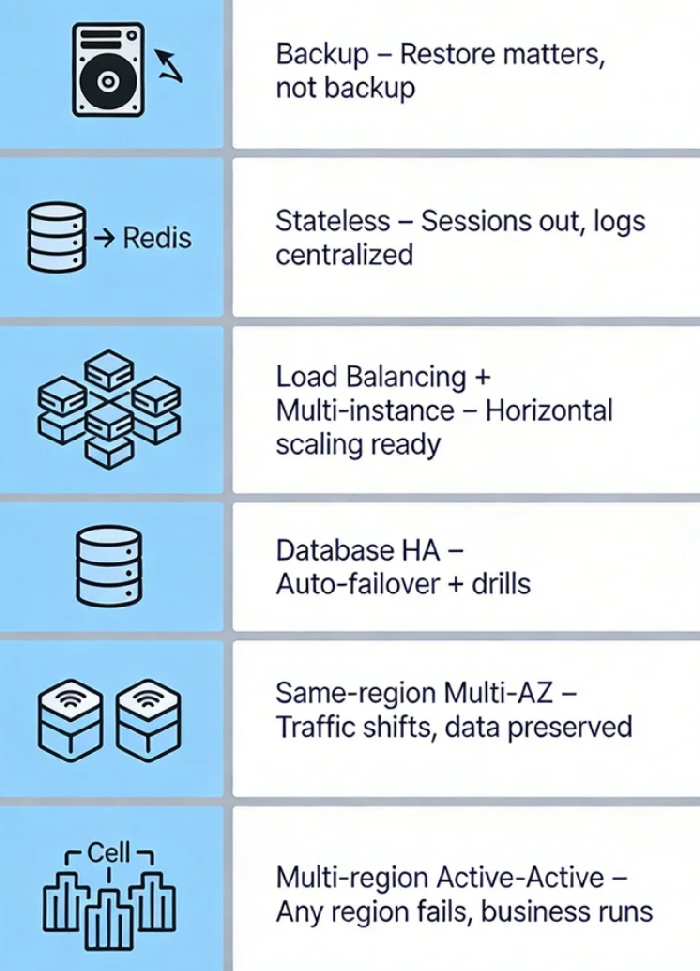
04 A Pragmatic Six-Step Path from Zero
If your system is still a single server, don't jump straight to multi-site. Follow this progression:
Step 1: Get backups right. Full daily backups, incremental hourly. And practice restores—being able to back up isn't the goal; being able to restore is.
Step 2: Make your application stateless. Move sessions out, files out, logs centralized. After this, your app can scale horizontally.
Step 3: Add load balancing + multiple app instances. At least two app servers behind a load balancer. Database: master-replica with manual failover for now.
Step 4: Automate database failover. Introduce tools like Orchestrator, Patroni, or cloud-managed HA. Practice failover drills until they're boring.
Step 5: Go cross-AZ (within a region). Deploy app across two availability zones, database synchronously replicated. Traffic can shift, data won't be lost.
Step 6: Multi-region active-active (optional). Not every business needs this. Consider if your user base is global, your RTO is sub-minute, or a regional outage is unacceptable.
A CTO I respect once said: "After a decade of building highly available systems, the biggest lesson isn't how hard the tech is—it's that the sooner you accept it will fail, the sooner you start preparing."
That server that ran for three years didn't do anything wrong. It just reached its expiration date.
High availability isn't about making servers immortal. It's about keeping your business alive after they fall.
When was your last restore drill?
When was your last failover test?
Where are the single points in your architecture tonight?
