

Diagnosing Database Performance Bottlenecks: From Disk I/O and Memory Tuning to Managed Service Selection
It's 2:17 PM. Peak traffic just hit. Your monitoring dashboard turns red: order API response time just jumped from 50ms to 3 seconds. You ssh into the database server, type top, and stare at the screen. CPU is fine. Memory looks fine. But that iowait number—the one you usually ignore—is glowing red.
You're now in the place every technical lead dreads: the database is slow, and you have no idea why.
Add more memory? It's already 64GB. Swap to faster SSDs? Already on NVMe. Move to a managed database? You can't answer the "how much will it cost" question from your boss.
Let's walk through a systematic way to diagnose database performance—from disk I/O to memory tuning, and finally, when to throw in the towel and let a cloud provider handle it.
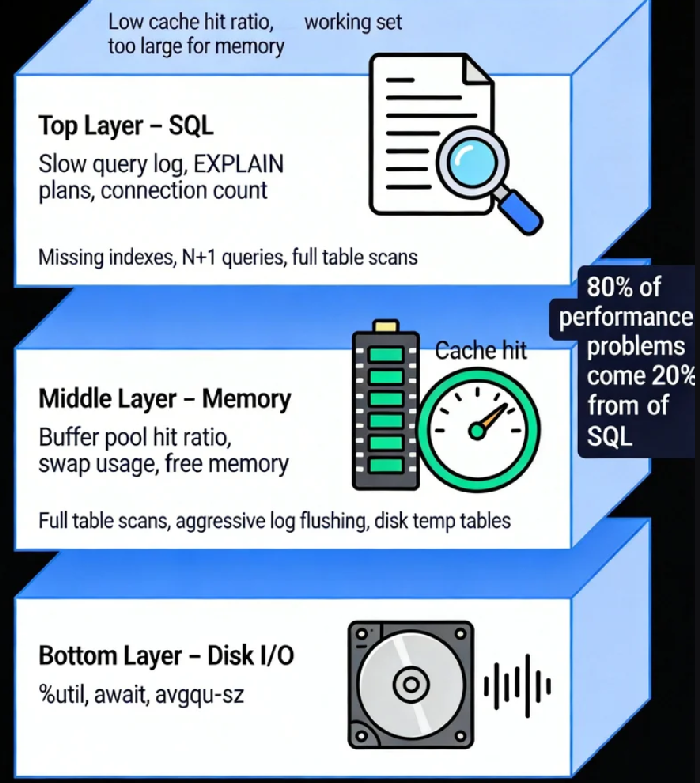
01 The Three-Layer Model of Database Performance
Think of your database as a three-story building:
The foundation: Disk I/O. Data eventually lands on disk. No matter how much memory you have, writes must reach persistent storage.
The warehouse: Memory. MySQL's Buffer Pool, PostgreSQL's Shared Buffers—they cache your hot data so you don't hit the disk.
The front desk: SQL parsing and execution plans. How your queries are written determines whether the foundation and warehouse are used efficiently.
Problems at any layer look the same from the outside: "the database is slow." But the path to finding the root cause is completely different.
02 Step One: Pinpoint Which Layer Is Hurting
Scenario One: I/O Pressure
Your metrics show disk utilization consistently above 80%, and latency is far higher than your SSD specs claim. You're likely dealing with an I/O bottleneck.
Common culprits:
Full table scans: Missing indexes, or indexes not being used, forcing large amounts of data to be read from disk.
Aggressive log flushing: InnoDB's
innodb_flush_log_at_trx_commit=1forces a disk flush on every commit—great for durability, terrible for throughput.Disk-based temporary tables: When memory isn't enough for sorting or grouping, the database spills to disk.
You need to find out who's writing. Operating system tools can show you which process is doing continuous writes, or whether your database is writing temporary files. These signals point you toward the real culprit.
Scenario Two: Memory Pressure
If your database's cache hit ratio is consistently below 95%, most queries are missing memory and hitting disk. That's going to be slow.
You can check this through database status variables. Low hit ratio means either your memory is genuinely too small, or your working data set is simply too large to fit in memory.
Here's the counter-intuitive part: Large memory doesn't automatically fix I/O problems. If your access pattern causes constant cache misses—like random point queries on a dataset much larger than memory—disk I/O becomes the hard bottleneck. A 16GB Buffer Pool can't hold a 200GB table. More memory helps at the margins, but it won't solve the fundamental mismatch.
Scenario Three: High CPU, Low I/O
This usually points to CPU-intensive work or bad SQL—unindexed joins, complex aggregations, or a flood of short-lived connections. Your attention should shift to slow query logs, looking for the queries consuming CPU cycles.
03 Step Two: Targeted Optimization
Optimizing Disk I/O
Hardware layer: If budget allows, moving from standard SSDs to NVMe can improve IOPS by an order of magnitude. For critical databases, consider separating data and logs onto different physical disks to reduce contention.
OS layer: Choose the right filesystem (XFS often outperforms ext4). Mount with noatime to avoid unnecessary metadata writes. These small changes add up.
Database layer: Tune I/O parameters to match your hardware. MySQL's innodb_io_capacity defaults to 200—far below what modern SSDs can handle. Increasing log file sizes and adjusting flush behavior (trading a tiny bit of durability for significantly higher throughput) can dramatically reduce I/O pressure.
Optimizing Memory
The principle is simple: keep hot data in memory.
For MySQL, innodb_buffer_pool_size should typically be 70-80% of available RAM, leaving room for OS cache and other processes. For PostgreSQL, shared_buffers is usually set to 25% of RAM (PostgreSQL relies more on OS caching).
But remember: Adding memory doesn't fix bad access patterns. If your workload scans large datasets but only uses a small portion—like nightly reporting jobs—buffer pools won't help. Those scenarios require architectural changes: column stores, data partitioning, or moving reporting to a replica.
Optimizing SQL and Application Logic
This is the highest-return activity, and the most overlooked.
Review slow query logs regularly. Find the worst few.
Use
EXPLAINto understand execution plans. Full table scans are your enemy.Watch for N+1 queries—querying in a loop is a design smell.
A simple practice: spend ten minutes each day looking at the slow query log and optimizing the worst one. Do this for a month, and your performance will at least double.
04 Step Three: When to Move to Managed Services
You've tuned for three months. You've done everything right. It's still slow. At this point, managed databases become a serious option.
What Managed Databases Give You
Hardware abstraction: The cloud provider has optimized storage underneath. You can provision IOPS without worrying about physical disks.
Sane defaults: RDS, CloudSQL, and others come with parameters already tuned better than most DIY setups.
Read replicas on demand: Need to scale reads? One click.
Automated backups: Point-in-time recovery, cross-region replication—cheaper and more reliable than building it yourself.
What Managed Databases Cost You
Black box: You can't see physical I/O or OS metrics. Some problems become harder to diagnose.
Locked sizing: IOPS is often bundled with memory and CPU. Sometimes you need high IOPS but not more RAM—you pay for both anyway.
Price: For steady, predictable workloads, a well-tuned self-managed database is cheaper.
A Decision Framework
Ask yourself three questions:
Do you have a dedicated DBA?
No → Managed database is safer.
Yes → Self-managed allows finer tuning, but requires ongoing investment.
Do you need extreme performance? (e.g., P99 < 10ms)
Yes → Self-managed with local NVMe gives you more control.
No → Managed database is sufficient.
Is your growth predictable?
Yes → Self-managed capacity planning is feasible.
No → Managed database's elasticity is valuable.
05 A Real Example
An e-commerce company I worked with had recurring slowdowns during peak hours. Here's what they did:
Diagnosis: I/O wait was high, but they were already on premium SSDs. Looking deeper, they saw I/O queue depth staying high—requests were piling up. Database metrics showed frequent log flush waits.
Optimization: They increased log file sizes and relaxed the flush behavior (accepting the risk of losing one second of data in a crash). I/O pressure dropped 60%. Peak hours became quiet.
Evolution: Six months later, traffic had doubled. Their two-person team couldn't keep tuning. They evaluated managed database options and moved. Performance stabilized. Cost was 30% higher than self-managed, but they saved 80% of the time previously spent on database maintenance.
For them, it was the right call.
06 Final Thoughts
There's a uncomfortable truth in database performance work: 80% of your performance problems come from 20% of your SQL. Spending a week tuning kernel parameters is less effective than spending an hour fixing that one query running ten thousand times a day.
The tools are just helpers: watch system load for I/O, check hit ratios for memory, examine slow logs for SQL. The method matters more than the commands.
A DBA with twenty years of experience once told me: "The most expensive thing isn't the SSD. It isn't the RAM. It's the hours you spend not knowing where the bottleneck is."
Next time your database slows down, resist the urge to throw hardware at it. Walk through these three layers—I/O, memory, SQL—and find the real problem. Then fix it. If you genuinely can't, or if the effort outweighs the benefit, that's when you call the cloud provider.
Knowing when to stop tuning and start paying is its own kind of expertise.
