

Your boss calls you into the office: "I hear containers save a ton on server costs. Let's move everything to Kubernetes next quarter—and cut our infrastructure budget by 30%."
You open your mouth to explain, then close it. Because honestly, you're not sure how to do the math either. Does self-managed K8s actually cost less than plain VMs? Is that monthly "cluster fee" for managed Kubernetes worth it?
Let's sit down, spread the spreadsheets, and run the numbers together.
01 The Biggest Misconception: Containers Don't Save Money
Here's the hard truth: Containers themselves don't save you a dime. What saves money is efficient resource utilization—and Kubernetes doesn't automatically give you that.
People hear "containers are lightweight" and assume they use fewer resources than VMs. That's half true. Containers do share the host kernel, so you save the overhead of a full guest OS per instance. But Kubernetes itself consumes a surprising amount of resources to orchestrate those containers:
A highly available control plane needs at least three master nodes (etcd, API server, scheduler, controller manager).
You still need worker nodes to run your actual workloads.
Monitoring, logging, networking plugins, ingress controllers—they all eat CPU and RAM.
At small scale, this control plane overhead dominates. You might run 10 pods but first need to spin up three mostly idle masters.
So whether containers save money depends entirely on scale. Below a certain threshold, you're not saving—you're spending more.
02 The First Line Item: Resource Costs
Let's start with the obvious: servers.
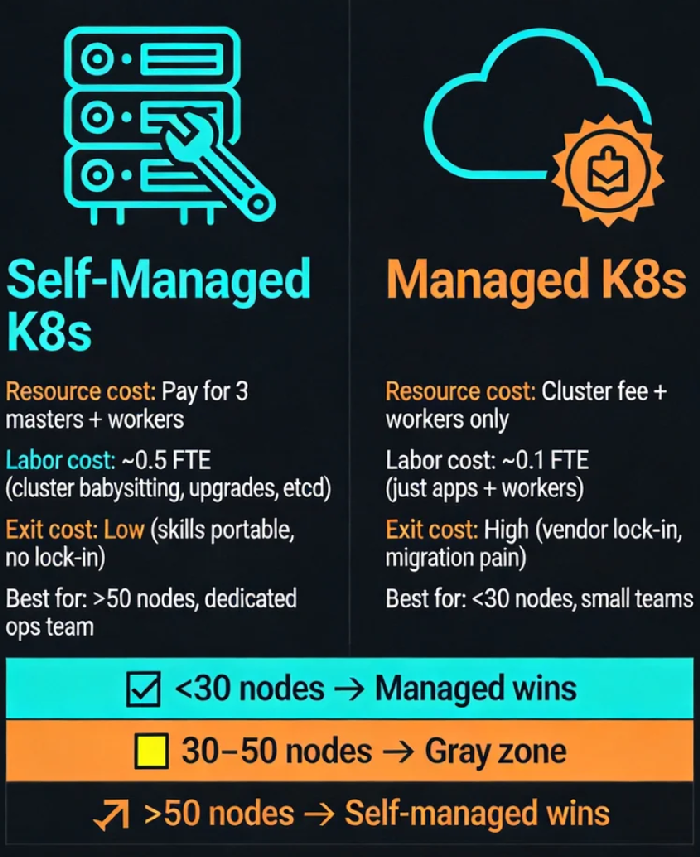
Self-Managed K8s Cost Model
Suppose you need to run 50 pods, each averaging 2 cores and 4GB RAM. A reasonable packing ratio is about 10 pods per node, so you'll need five worker nodes with 8 cores, 32GB each.
For high availability, you need at least three master nodes (4 cores, 8GB each—etcd is memory hungry). That's eight nodes total.
On a cloud provider like AWS, using on-demand instances, eight m5.2xlarge (8 vCPU, 32GB) will run you roughly $2,000 per month each in many regions. Total: $16,000/month.
If you use reserved instances or savings plans, you can cut that by 30–50%, but you pay upfront.
Managed K8s Cost Model
Managed services (EKS, AKS, GKE) charge a control plane fee:
AWS EKS: $0.10 per hour per cluster—about $72/month. Wait, that's too low? Actually EKS charges $0.10 per hour per cluster (not per master), so about $72/month. But many providers charge a flat monthly fee per cluster (around $100–$200). Let's use $150/month as a rough average.
Worker nodes are the same as self-managed: five nodes = $10,000/month.
Total: $10,150/month.
Counter‑intuitive conclusion: At this scale (50 pods), managed K8s is actually cheaper—by almost $6,000/month. Because the cloud provider eats the cost of those three master nodes; you only pay for workers plus a modest control plane fee.
03 The Hidden Line Item: Labor Costs
Now we get to the elephant in the room: the people.
Self-Managed Labor:
Cluster bring‑up: A decent engineer needs at least a week to get a production‑ready cluster running—networking, security, storage classes, monitoring.
etcd babysitting: etcd is the brain of Kubernetes. When it glitches, the whole cluster stutters. How many engineers have been woken at 3am by etcd alarms?
Upgrades: Kubernetes releases three major versions a year. Upgrade or be exposed to CVEs. Either way, someone spends days testing and rolling out.
Firefighting: Nodes go NotReady, CNI plugins break, DNS resolution fails. Each requires deep Kubernetes knowledge.
Assuming a senior ops engineer costs $8,000/month (rough US market rate), a self-managed cluster easily consumes 0.5 FTE—that's $4,000/month in labor. Many small teams actually dedicate a full person.
Managed Labor:
The cloud provider handles the control plane. You just manage worker nodes and your applications.
Upgrades are a button click (still some testing, but far less).
etcd backups? Provider's problem.
Labor drops to maybe 0.1 FTE—$800/month.
Add that to the resource costs:
Self-managed: $16,000 (servers) + $4,000 (labor) = $20,000/month
Managed: $10,150 (servers) + $800 (labor) = $10,950/month
Now managed is almost half the total cost.
04 The Break‑Even Point: Where Does Self-Managed Win?
Of course, these numbers shift with scale.
I've collected data from teams who've done this migration. The curve looks roughly like this:
< 10 nodes: Managed wins hands down. You'd need a full person to babysit a small cluster—not worth it.
10–30 nodes: The gap narrows. Self-managed starts to benefit from economies of scale.
30–50 nodes: A gray zone. It depends on your team's Kubernetes expertise and tolerance for pain.
> 50 nodes: Self-managed becomes 20–30% cheaper. Why? Because the control plane cost is fixed. Those three masters can manage 100 nodes just as easily as 10 nodes. Spread the cost, and per‑node overhead plummets.
At very large scale (hundreds of nodes), self-managed is clearly cheaper—if you have the team to run it.
05 The Exit Cost: The Line Item No One Accounts For
This is the cost that never appears on a bill—until you try to leave.
Suppose you've run on EKS for three years. You've naturally adopted AWS‑native integrations:
ALB/NLB for Ingress
EBS volumes for persistent storage
CloudWatch for logs and metrics
Now imagine you want to migrate to another cloud—or back on‑prem.
Ingress definitions need rewriting.
Storage volumes must be migrated (often with downtime).
Monitoring history is gone.
Your team has to unlearn AWS idioms and learn another provider's.
This exit cost can easily reach hundreds of thousands in engineering time, plus business risk. Accountants call it "switching cost." Engineers call it "vendor lock‑in."
Self-managed Kubernetes keeps your skills portable. You can run it on bare metal, on any cloud, in a hybrid setup. The API is the same. Your knowledge travels with you.
06 So Which One Should You Choose?
It's not a math problem with a single answer. It depends on your constraints.
Choose managed K8s if:
Your team is small (<5 people) with no dedicated infrastructure folks.
Your cluster size is under 30 nodes.
You want to move fast and not reinvent the ops wheel.
You're comfortable with some vendor lock‑in.
Choose self‑managed K8s if:
You have a dedicated ops/infrastructure team.
Your cluster exceeds 50 nodes and is growing.
You have strict data sovereignty or compliance requirements.
You want to build core Kubernetes expertise in‑house.
There's a middle path: Use a managed control plane but stick to standard Kubernetes APIs. Avoid deep integrations with proprietary cloud services. That way you get the "no babysitting" benefit while keeping your options open.
07 The Final Number: Peace of Mind
I asked a friend who runs a 200‑node cluster why he pays for a managed service even though it's more expensive.
He said: "I'm not paying for servers. I'm paying to sleep through the night. I don't want to get paged because etcd decided to corrupt itself. My time and my sanity are worth the premium."
Another, who runs a self‑managed cluster for a fintech startup, said:
"We can't afford any vendor lock‑in. Our data must stay on hardware we control. The extra cost is the price of sovereignty."
So the math isn't just dollars. It's about how much you value your team's time, your sleep, and your freedom to move.
A Simple Checklist Before You Move
Before you containerize, ask three questions:
How big are we?
Under 30 nodes → managed is cheaper and easier.
Over 50 nodes → self-managed starts to make economic sense.
How many people do we have?
Less than three → managed is survival.
More than five → you can consider self‑managed.
Can we tolerate vendor lock‑in?
No → self-managed or "standard API only" managed.
