

It's 2 AM. Your phone buzzes again.
You squint at the screen: "Order service response time > 5 seconds." You VPN in, open Grafana. CPU looks fine. Memory is okay. You grep through logs—plenty of errors, but no idea which request caused them. Thirty minutes later, you discover the Redis cluster went down. You weren't even monitoring Redis.
How many nights like this have you had?
This isn't operations. This is firefighting. You rush in after the fire starts, then do a post-mortem after everything burns. Mature teams aim for something different: fire prevention. Smelling the smoke before the flames appear.
01 Observability Is Not Monitoring 2.0—It's a Different Game
Let's clarify something upfront: Observability and monitoring are not the same thing.
Monitoring tells you that the system is down. Observability tells you why it's down.
Monitoring relies on predefined metrics and thresholds—CPU > 80% alerts, disk full alerts. But real-world failures never follow your script. A request mysteriously slows down. A user's session keeps dropping. A microservice times out intermittently. These "unknown unknowns" slip right through monitoring's net.
Observability's core idea: Make the system's internal state explorable through external data. You don't need to guess every possible failure mode in advance. You just need to keep three types of data—metrics, logs, and traces—and then, when something breaks, follow the clues like a detective.
These three pillars are non-negotiable.
02 Metrics: Your Vital Signs
Metrics are what you first think of when someone says "monitoring": CPU usage, memory consumption, QPS, error rates, latency. They're time-series data, aggregated, telling you the overall health of your system.
But metrics have a natural limitation: they lose context.
You see "order service error rate jumped from 0.1% to 5%." You know something's wrong, but you don't know which user, which endpoint, which parameters caused it. Metrics tell you where the fire is, not how it started.
The usual suspects: Prometheus for collection, Grafana for visualization. They're the industry standard for good reason—flexible querying, beautiful dashboards, active community.
Counter-intuitive truth: More metrics aren't better. Some teams instrument everything in sight, ending up with dozens of panels nobody looks at. Useful metrics are those that directly reflect user experience and business health—P99 latency, checkout completion rate, active users. Internal technical metrics (goroutine counts, GC pauses) matter only during specific investigations.
03 Logs: Your Black Box
Logs are discrete event records. Each line says "at this exact time, this specific thing happened."
The old way: write logs to local files, SSH in and grep when something breaks. That works until you have more than ten servers. Then it falls apart completely.
Modern logging does three things:
Centralized collection: Fluentd, Logstash, or vector continuously ship logs from every server to a central store.
Structuring: Parse raw text into fields—timestamp, level, request ID, user ID, error code—making it searchable and aggregatable.
Full-text indexing: Tools like Elasticsearch let you search terabytes of logs in seconds.
Trap: More logs aren't better. Some teams enable debug level everywhere, generating terabytes daily. Storage costs explode, and the signal drowns in noise. The right approach: INFO for business-critical events, ERROR for actual anomalies, DEBUG only temporarily during active debugging.
Surprising data point: A survey of 200 companies found that 70% of post-mortems revealed the logs already contained early warning signs—nobody was looking. Not because people were lazy, but because the logging system was too painful to query.
04 Traces: Your X-Ray Vision
Traces are the youngest and most powerful pillar.
In a microservice architecture, a single user request might pass through ten services and twenty RPC calls. Metrics tell you which service slowed down. Logs tell you what each service logged. But you still don't know—what did that specific request experience?
Distributed tracing solves this. It assigns every request a global Trace ID, then propagates it across service boundaries, recording timing and metadata at each hop. When you collect all these spans, you get a complete "request journey map."
Tools: Jaeger, Zipkin, SkyWalking. OpenTelemetry is becoming the unified standard for generating this data.
Counter-intuitive truth: You don't need to trace every request. 99.99% of requests are fine. Full tracing at scale kills performance and storage budgets. Industry practice is sampling—trace 1% of normal requests, or all error requests. This captures anomalies without drowning you in data.
Another hard truth: Logs without trace IDs are nearly useless. When you find a failed request, if your logs don't carry the Trace ID, you can't correlate them. You're back to grepping blindly.
05 The Integration: How the Three Pillars Work Together
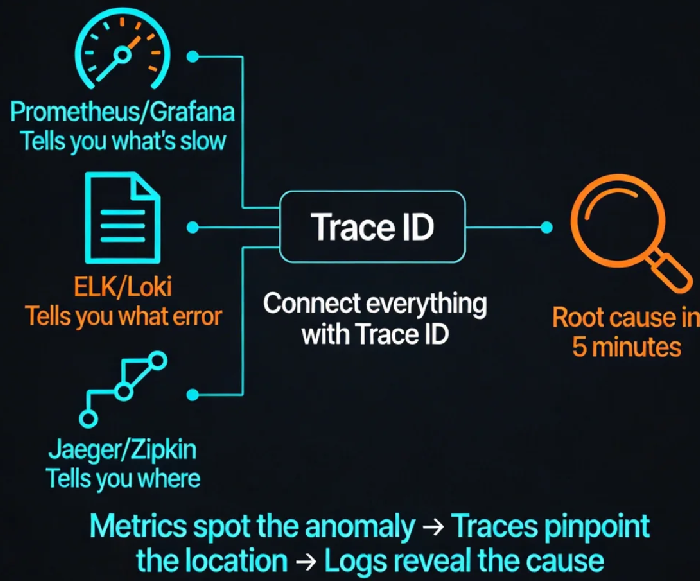
Each pillar is valuable alone. The real magic happens when you connect them.
Imagine this workflow:
Alert fires: Grafana shows "Order service P99 latency 100ms → 3s." (Metrics)
Click the alert, jump to a trace dashboard showing the slowest requests during that window. (Traces)
Open the worst trace, see that the "inventory service" call took 2.8 seconds.
Grab that request's Trace ID, one-click jump to the log system, search for that ID.
Find the inventory service log: "connection pool exhausted." (Logs)
Total time: under five minutes. Not the usual thirty-minute scramble.
This is observability's endgame: metrics spot the anomaly, traces pinpoint the location, logs reveal the root cause. Seamless handoff between tools.
Making this work requires one technical discipline: propagate a unified Trace ID across all services, and log it everywhere. Simple in concept, but in polyglot, multi-team environments, it demands consistent standards.
06 Alerting: Don't Cry Wolf
With complete observability data, you can build smarter alerts. But most teams' alerting systems are noise machines—so many false alarms that everyone ignores them, until the real one hits.
Static threshold trap: "CPU > 80% alert." It fires every afternoon during a routine batch job, so ops silences it. One day CPU really hits 100%—nobody notices.
Modern alerting uses dynamic baselines and trend detection. Machine learning models learn normal behavior over the last 30 days, then alert when metrics deviate from "normal." A sudden 20% QPS drop might not break any threshold, but it's highly unusual—and worth investigating.
Another principle: Alerts need context. A good alert includes: timestamp, service, metric, deviation, and links—Grafana dashboard, log query, trace explorer. The person on call should know where to look without guessing.
07 From Firefighting to Prevention: It's Cultural, Not Just Technical
Observability isn't something you buy and install. It's a shift in how your team thinks about building systems.
Old mindset: write code → deploy → wait for user complaints → SSH into servers and grep.
Observability mindset: when writing code, ask—what metrics should this expose? What context belongs in logs? How does the trace ID propagate? Make "observability" a feature, not an afterthought.
I once worked with a team that had an "observability review" before any major release. They'd ask: can we tell within five minutes if this new feature is healthy? If it breaks, can we find the cause in five more minutes? If not, the release didn't go out.
That sounds strict. But it's why they went from "firefighting every week" to "one major incident per year."
A CTO friend once said: "I used to get woken up because the system was down. Now I get woken up because the system predicts it might go down tomorrow, and I need to decide whether to scale early. I prefer the second kind of call."
From firefighting to prevention—the tools help, but the real difference is mindset.
Where does your team sit? Still SSH-ing into boxes and grepping logs? Or already connecting the three pillars?
