

From On-Prem to Cloud: A Practical Migration Guide and Pitfalls to Avoid
Last month, a friend who'd spent a decade in traditional IT asked me out for drinks. His company had finally decided to "go cloud." The boss gave the order: move everything from the on-prem data center to the cloud by year-end.
I asked: "How are you planning to do it?"
He said: "Got a few quotes from migration vendors. Going with the cheapest. We'll move over a weekend. Should be done by Monday."
I nearly choked on my drink.
"How many servers do you have in that data center?"
"About two hundred."
"What's running on them?"
"ERP, CRM, the company website, email system, a few internal tools."
"Databases?"
"MySQL and SQL Server. Some are old versions—Windows Server 2008 stuff."
I put down my glass. "Do you have any idea how likely this is to go wrong?"
He was quiet for a moment. "That's why I'm having drinks with you."
Today, let's talk about cloud migration. Not the "cloud is great" fluff, but how to actually figure out: How do you assess, plan, and execute? And how do you avoid the traps that ruin your weekends?
01 First, Let's Bust Some Myths
Myth #1: Moving to the cloud saves money.
This is the most common misunderstanding. Cloud pricing is OPEX (operational expenditure). On-prem is CAPEX (capital expenditure). CAPEX is a big upfront cost, but then it's yours. OPEX is a monthly bill—you pay for what you use.
If your workload is stable and predictable, buying servers and running them for five years can actually be cheaper than cloud. The cloud's advantage is elasticity—scale up when traffic spikes, scale down when it drops. If you migrate and then run instances 24/7 at peak capacity, you'll probably end up paying more than you did on-prem.
Myth #2: Just lift and shift.
Some people think the cloud is just "someone else's data center." Take VM images, upload them, done. That's called "lift and shift." Technically possible. Often a disaster.
Old applications can depend on specific hardware, specific network topologies, specific OS versions. After migration, performance tanks. Errors appear. Databases won't connect. I've seen this too many times.
Myth #3: Longer migration windows are safer.
Some teams stretch migrations over six months or a year. "We'll run both environments. If something breaks, we can roll back."
But running two environments costs twice as much. You're maintaining two sets of infrastructure, paying two bills, splitting your team's focus. The longer it drags on, the more it costs. Eventually, you're stuck.
02 The Four Phases of Migration: Don't Skip Steps
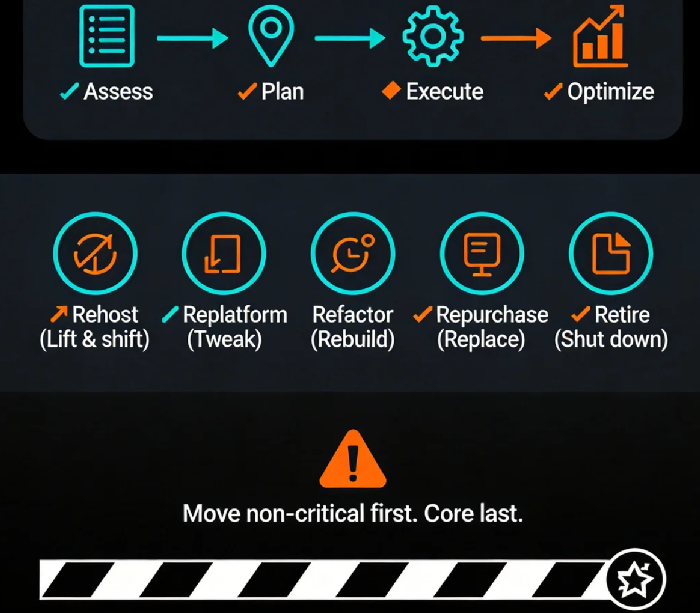
Phase 1: Assessment
This is the most skipped phase—and the most important.
Inventory your assets: How many servers? What specs? What applications? What dependencies?
Categorize and prioritize: Which are core business? Which can tolerate downtime? Any compliance requirements?
Choose migration strategies: More on this below.
The output of this phase should be a migration checklist. Every server, every database, every dependency listed. Priorities and strategies assigned.
Phase 2: Planning
Choose target Region and AZ: Where are your users? What compliance rules apply? Disaster recovery needs?
Network design: VPC layout? Direct Connect or VPN? Bandwidth enough?
Data sync strategy: Full copy or incremental sync? How long can you afford downtime?
Rollback plan: If things go wrong, how do you revert? How do you keep data consistent?
Schedule: Move non-critical stuff first. Practice. Then move the crown jewels. Never start with ERP.
Phase 3: Execution
Build the target environment: VPCs, subnets, security groups—set it up per plan.
Migrate data: Use cloud tools (AWS DMS, Azure Database Migration Service, etc.).
Migrate applications: Follow your chosen strategies (Rehost, Replatform, Refactor).
Validate: Functional tests, performance tests, security tests. All of them.
Phase 4: Optimization
Getting there is just the beginning. Now you optimize:
Rightsize: Those instances you provisioned at peak capacity? Probably can downsize now.
Configure auto-scaling: Let the cloud handle traffic spikes automatically.
Monitor costs: Set up budget alerts. Don't wait for the bill to surprise you.
03 The Five Migration Strategies: Pick the Right Tool
The industry calls them the "5 R's." Each balances effort against payoff.
1. Rehost – Lift and shift
Take your VM images, run them on cloud instances. Fastest path, but may have performance issues and higher costs. Good for non-critical systems, temporary过渡.
2. Replatform – Tweak then move
Change no code, but replace self-managed services with managed cloud versions. MySQL on EC2 → RDS. Redis you built yourself → ElastiCache. Saves ops work, improves performance. Sweet spot for most business apps.
3. Refactor – Rebuild for cloud
Change code to use cloud-native capabilities. Monolith → microservices. Scheduled jobs → Lambda. Highest effort, highest payoff. For core systems, long-term strategy.
4. Repurchase – Replace with SaaS
Ditch custom software for SaaS. Self-hosted CRM → Salesforce. In-house email → Office 365. Fast, but data migration and customization can be tricky.
5. Retire – Just turn it off
That inventory phase often finds systems nobody uses anymore. Shut them down. Instant savings.
No single strategy is always right. It's about balancing business value against technical debt.
04 Four Critical Traps in Migration
Trap #1: Bandwidth miscalculation
You estimate data transfer time based on "theoretical bandwidth." Reality hits. 1TB of data over a 10Mbps link? That's nine days, assuming it runs perfectly.
Solution: Measure actual data volume. Calculate based on real available bandwidth. Add buffer. For huge datasets, use physical transfer appliances (AWS Snowball, Azure Data Box).
Trap #2: Missed dependencies
You migrate System A. It needs to talk to System B's internal IP. But System B isn't migrated yet, and its IP has changed.
Solution: Map dependencies before you start. Migrate in dependency order. Or extend your network first—VPN between cloud and on-prem—so IPs stay reachable during transition.
Trap #3: Data consistency fails
During incremental sync, both environments are being written to. When you cut over, data doesn't match.
Solution: Use database sync tools (DMS, DataX) with bidirectional replication. Validate data before cutover. Make sure checksums match.
Trap #4: No rollback path
Migration hits a problem. You try to roll back. But data's already been overwritten. You're stuck.
Solution: Take full snapshots before migration. Test the rollback process. Have a documented, rehearsed plan.
05 A Case Study: How Not to Migrate
Three years ago, I helped a client post-mortem a failed migration. They moved from on-prem to cloud. Hit every trap:
No assessment. Just got a vendor quote based on "server count."
Cheapest option: Rehost. Dragged old configs along for the ride.
Bandwidth not calculated. 20TB of data estimated at three days. Took two weeks.
Dependencies missed. ERP migrated, couldn't talk to finance system.
No rollback rehearsal. When things broke, recovery took three days.
Result: three-month delay, 2x budget overrun, three engineers burned out.
When they redid it, they did it right: Replatform for databases, network extension first, DMS for data sync, staged migration. Three months later, it was done. Costs 20% lower than on-prem.
The Bottom Line
That friend from the beginning? He followed the steps. Did the assessment. Made a plan. Last week, he messaged me: first batch of non-critical systems migrated, smooth sailing. The boss stopped asking.
"I used to think cloud migration was a procurement decision," he said. "Now I know it's a systems engineering problem."
I replied: "Moving to the cloud isn't moving houses. It's rebuilding. Skip the foundation, and you'll be patching walls forever."
Your workloads still on-prem? When you start planning that move, keep this guide handy. It might save you a lot more than money.
