

Cloud Data Backup and Disaster Recovery: From Backup Strategies to Cross-Region Recovery
Last month, a friend running a SaaS startup called me at midnight. His voice was shaky: "Someone deleted our database."
I asked: "Do you have backups?"
He said: "Yes, daily automated backups."
I relaxed: "So just restore, right?"
Long pause. "Can't. The backup script ran for three years, but we never actually restored. Today we found out the backup files are corrupted."
On the other end of the line, he was manually recovering data from local logs. He'd been at it for six hours.
This is the third "we had backups but couldn't restore" story I've heard this year. Same pattern every time: we thought we were safe because we had backups. Until we actually needed them.
Today, let's talk about cloud data backup and disaster recovery. Not the "backups are important" fluff, but how to actually design backup strategies, choose DR architectures, and make sure you can recover when things go south.
01 First, Get This Straight: Backup Isn't the Goal—Recovery Is
This sentence deserves to be taped to your monitor.
Backup is just the process. Recovery is the goal. Lots of teams design beautiful backup strategies: daily fulls, hourly incrementals, cross-region replication. But they've never actually restored. When the real moment comes, they discover:
Backup files are corrupted
No one knows the restore procedure
Recovery takes three days—business already dead
Data comes back, but it's inconsistent, accounts don't balance
Counter-intuitive truth: A backup you've never restored is the same as no backup at all.
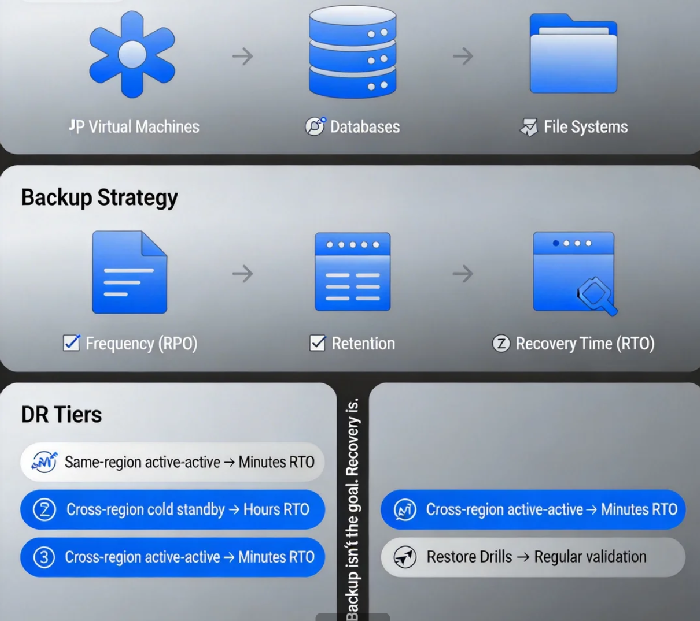
02 The Three Pillars of Backup Strategy: Frequency, Retention, Recovery Time
When designing backups, you balance three parameters.
First, backup frequency. This determines how much data you can lose (RPO). Higher frequency means less data loss, but higher cost. Hourly backups cost much more than daily. Core business systems might need hourly; non-critical can do daily.
Second, retention period. How long do you keep backups? 7 days? 30 days? A year? Compliance requirements, business needs, and cost—all must balance. Some regulated industries require seven-year retention. That means cold storage, moving old backups to cheap archive tiers.
Third, recovery time (RTO). When disaster hits, how fast can you restore? Restoring from backup is just the first step. You also need to validate data, switch traffic, notify users. Design the full workflow, not just "data copy time."
These three trade off against each other. Fast recovery needs hot storage—expensive. Long retention needs cold storage—slow recovery. No perfect solution, only solutions that match your business needs.
03 Backup Targets: Different Things, Different Strategies
Cloud workloads are diverse. Backup strategies must match.
Virtual machines. Simplest approach: full images. Fastest to restore—bring back the whole machine at once. Downside: wasteful. Might include temp files, logs, caches. Good for stateful, heavyweight applications.
Databases. This is the crown jewel. Cloud providers offer native backup (RDS automated backups, PITR). Key points: enable automated backups, set retention, test restores regularly.
File systems. Config files, logs, user uploads. Use cloud file backup services or third-party tools. Critical requirement: consistency. If files are being written during backup, can you restore a consistent state?
Object storage. S3, Blob, OSS—they're highly durable by design. But not immune. Accidental deletion, security attacks, corrupted writes—all need protection. Common approaches: cross-region replication, periodic exports to another bucket.
04 Backup Storage: Hot, Cold, and Frozen
Backup data has a lifecycle.
Fresh backups might be needed anytime. Keep them in hot storage (standard tier). Higher cost, fast recovery.
Last week's backups might be for compliance only. Move to warm storage (infrequent access). Half the cost, slower recovery is acceptable.
Last month's backups? Probably never needed. Move to cold storage (archive tier). Lowest cost, recovery might take hours.
Cloud providers offer lifecycle policies. Use them. They save serious money.
Counter-intuitive truth: Not every backup needs to be kept for a year. Core systems: long retention. Non-critical: shorter. Classify by business need, not one-size-fits-all.
05 Disaster Recovery: Beyond Backup
Backup answers "is my data still there?" DR answers "can my business still run?"
DR has multiple tiers, each with different RTO/RPO:
Tier 1: Same-region active-active. Two AZs running live. One fails, traffic shifts. RTO minutes, RPO near zero. Expensive, but bulletproof.
Tier 2: Cross-region cold standby. Primary region fails. Restore from backup in another region. RTO hours, RPO depends on last backup. Cheap, but slow.
Tier 3: Cross-region active-active. Multiple regions live. Any region fails, others continue. RTO minutes, RPO near zero. Most expensive, most complex. For global businesses.
Which one? Depends on tolerance. E-commerce flash sale might need active-active. Internal OA system? Cold standby is fine.
06 Restore Drills: Train Like You Fight
This is the most overlooked piece.
Backup system runs for a year. Never restored. Until the real day, when you discover:
Documentation is outdated, steps don't match
Permissions missing—someone left and took the keys
Restored data is incomplete, logs have gaps
What to do? Schedule regular drills.
Every quarter, pick a non-critical system. Run a real restore. Time it. Document issues. Fix the process. When the real thing happens, you'll be ready.
Counter-intuitive truth: Drills are more important than backups. Backup is buying insurance. Drills are confirming the insurance actually pays out.
07 Tooling: Native vs Third-Party
Cloud providers offer backup services:
AWS: Backup, RDS automated backups, S3 versioning
Azure: Backup, Site Recovery
Google: Backup and DR service
Alibaba: HBR, RDS backups, OSS cross-region replication
Native tools are good enough for most. Easy to configure, integrated with the cloud. Downside: vendor lock-in. Moving to another cloud means rebuilding.
Third-party tools (Veeam, Commvault, Veritas) offer more: multi-cloud support, hybrid environments, unified management. Downside: expensive, complex.
Small teams: native is fine. Large enterprises with compliance needs: third-party might be worth it.
08 A Real Story: Backups Saved Them—Almost
Last year, an e-commerce company accidentally deleted their product database during pre-sale preparations. They had backups. Restored. Then discovered data was missing two hours—because backup ran daily at 2 AM, and deletion happened at 4 PM.
They spent four hours manually recovering from binlogs. The site was half-down all morning. Lost millions.
They changed strategy after: core DB hourly backups, binlogs streaming to another region, quarterly restore drills. This year, they told me: "We sleep better now. Costs more, but worth it."
I asked: "How much more?"
"Enough. That half-day outage would have paid for ten years of backup."
The Bottom Line
That friend who called at midnight? He spent three days manually recovering data. Got back 80%. Lost 20% forever.
He said something I won't forget: "I thought buying insurance was enough. Never occurred to me to check if the insurance actually pays out."
Backup is invisible when things work. Critical when they don't. And when they don't, there's no second chance.
Can your backups actually restore? Find out today. Pick a non-critical system. Run a drill. Takes half a day. Might save your business tomorrow.
Because data—once lost—stays lost.
