

Cloud Support Navigation: How to Find Answers—From Docs and Tickets to Communities
It's 2 AM. Your server is down again.
You open your browser, search for the error code. Three pages of results—all useless. You start filling out a support ticket, get halfway, and realize you don't know where to find the logs. You post on Stack Overflow. Wait half an hour. No replies.
Next morning, your boss asks: "What happened last night?" You say: "Hit a weird issue. Still investigating." He nods. But you know the truth—you don't actually know how to investigate.
I've been there. Too many times.
After years in this industry, I've learned one thing: Problems are inevitable. Not knowing how to find answers is the real failure.
Today, let's talk about cloud support navigation. Not the "just open a ticket" fluff, but how to actually: What's the first thing you do? Second? How do you mine answers from documentation? How do you write a ticket that engineers actually want to read? How do you ask questions in communities without getting roasted?
01 First, Admit This: Most Answers Are Already in the Docs
Some people won't like hearing this. But it's true.
I see it constantly. First reaction to a problem: Google it. Ask in Slack. Ping a friend. Hours later, they finally check the official docs—and the answer was on page one. Why didn't they look? Because they didn't think to.
Documentation is the most underrated support resource on the planet.
Cloud providers employ hundreds of people to write docs. They spend millions of dollars annually. Not for decoration. But why do so many people avoid reading them?
Three reasons: too long, too scattered, sometimes badly written.
All valid. But here's how to deal with it.
How to actually read docs:
Start with Troubleshooting guides. Every major service has a dedicated "Troubleshooting" section. Search for your error code there first. High probability of direct hit.
Check the version. Many problems come from using outdated versions. Docs may have already addressed it. Know your version. Match it to the docs.
Look at sample code. Text confusing? Look at examples. Copy, run, see what happens. Often exposes the issue immediately.
Scan Known Issues. Sometimes it's not your fault—it's a documented product limitation. They list these.
Here's a stat that might surprise you: AWS internal data shows about 80% of support tickets could have been answered by existing documentation. Four out of five tickets you open? You probably didn't need to.
02 Opening a Ticket Is a Skill
If docs really don't have it, then you open a ticket.
But most people open tickets in ways that make support engineers cringe.
Bad example:
"My server won't connect. Please help."
Every engineer reading this dies a little inside. Which server? When did it start? What error? Logs? IP? How am I supposed to help with this?
Good example:
Full context: Region, service, instance ID, time range. Without this, first response will be asking for it. That's a day lost in back-and-forth.
Complete error: Don't just say "got an error." Paste the full stack trace. As text, not screenshot—so it's searchable.
Clear steps: What exactly did you do? Clicked where? Ran what command? Make it reproducible.
Expected vs actual: What should have happened? What happened instead? Sometimes what you think is a bug is actually intended behavior.
What you've already tried: Tell them you restarted, changed browsers, checked docs. Don't make them repeat your work.
A ticket template that works:
text
Service: RDS MySQL
Region: ap-southeast-1
Instance ID: rm-xxxxx
Time: 2025-03-16 14:20 UTC

Issue: Connection fails with "Too many connections"
Logs: [paste logs]

Steps to reproduce:
1. Connect with MySQL client
2. Run 'show processlist'

Expected: See list of connections
Actual: Connection fails immediately

Already tried:
- Restarted instance
- Increased max_connections
Engineers see a ticket like this, and they want to help. No follow-up questions needed.
03 Communities Are Great—If You Use Them Right
Communities are fast. Also sometimes wrong.
Stack Overflow, Reddit, official forums—great places for real-world experience. Also full of outdated answers and bad advice.
Community rules of engagement:
Check timeliness first. Answer from five years ago? Probably irrelevant. Look at dates. Prioritize recent.
Look at votes and comments. Accepted answers aren't always right, but at least someone validated. Comments often have "this didn't work for me" feedback—worth reading.
Don't be a help vampire. First post ever: "Someone help me fix this"? You'll get ignored—or roasted. Search first. If you must ask, provide full context.
Give back. Solved your problem? Write up the answer. Note the traps you avoided. Next person finds it, you saved them hours.
Fun fact: On AWS's official forums, many answers come from engineers answering in their spare time. They don't owe you anything. Be nice. Problems get solved faster.
04 Paid Support: Is It Worth It?
Every cloud provider has paid support tiers. Basic to Enterprise. Prices vary by 10x or more.
Basic Support: Ticket system + docs + community. Response times: hours to a day. Fine for non-critical, dev/test.
Developer Support: Adds chat, phone, faster response. Good for production, but not mission-critical.
Business/Enterprise Support: Dedicated TAM, 15-minute response, health checks, architecture reviews. Expensive. Worth it.
Worth it? Do the math:
One hour of core business downtime might cost you tens of thousands. Enterprise support might cost that much for a whole year. When things go sideways, someone's there.
But if you're a small startup? Start with Basic. Exhaust the docs first.
05 The Reseller Advantage: Someone in Your Corner
If you buy cloud through a reseller (like CloudFlew), your support path changes.
What's a reseller actually good for?
Language: English tickets to AWS vs talking to someone in your native language? No contest. They translate your problem into proper technical terms.
Experience: Resellers have seen hundreds of customers hit the same issues. They might have the solution ready, without you starting from zero.
Escalation path: Resellers have direct channels to cloud providers. Your ticket gets prioritized. Response times shrink.
Filtering noise: Sometimes it's not a problem—it's user error. A reseller spots it in minutes, saves you the ticket cycle.
I've seen clients with Enterprise support still call their reseller first. Why? Faster. Lower communication friction.
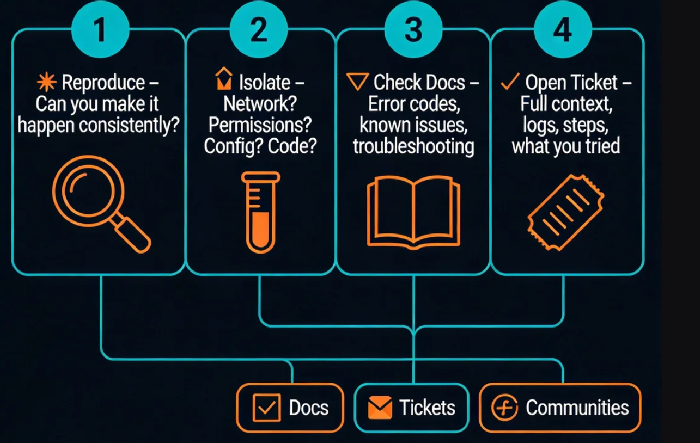
06 A Four-Step Troubleshooting Framework
Here's a simple framework. Next time something breaks, follow it. You won't panic.
Step 1: Reproduce
Can you make it happen consistently, or is it random? Reproducible = bug. Random = heisenbug. Try to stabilize it. If you can't, add logging, monitoring, wait for it to reappear.
Step 2: Isolate
Network? Permissions? Configuration? Code? Strip layers. Try different environment, different account, different region. Narrow the blast radius.
Step 3: Check Docs
By now you know the error code, the service, the version. Go to docs. Search error codes, known issues, troubleshooting guides. 80% of problems die here.
Step 4: Open Ticket / Ask Community
Still stuck? Now you open that ticket or post that question. And you include everything from Steps 1-3: reproduction steps, isolation results, docs you already checked. People see you did your homework. They help.
The Bottom Line
Last year, a client had a data sync issue at midnight. They spent two hours panicking, searching, getting nowhere. Then they called us. We looked: documented known issue. Upgrade fixes it. They hadn't checked the docs. Two hours wasted.
They learned. Next time, docs first. Then us. Gradually, they solved more themselves, asked us less.
Last month, their tech lead messaged me: "I used to think support meant 'call someone when it breaks.' Now I realize the best support is learning how to find answers yourself."
I replied: "That's growth."
Is your team still relying on "who has the most experience" to fix things? Try this framework. Turn individual knowledge into team capability. Next time something breaks, you won't point at a person. You'll run the steps. And the answer will find you.
