

Cloud Data Encryption and Key Management: From Transit Encryption to BYOK
Last year, a client had a close call. A developer left the company. During offboarding, they quietly held back their cloud keys. A week later, someone from an overseas IP downloaded a database backup. Fortunately, the backup was encrypted. The attacker didn’t have the key and couldn’t open it. But the incident shook the company.
The post‑mortem revealed a problem: the backup was encrypted, but with the cloud provider’s default key. The departed employee still had KMS permissions and theoretically could have called the key to decrypt it. No key rotation. No permission cleanup. It was like leaving a spare key with someone who no longer works for you.
This is the most overlooked part of data encryption: You encrypted the data. But did you manage the keys?
Today, let’s talk about cloud data encryption and key management. Not the “encryption is important” fluff, but a practical guide: what to encrypt, how to encrypt it, how to manage keys, and what to do when a key is lost.
01 Encryption Is Not a Checkbox
Many people think encryption means ticking a box labeled “enable encryption.” That’s far from enough.
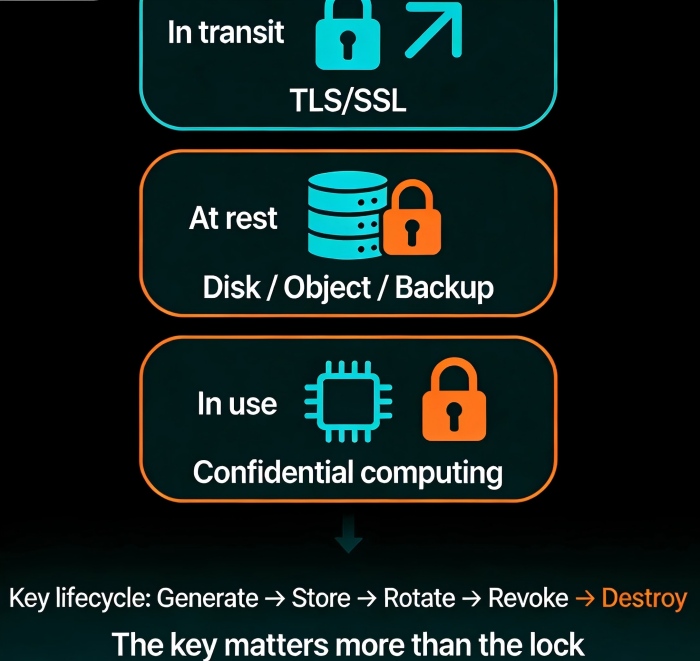
Cloud encryption has three layers. You need to understand each.
Layer 1: Encryption in transit (TLS/SSL)
Data encrypted while traveling over the network. This is table stakes now. HTTPS for websites, TLS for APIs, SSL for database connections. Skip this, and you’re naked on the public internet.
Layer 2: Encryption at rest
Data encrypted while stored on disk, in object storage, or in a database. Cloud providers offer this: EBS encryption, S3 encryption, RDS encryption. But here’s the trap—many people encrypt the primary storage but forget the backups. Backups often sit in plain text.
Layer 3: Encryption in use (confidential computing)
Data encrypted while being processed by the CPU. This is the hardest layer and the newest. Confidential computing technologies (Intel SGX, AMD SEV) keep data encrypted even in memory—invisible to the operating system. High‑sensitivity industries like finance and healthcare need this. Most businesses don’t—yet.
Counter‑intuitive truth: For most companies, the weak link isn’t the encryption algorithm. It’s key management. AES‑256 is strong enough. But if someone steals your key, the encryption is worthless.
02 Key Management Matters More Than Encryption
Key management is the most neglected part of encryption—and where things go wrong most often.
Key generation
Don’t invent your own keys. Use the cloud provider’s KMS (Key Management Service) or a hardware security module (HSM). Use true randomness. No guessing.
Key storage
Don’t store keys next to the encrypted data. Keep keys in KMS. Applications call the KMS API to use keys; they never touch the raw key material.
Key rotation
This is the most common trap. A company sets up encryption, then never changes the key for three years. Departing employees, leaked credentials, compliance requirements—regular rotation is a must.
Cloud KMS typically supports automatic rotation—once a year, for example. Turn it on. It takes minutes.
Key access control
Who can use this key? Who can manage it? Use IAM to separate duties strictly. The backup system can call the key to decrypt backups, but cannot modify the key itself. The KMS admin can rotate keys, but cannot decrypt data.
Counter‑intuitive truth: Encryption isn’t adding one lock. It’s building a key‑management system. Every key needs an owner, a rotation schedule, and an access log.
03 BYOK: Bring Your Own Key
Some customers don’t trust cloud providers with their keys. “Can I use my own keys?”
Yes. That’s called BYOK (Bring Your Own Key). You import your key material into the cloud KMS. The cloud provider stores and uses the key but never sees the raw material.
How it works:
AWS: Generate key in CloudHSM, import into KMS
Azure: Use BYOK tool, import from HSM
Google: External key manager (EKM) supports BYOK
Alibaba: External key import supported
BYOK gives you the root of trust. Even if the cloud provider were compelled to hand over data, they can’t because they don’t have the key.
But there’s a catch: If you lose the imported key, the cloud can’t recover it. Lose your key, lose your data.
04 Cloud HSM: Hardware‑Grade Key Protection
KMS is a managed key service. A hardware security module (HSM) is dedicated encryption hardware. Cloud HSM lets you rent an HSM in the cloud.
KMS vs Cloud HSM:
KMS: Managed service, auto‑rotation, auto‑auditing, deeply integrated with cloud services. Good for most workloads.
Cloud HSM: Dedicated hardware, higher performance, stronger compliance certifications (e.g., FIPS 140‑2 Level 3). Required for finance, government, and other regulated industries.
Price difference is huge: KMS is nearly free (you pay pennies per API call). Cloud HSM rents by the hour—thousands of dollars per month. Don’t use it unless you must.
05 Encrypt Backups: The Most Overlooked Gap
Remember the trap mentioned earlier? This is it.
Many people enable EBS encryption and RDS encryption and think they’re done. But what about backups?
EBS snapshots do not inherit encryption by default. You must enable it.
RDS automated backups inherit instance encryption, but manual snapshots must be configured separately.
S3 cross‑region replication—the destination bucket’s encryption must be configured independently.
A real example: a company enabled RDS encryption, but manual snapshots were not encrypted. An attacker got a snapshot and exported it in plain text. Data lost.
Checklist: Every backup, snapshot, replica, and cross‑region copy must have encryption explicitly enabled and verified.
06 A Real Story: The Cost of No Rotation
Back to the client with the departing employee. Why could they still decrypt backups? No key rotation. No permission cleanup.
We helped them do several things:
First, enabled automatic KMS rotation, once per year. Old keys kept for decrypting old data; new keys used for new data.
Second, tightened IAM permissions. The backup system could call the key to decrypt, but not manage keys. The KMS admin could rotate keys, but not decrypt data.
Third, enabled key access logging. Every key invocation was logged: who, when, why. Anomalous calls triggered alerts.
Fourth, enforced encryption for all backups, snapshots, and cross‑region copies.
Six months later, when they received an alert about an unexpected key invocation, they could immediately see who made the call, why, and whether to block it.
Their security lead told me: “I used to think encryption was a technical problem. Now I see it’s a management problem. Manage the keys right, and the data stays safe.”
The Bottom Line
Data encryption can feel overwhelming. But the core is simple: the key matters more than the lock.
Whether you use AES‑256 or SM4 makes little difference. But key rotation, permission cleanup, and backup encryption—those details determine whether you’re actually secure.
That client summed it up: “Encryption isn’t flipping a switch. It’s building a system. The switch is easy. The system is hard. But once it’s built, you sleep at night.”
Your data is locked. But who has the keys?
